3 Essential MCP Servers for Secure and Productive Agentic AI Workflows
Discover three essential Model Context Protocol (MCP) servers—Kubernetes, Context7, and GitHub—to securely boost your agentic AI workflows. Learn crucial safety guardrails and integration tips for enhanced productivity and data protection on platforms like Red Hat OpenShift AI.
If you've been experimenting with large language models (LLMs), you've likely recognized their immense potential. However, a significant limitation is their inability to directly utilize the same services that developers and engineers rely on daily. For instance, if you ask a model:
Can you diagnose issues in my blackjack-ai-demo Kubernetes namespace?
A typical foundational model would offer a generic, helpful response like "You need to run kubectl get pods" but lacks the capability to actually execute commands or retrieve real-time data. This is where the Model Context Protocol (MCP) has gained traction. MCP provides a standardized method for your AI model to gather information from various resources and interact with tools, including your cluster, browser, and much more. This capability is often referred to as agentic AI.
By using an MCP client (such as VS Code, Claude Desktop, or your own application built with Llama Stack), you can interact with your favorite services in natural language via MCP servers (like Playwright, GitHub, and others).
An MCP client is responsible for invoking tools, querying resources, and interpolating prompts, while an MCP server exposes these tools, resources, and prompts:
- Tools: Model-controlled functions invoked by an AI model. Examples include retrieving and searching information, sending messages, or updating database records.
- Resources: Application-controlled data exposed to the application, such as files, database records, or API responses (e.g., HTTP GET/POST).
- Prompts: User-controlled, pre-defined templates for AI interactions, useful for document Q&A, transcript summaries, or generating output as JSON.
With great power, however, comes great responsibility—and often, a surprisingly high token bill. Each MCP server you integrate can add thousands of tokens of tool metadata to a model's context window, even before your primary prompt begins. More importantly, connecting an LLM to your live systems must be done with extreme care.
Let's explore three of the most useful MCP servers you can integrate into your workflow today, along with the non-negotiable guardrails required to deploy them safely, especially on a platform like Red Hat OpenShift AI.
What You Should Know About MCP and Safety
Before any installation, it's crucial to understand how to prevent private data leaks through prompt injection. This risk becomes particularly high when an AI agent possesses a "lethal trifecta" of capabilities:
- Private data: Access to internal wikis, codebases, or databases.
- Untrusted content: The ability to read data from external sources, such as a new GitHub issue or a public webpage.
- External communication: The ability to send data out, by posting comments, calling webhooks, or running
curlcommands.
An agent combining all three presents a significant data exfiltration risk. For instance, an attacker could craft a malicious GitHub issue (untrusted content) that tricks your agent (which has access to your private code) into sending that code to an external server. The essential fix? Implement "human-in-the-loop" as a mandatory step, not merely a suggestion. By default, every tool should be configured for read-only access, requiring explicit user approval for any write action. Best practice dictates avoiding giving a model write access to anything you wouldn't want deleted, or read access to anything you wouldn't want publicly leaked.
With these safety considerations in mind, let's dive into the servers!
Pick #1: Kubernetes MCP Server
This server is exceptionally powerful and an indispensable tool for any platform or SRE team from day one. The Kubernetes MCP server allows your AI assistant to communicate directly with your cluster, enabling it to perform any CRUD (create, retrieve, update, delete) operation on resources, and even interact with and install Helm charts. Wonder why your pod is failing? Simply ask your model:
get the logs and recent events for pod xyz and tell me why it's crash-looping.
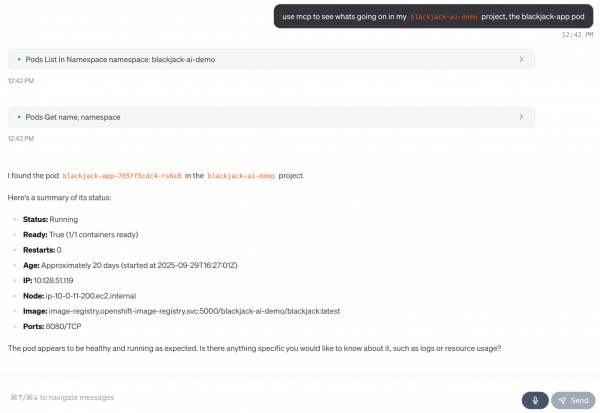
Figure 1: The AI assistant communicates directly with your cluster.
Install the Kubernetes MCP Server
Refer to this Red Hat Developer guide on setting up the Kubernetes MCP server with least-privileged ServiceAccounts, which enables safer querying of your cluster. In your AI assistant (like Goose or Claude Desktop), here’s the MCP server configuration:
{
  "mcpServers": {
    "kubernetes-mcp-server": {
      "command": "npx",
      "args": ["-y", "kubernetes-mcp-server@latest", "--read-only"]
    }
  }
}
With this, you can safely diagnose issues (e.g., "Why is my deployment not scaling?") by inspecting resources, all while adhering to your existing RBAC policies.
Pick #2: Context7 MCP Server
A significant challenge with LLMs is that their knowledge is often frozen in time. They can confidently hallucinate non-existent APIs or generate code for deprecated library versions. This can be particularly frustrating for developers using code assistants. The Context7 MCP server addresses this by providing your agent with access to up-to-date technical documentation on demand.
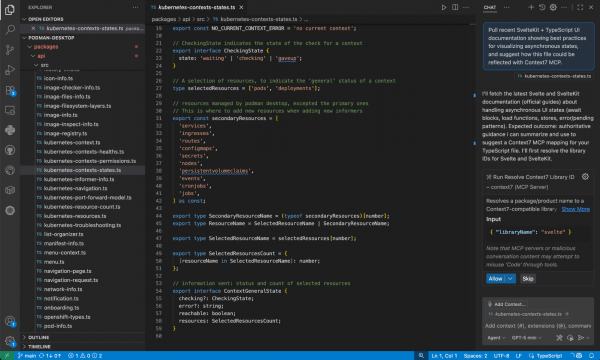
Figure 2: The Context7 MCP server enables code assistants like GitHub Copilot or Cursor to use MCP servers to pull in up-to-date technical documentation on demand.
Install the Context7 MCP Server
To fetch fresh documentation for your projects (for example, asking "pull recent SvelteKit + TypeScript UI documentation showing best practices for visualizing asynchronous states"), add this MCP server configuration directly to your IDE (such as VS Code or Cursor):
{
  "mcpServers": {
    "context7": {
      "command": "npx",
      "args": ["-y", "@upstash/context7-mcp@latest"]
    }
  }
}
Since Context7 is designed to be read-only, it inherently poses less risk. However, exercise caution when combining this server with a write-capable one (like the GitHub MCP server), especially since Context7 can also support API keys to access private repository documentation.
Pick #3: GitHub MCP Server
For developers, coding often constitutes only a small portion of the work. Much of our time is spent on tasks like PR triage, issue grooming, searching for code, and more. The official GitHub MCP server streamlines interaction with your repositories. I've personally even used it for CI/CD, to understand why my GitHub Actions are failing.
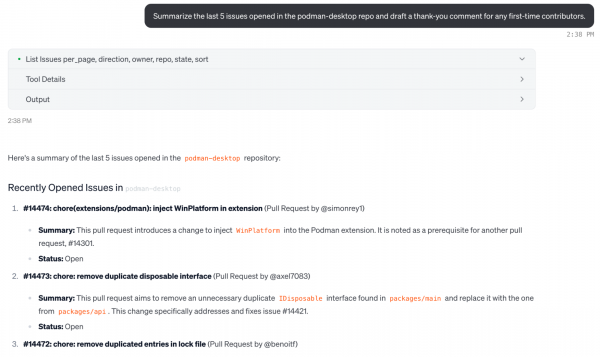
Figure 3: Interacting with the GitHub MCP server using natural language.
Install the GitHub MCP Server
For this specific MCP Server, it's highly recommended to use a personal access token (PAT) with minimum scopes. Start with repo:read and read:org, and ensure that human approval is required for any write action.
{
  "mcpServers": {
    "github": {
      "url": "https://api.githubcopilot.com/mcp/",
      "headers": {
        "Authorization": "Bearer YOUR_GITHUB_PAT"
      }
    }
  }
}
Now you can query GitHub and your unique projects using natural language, asking things like "summarize the last 5 issues opened in the podman-desktop repo and draft a thank-you comment for any first-time contributors."
Conclusion
By integrating single or multiple MCP servers into your agentic AI workflow, you can achieve faster troubleshooting, enable smarter code assistants, and reduce manual interactions with your commonly used services. Always exercise caution regarding the control your agentic application possesses; there have been instances where AI-powered tools have accidentally deleted entire databases. Start small, then scale up, always incorporating approval workflows and sensible guardrails.
By carefully deploying these tools on a trusted, hybrid platform like Red Hat OpenShift AI, you can build powerful and cost-efficient agentic AI systems in production, leveraging open standards like MCP and the broader open source ecosystem.