7 Deprecated Linux Commands You Should Stop Using (And Their Modern Replacements)
Discover 7 common Linux commands like `cron`, `ifconfig`, and `scp` that are now deprecated. Learn why you should stop using them and explore their powerful, modern alternatives.
A technology enthusiast, Bobby studied Computer Science at the University of Southampton before working in a number of roles across industries, from the private sector to the charitable one, at multinationals and startups. He’s helped maintain backend Java servers, designed databases and front-end interfaces, and created a bespoke content management system.
Bobby also enjoys video gaming, and has written for several outlets, including a stint as Editor-in-Chief at Switch Player Magazine and contributions to online magazine, SUPERJUMP. Bobby uses a Mac for day-to-day work and an Android phone for distractions.
Over the years, several Linux commands have been deprecated, either because they are no longer relevant, have security problems, or have ceased to be maintained. While you might still be able to use these common commands, it's generally advisable not to. Instead, consider using alternatives that are less prone to bugs and offer more robust features.
cron: Use systemd or launchd Instead
One of my favorite commands, cron was a foundational tool but could be frustrating to master. Its awkward syntax and challenging-to-debug environment led to the development of more modern alternatives. On Linux, systemd handles many startup-related tasks, including timers.
If you are using a recent Linux distribution, you can inspect all systemd timers using the systemctl command:
systemctl list-timers
To get more detailed information about a specific timer, use the status sub-command:
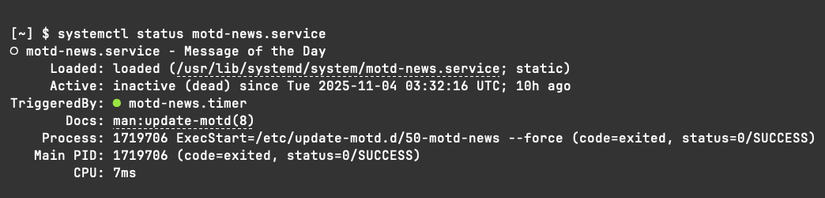
systemctl status motd-news.service
The output will include a "Process" line detailing the actual command executed by the timer.
On macOS, cron is also deprecated, but its replacement is launchd rather than systemd. launchd offers broader functionality beyond just task scheduling, acting as a significant upgrade to cron with features like improved handling of tasks that may need to run when your computer is powered off.
ifconfig: ip Replaces It
The ip command provides comprehensive information about your network connection, including IP addresses, routing to the public internet, and network devices. This low-level tool truly shows its power in the hands of network or system administrators. For most users, it primarily replaces the older ifconfig tool for discovering your public IP address:
ip address
Naturally, you can obtain similar information from a website like ifconfig.me, which reports the IP address you connect from, along with other diagnostics. You can even access it directly from the command line to view your IP in plain text:

However, when debugging network issues, these external options might be unavailable. A local tool will always be more reliable than a remote website, which could itself become deprecated.
nslookup: dig Is More Powerful
The "ns" in "nslookup" stands for "name server," indicating its role in querying DNS. dig serves the same purpose but comes with more features and superior formatting. Although nslookup's status has fluctuated between deprecated and reinstated, dig remains a robust and recommended replacement.
In practice, dig functions as a direct substitute for nslookup: provide it a domain name, and it will return the corresponding IP address (or addresses).
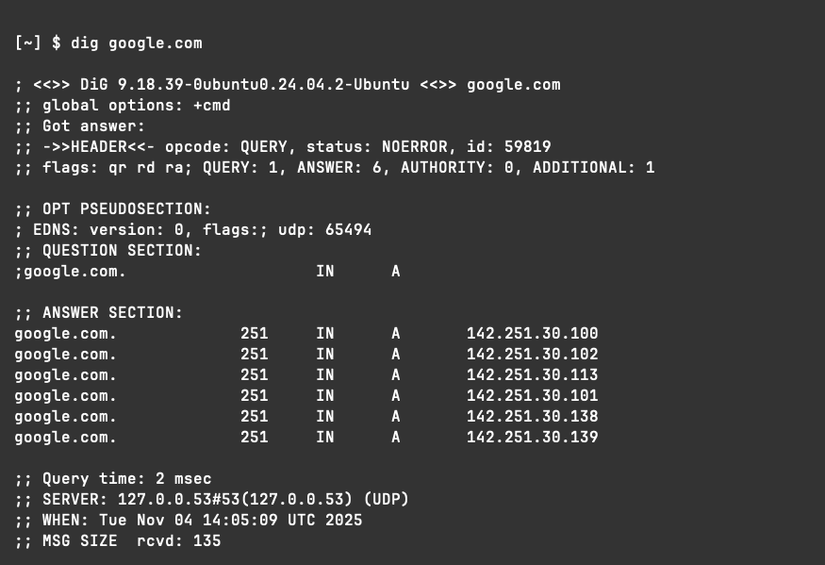
For basic lookups, nslookup will suffice. But for detailed debugging information or advanced record querying, dig should be your primary choice.
neofetch: Many Successors Are Available
Some commands become so popular that their deprecation leads to a multitude of replacements. The Neofetch program was renowned for displaying colorful ASCII logos and detailed system information in Linux terminal screenshots.
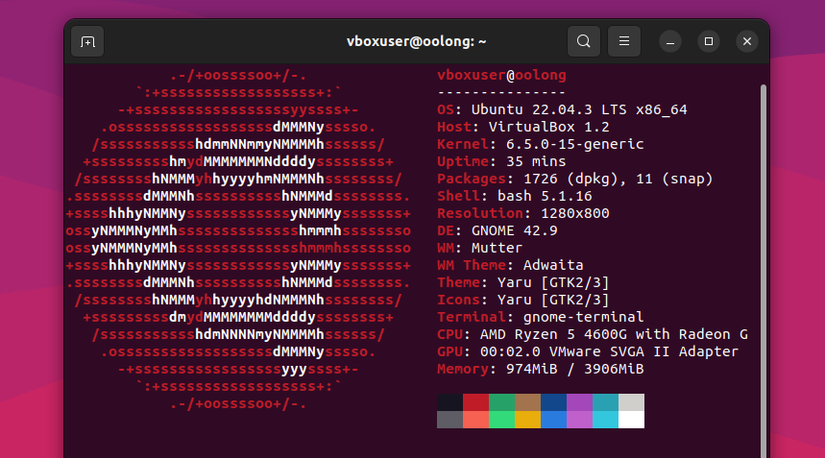
Sadly, the tool was retired in 2024, but fortunately, numerous alternatives have emerged. It seems nearly every programming language now offers its own version of this utility, from Bash scripts to C and Rust implementations.
Fastfetch is currently the leading contender, presenting vibrant logos alongside comprehensive system specifications and statistics. Its output is highly configurable, allowing you to customize everything from the layout to the specific information displayed and its presentation.
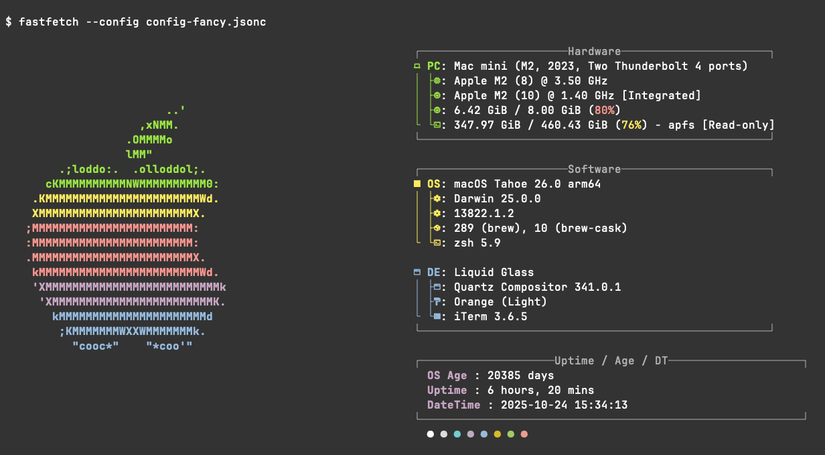
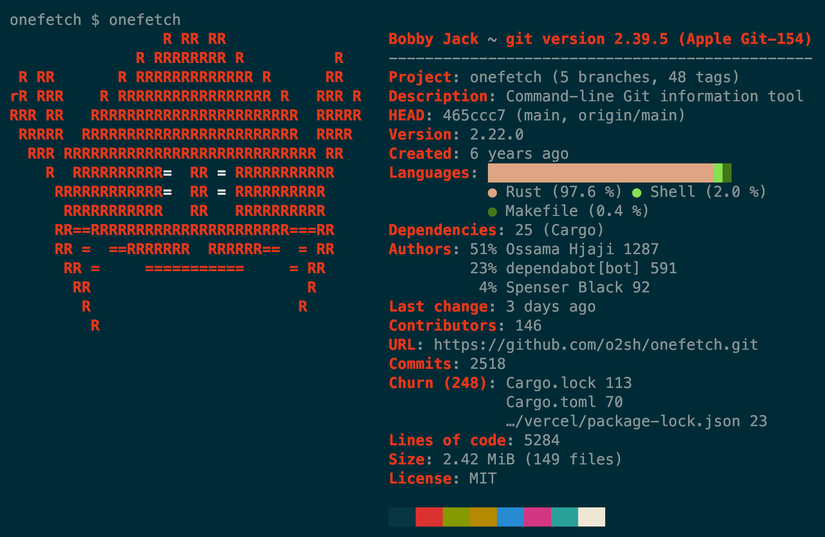
While many options exist, fastfetch is arguably the best, particularly due to its active maintenance. Other alternatives, such as ufetch or pfetch, have been archived or are no longer updated. Some tools, though inspired by fastfetch's design, serve different functions; for instance, onefetch displays summary information about a Git project.
scp: rsync Can Be Much Faster
scp—short for "secure copy"—is a straightforward command that securely copies files over a network using an SSH connection. It represented an upgrade over FTP but is now deprecated in favor of rsync, depending on your specific requirements.
For simple file uploads to a remote computer, both tools can be used similarly:
rsync foo.txt user@some-computer:/path/to/remote/foo.txt
scp foo.txt user@some-computer:/path/to/remote/foo.txt
While scp works perfectly well for individual file uploads, rsync excels with more complex directory structures that you might need to upload (or download) repeatedly. As its name suggests, rsync synchronizes a remote set of files with a local set. When differences exist, it intelligently transfers only the changes (deltas) rather than entire files, making it significantly more efficient than scp.
netstat: ss Is the Upgrade to Reach For
The netstat tool—an abbreviation for "network status"—is another networking utility that has been deprecated because it was part of the net-tools package. Its modern equivalent is ss.
netstat displays open network sockets, routing tables, and various other networking statistics, making it valuable for troubleshooting network problems and assessing network traffic performance.
ss, which belongs to the iproute2 collection, provides similar networking statistics. It functions much like ip route but is available as a standalone command.
which: type Is a Better Option
Another potentially confusing aspect of Linux involves understanding precisely what occurs when you execute a command. For example, running a command like ls seems simple:
ls
However, behind the scenes, one of several actions could take place, including:
- Running a built-in command.
- Running a shell function.
- Running an executable program.
- Running an alias, which might cause the process to repeat.
Several commands exist to help you ascertain what's happening. These include:
which: Locates a program file in the user's path.whence: A Zsh built-in to indicate how a command would be interpreted.where: Reports all known instances of a command.whereis: Locates programs.command -v: Displays the path to the executable or the alias definition of a specific command.
The whatis command is also related but serves a slightly different purpose: whatis -d keyword provides detailed information about a command (and related commands) by searching man pages for the keyword.
While these tools perform similar functions with minor differences in output, the recommended replacement for which is type.
On macOS, the which command is a shell built-in. However, on my Ubuntu 24 system, which is an executable program located at /usr/bin/which. This executable cannot provide as much information as a shell built-in because it lacks access to that data. Consequently, running which cd on Ubuntu yields no output, whereas macOS reports "cd: shell built-in command."
The type command, conversely, is a built-in. On both macOS and Ubuntu (and any other Linux distribution), it accurately identifies what a command is and, if applicable, its location:
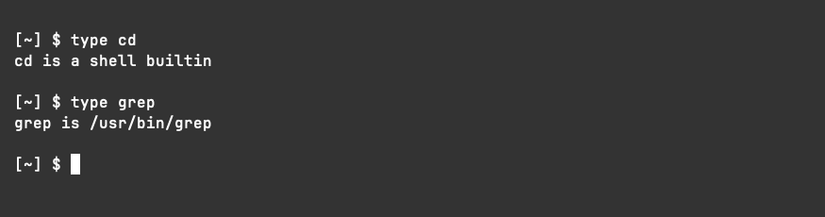
Notably, type also supports the useful -a option, similar to which, to display all instances of a command, not just the first:

If the presence of cd as both an executable and a built-in seems unusual—it should! On macOS, the executable program is merely a shell script that calls the cd built-in, serving as a dummy wrapper for POSIX compliance. You will likely never need to use it directly.