Angular Signal Forms vs. Reactive Forms: A Comprehensive Comparison
Dive into the evolving landscape of Angular forms with a detailed comparison between traditional Reactive Forms and the new Signal Forms, focusing on validation and implementation.

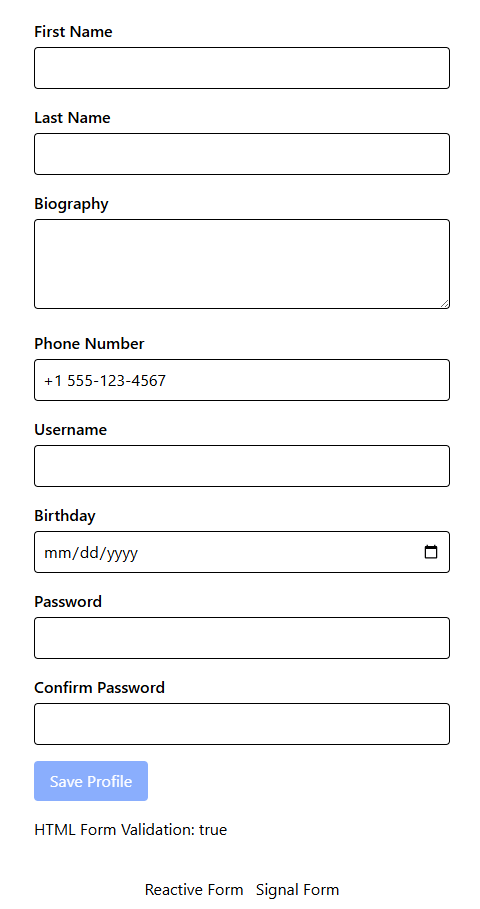
Angular is introducing significant updates to its forms, transitioning to use signals. This evolution necessitates a fresh approach to data validation. This article explores the implementation of a profile form featuring an asynchronous username validator and a password matching validator using both Angular Reactive Forms and the new Signal Forms. Both approaches are effective, but Signal Forms offer automatic binding with pure HTML form validation.
Installation
Ensure you have the latest version of Angular installed globally:
npm install -g @angular/cli
Then, update to the next branch:
npx ng update --next
Note: This article was written using Angular version 21.0.0-next.9, so minor changes may occur in future releases.
For simplified styling, consider installing Tailwind CSS.
Error Component
A simple shared error component can be created to display validation messages. It accepts an array of strings as input, which are then looped through and displayed.
errors = input<string[]>([]);
The component will only display if there are errors present, showing them beneath each relevant field in both Reactive and Signal form implementations.
@let showErrors = errors();

@if (showErrors?.length) {
<ul class="text-red-600 text-sm list-disc list-inside">
    @for (e of showErrors; track ([e, $index])) {
    <li>{{ e }}</li>
    }
</ul>
}
Reactive Forms Version
To begin with Reactive Forms, import ReactiveFormsModule along with the custom ShowErrors component.
imports: [ReactiveFormsModule, ShowErrors]
Custom Validators
While these validators are presented in a single file for brevity, it is recommended to separate them into individual files for production applications.
Phone Number Validator
This custom validator leverages Validators.pattern but allows for a custom validator name.
export const phoneNumberValidator: ValidatorFn = (
  control: AbstractControl
): ValidationErrors | null => {

  return Validators.pattern(/^\+?[0-9\s-]+$/)(control)
    ? { phoneNumber: true }
    : null;
};
Match Validator
The matchValidator addresses the common confirm password scenario by applying the same validation logic to two different fields and displaying the error on only one if they do not match.
export function matchValidator(
  matchTo: string,
  reverse?: boolean
): ValidatorFn {
  return (control: AbstractControl):
    ValidationErrors | null => {
    if (control.parent && reverse) {
      const c = (
        control.parent?.controls as Record<string, AbstractControl>
      )[matchTo] as AbstractControl;
      if (c) {
        c.updateValueAndValidity();
      }
      return null;
    }
    return !!control.parent &&
      !!control.parent.value &&
      control.value ===
      (
        control.parent?.controls as Record<string, AbstractControl>
      )[matchTo].value
      ? null
      : { matching: true };
  };
}
Username Availability Validator
For scenarios requiring a database check (e.g., username, unique slugs, emails), an asynchronous validator is essential. This example includes a timeout to prevent excessive database calls during rapid typing.
export function usernameAvailableValidator(delayMs = 400): AsyncValidatorFn {

  const checkUsername = inject(USERNAME_VALIDATOR);
  let timer: ReturnType<typeof setTimeout>;

  return (control: AbstractControl): Promise<ValidationErrors | null> => {
    const value = control.value;
    if (!value) return Promise.resolve(null);

    clearTimeout(timer);
    return new Promise((resolve) => {
      timer = setTimeout(async () => {
        try {
          const available = await checkUsername(value);
          resolve(available ? null : { taken: true });
        } catch {
          resolve(null);
        }
      }, delayMs);
    });
  };
}
checkUsername is an asynchronous function that returns true if the username is available, or false otherwise. A timeout is used to throttle requests, mitigating race conditions. While an observable version is also possible, this example uses promises.
USERNAME_VALIDATOR Injection Token
An injection token simulates a real database call to check username availability.
import { InjectionToken } from "@angular/core";

export const USERNAME_VALIDATOR = new InjectionToken(
  'username-validator',
  {
    providedIn: 'root',
    factory() {
      return async (username: string) => {
        const takenUsernames = ['admin', 'user', 'test'];
        await new Promise((resolve) => setTimeout(resolve, 500));
        return !takenUsernames.includes(username);
      }
    }
  }
);
An injection token is used here as production applications often require other services to be injected and shared.
Creating the Form
Form errors are defined in a JSON object for easy maintenance. The keys within errorMessages must correspond to the error keys produced by the validators (e.g., phoneNumber).
profileForm: FormGroup;

  errorMessages: Record<string, Record<string, string>> = {
    firstName: {
      required: 'First name is required.',
      minlength: 'First name must be at least 2 characters.'
    },
    lastName: {
      required: 'Last name is required.',
      minlength: 'Last name must be at least 2 characters.'
    },
    biograph: {
      maxlength: 'Biography cannot exceed 200 characters.'
    },
    phoneNumber: {
      phoneNumber: 'Enter a valid phone number.'
    },
    username: {
      required: 'Username is required.',
      minlength: 'Username must be at least 3 characters.',
      taken: 'This username is already taken.'
    },
    birthday: {
      required: 'Birthday is required.'
    },
    password: {
      required: 'Password is required.',
      matching: 'Passwords must match.'
    },
    confirmPassword: {
      required: 'Confirm password is required.',
      matching: 'Passwords must match.'
    }
  };
Applying Validators
Custom validators can be used similarly to built-in Angular validators, provided their abstract control types are correctly defined. Asynchronous validators are placed in the third parameter of the FormGroup.
this.profileForm = this.fb.group({
  firstName: ['', [Validators.required, Validators.minLength(2)]],
  lastName: ['', [Validators.required, Validators.minLength(2)]],
  biograph: ['', Validators.maxLength(200)],
  phoneNumber: ['', phoneNumberValidator],
  username: ['', [Validators.required, Validators.minLength(3)], usernameAvailableValidator()],
  birthday: ['', Validators.required],
  password: ['', [Validators.required, matchValidator('confirmPassword', true)]],
  confirmPassword: ['', [Validators.required, matchValidator('password')]]
});
Error Testing
This function maps control errors to their corresponding messages. It checks for touched and dirty states to prevent displaying errors on a blank form before user interaction.
getErrors(controlName: string): string[] {
  const control = this.profileForm.get(controlName);
  if (!control || !control.errors || (!control.touched && !control.dirty)) {
    return [];
  }

  const messagesForField = this.errorMessages[controlName] ?? {};
  return Object.keys(control.errors)
    .map(key => messagesForField[key])
    .filter((msg): msg is string => !!msg);
}
Form Submission
For testing, a simple alert displays the form data upon valid submission or indicates invalidity.
onSubmit(): void {

  if (this.profileForm.valid) {
    alert('Profile Data: ' + JSON.stringify(this.profileForm.value));
  } else {
    alert('Form is invalid');
  }
}
Reactive Forms Template
The template binds the formGroup to the form, handles onSubmit, connects individual form controls via formControlName, and displays errors using the getErrors('name') method with the custom error component.
<form [formGroup]="profileForm" (ngSubmit)="onSubmit()" class="space-y-4 p-4 max-w-md mx-auto">
    <div>
        <label class="block mb-1 font-semibold">First Name</label>
        <input type="text" formControlName="firstName" class="w-full border p-2 rounded" />
        <app-show-errors [errors]="getErrors('firstName')" />
    </div>

    <div>
        <label class="block mb-1 font-semibold">Last Name</label>
        <input type="text" formControlName="lastName" class="w-full border p-2 rounded" />
        <app-show-errors [errors]="getErrors('lastName')" />
    </div>

    <div>
        <label class="block mb-1 font-semibold">Biography</label>
        <textarea #bio formControlName="biograph" rows="3" class="w-full border p-2 rounded"></textarea>
        <app-show-errors [errors]="getErrors('biograph')" />
    </div>

    <div>
        <label class="block mb-1 font-semibold">Phone Number</label>
        <input type="tel" formControlName="phoneNumber" placeholder="+1 555-123-4567"
            class="w-full border p-2 rounded" />
        <app-show-errors [errors]="getErrors('phoneNumber')" />
    </div>

    <div>
        <label class="block mb-1 font-semibold">Username</label>
        <input type="text" formControlName="username" class="w-full border p-2 rounded" />
        <app-show-errors [errors]="getErrors('username')" />
    </div>

    <div>
        <label class="block mb-1 font-semibold">Birthday</label>
        <input type="date" formControlName="birthday" class="w-full border p-2 rounded" />
        <app-show-errors [errors]="getErrors('birthday')" />
    </div>

    <div>
        <label class="block mb-1 font-semibold">Password</label>
        <input type="password" formControlName="password" class="w-full border p-2 rounded" />
        <app-show-errors [errors]="getErrors('password')" />
    </div>

    <div>
        <label class="block mb-1 font-semibold">Confirm Password</label>
        <input type="password" formControlName="confirmPassword" class="w-full border p-2 rounded" />
        <app-show-errors [errors]="getErrors('confirmPassword')" />
    </div>

    <button type="submit" class="bg-blue-600 text-white px-4 py-2 rounded hover:bg-blue-700 disabled:opacity-50"
        [disabled]="profileForm.invalid">
        Save Profile
    </button>
    <p>HTML Form Validation: {{ bio.getAttribute('maxlength') === '200' }}</p>
</form>
A reference to the #bio field is included to check for HTML validation synchronization, which is not inherently present in the Reactive Forms version.
Signal Forms Version
For Signal Forms, import the Field control and the custom ShowErrors component. Note that Field replaces the deprecated Control.
imports: [Field, ShowErrors],
The implementation differs significantly from Reactive Forms, though it addresses the same validation concerns.
Custom Validators
Phone Number Validator
Signal forms utilize functions like pattern for validation. This customized version returns a customError with appropriate typing.
export function phoneNumber(
  field: Parameters<typeof pattern>[0],
  opts?: { message?: string }
) {
  return pattern(field, /^\+?[0-9\s-]+$/, {
    error: customError({
      kind: 'phoneNumber',
      message: opts?.message ?? 'Invalid phone number format.'
    })
  });
}
Match Validator
The password validator in Signal Forms is simpler, leveraging the validate function, which reruns on every keystroke.
export function matchField<T>(
  field: Parameters<typeof validate<T>>[0],
  matchToField: Parameters<typeof validate<T>>[0],
  opts?: {
    message?: string;
  }
) {
  return validate(field, (ctx) => {

    const thisVal = ctx.value();
    const otherVal = ctx.valueOf(matchToField);

    if (thisVal === otherVal) {
      return null;
    }

    return customError({
      kind: 'matching',
      message: opts?.message ?? 'Values must match.'
    });
  });
}
Username Availability Validator
Implementing the username validator with Signal Forms is more complex, requiring validateAsync which relies on a resource function with a loader and parameters. A timeout is integrated to manage rapid typing. The checkUsername token function is reused here.
export function usernameAvailable(
  field: Parameters<typeof pattern>[0],
  delayMs = 400,
  opts?: { message?: string }
) {

  const checkUsername = inject(USERNAME_VALIDATOR);

  return validateAsync(field, {
    params: (ctx) => ({
      value: ctx.value()
    }),
    factory: (params) => {
      let timer: ReturnType<typeof setTimeout>;
      return resource({
        params,
        loader: async (p) => {
          const value = p.params.value;
          clearTimeout(timer);
          return new Promise<boolean>((resolve) => {
            timer = setTimeout(async () => {
              const available = await checkUsername(value);
              resolve(available);
            }, delayMs);
          });
        }
      })
    },
    errors: (result) => {
      if (!result) {
        return {
          kind: 'taken',
          message: opts?.message ?? 'This username is already taken.'
        };
      }
      return null;
    }
  });
}
Creating the Schema
Signal Forms use a typed schema instead of a FormGroup.
type Profile = {
  firstName: string;
  lastName: string;
  biograph: string;
  phoneNumber: string;
  username: string;
  birthday: string;
  password: string;
  confirmPassword: string;
};

const profileSchema = schema<Profile>((p) => {
  required(p.firstName, {
    message: 'First name is required.'
  });
  minLength(p.firstName, 2, {
    message: 'First name must be at least 2 characters.'
  });
  required(p.lastName, {
    message: 'Last name is required.'
  });
  minLength(p.lastName, 2, {
    message: 'Last name must be at least 2 characters.'
  });
  maxLength(p.biograph, 200, {
    message: 'Biography cannot exceed 200 characters.'
  });
  required(p.username, {
    message: 'Username is required.'
  });
  minLength(p.username, 3, {
    message: 'Username must be at least 3 characters.'
  });
  required(p.birthday, {
    message: 'Birthday is required.'
  });
  required(p.phoneNumber, {
    message: 'Phone number is required.'
  });
  required(p.password, {
    message: 'Password is required.'
  });
  required(p.confirmPassword, {
    message: 'Confirm password is required.'
  });
  phoneNumber(p.phoneNumber, {
    message: 'Enter a valid phone number.'
  });
  matchField(p.confirmPassword, p.password, {
    message: 'Passwords must match.'
  });
  usernameAvailable(p.username, 400, {
    message: 'This username is already taken.'
  });
});
This schema-based approach provides clarity but can be verbose. Error messages are embedded directly within the function validators, eliminating the need for a separate JSON object for messages.
An actual signal is required to manage changes within the form.
private initial = signal<Profile>({
  firstName: '',
  lastName: '',
  biograph: '',
  phoneNumber: '',
  username: '',
  birthday: '',
  password: '',
  confirmPassword: ''
});

profileForm = form(this.initial, profileSchema);
Error Testing
The error handling function is similar to the Reactive Forms version, mapping errors to their respective fields. It also observes the touched() and dirty() states to only show errors after user interaction.
getErrors(controlName: keyof typeof this.profileForm): string[] {

  const field = this.profileForm[controlName];

  const state = field();

  // Only show errors after user interaction
  if (!state.touched() && !state.dirty()) return [];

  const errors = state.errors();
  if (!errors) return [];

  return errors
    .map(err => err.message ?? err.kind ?? 'Invalid')
    .filter(Boolean);
}
Signal Forms Template
The template is largely similar to the Reactive Forms version, but it uses [field] to bind form values.
<form (submit)="$event.preventDefault(); onSubmit()" class="space-y-4 p-4 max-w-md mx-auto">
  <div>
    <label class="block mb-1 font-semibold">First Name</label>
    <input type="text" [field]="profileForm.firstName" class="w-full border p-2 rounded" />
    <app-show-errors [errors]="getErrors('firstName')" />
  </div>

  <div>
    <label class="block mb-1 font-semibold">Last Name</label>
    <input type="text" [field]="profileForm.lastName" class="w-full border p-2 rounded" />
    <app-show-errors [errors]="getErrors('lastName')" />
  </div>

  <div>
    <label class="block mb-1 font-semibold">Biography</label>
    <textarea #bio rows="3" [field]="profileForm.biograph" class="w-full border p-2 rounded"></textarea>
    <app-show-errors [errors]="getErrors('biograph')" />
  </div>

  <div>
    <label class="block mb-1 font-semibold">Phone Number</label>
    <input type="tel" placeholder="+1 555-123-4567" [field]="profileForm.phoneNumber"
      class="w-full border p-2 rounded" />
    <app-show-errors [errors]="getErrors('phoneNumber')" />
  </div>

  <div>
    <label class="block mb-1 font-semibold">Username</label>
    <input type="text" [field]="profileForm.username" class="w-full border p-2 rounded" />
    <app-show-errors [errors]="getErrors('username')" />
  </div>

  <div>
    <label class="block mb-1 font-semibold">Birthday</label>
    <input type="date" [field]="profileForm.birthday" class="w-full border p-2 rounded" />
    <app-show-errors [errors]="getErrors('birthday')" />
  </div>

  <div>
    <label class="block mb-1 font-semibold">Password</label>
    <input type="password" [field]="profileForm.password" class="w-full border p-2 rounded" />
    <app-show-errors [errors]="getErrors('password')" />
  </div>

  <div>
    <label class="block mb-1 font-semibold">Confirm Password</label>
    <input type="password" [field]="profileForm.confirmPassword" class="w-full border p-2 rounded" />
    <app-show-errors [errors]="getErrors('confirmPassword')" />
  </div>

  <button type="submit" class="bg-blue-600 text-white px-4 py-2 rounded hover:bg-blue-700 disabled:opacity-50"
    [disabled]="profileForm().invalid()">
    Save Profile
  </button>
  <p>HTML Form Validation: {{ bio.getAttribute('maxlength') === '200' }}</p>
</form>