Backstage Adoption Guide: Is Spotify's IDP the Right Fit for Your Engineering Team?
Deciding on Backstage? This guide, based on 20+ team interviews, helps you assess if Spotify's IDP is the right fit, understand costs, avoid pitfalls, and prove ROI effectively.
14 minute read Updated: September 25, 2025
By Brandon Schurman
TL;DR:
I interviewed over 20 Backstage teams of various types and sizes, asking about their experiences—what worked and what didn’t. Here’s their combined advice (and warnings) to help you decide whether to adopt the popular open-source Internal Developer Portal (IDP) framework.
If you’ve spent more than five minutes in the platform engineering Slack, you’ve likely heard about Backstage. It’s the open-source sensation in the IDP space, reportedly capturing 67% of the market and promising to streamline microservice complexity with a unified interface.
For many teams, Backstage has delivered significant wins. However, building a production-ready IDP is a substantial investment. Some teams abandon the effort midway, while others celebrate major gains in productivity and Developer Experience (DevEx).
I aimed to understand why Backstage succeeds for some organizations and fails for others. My conversations with 20 engineering teams—ranging from agile startups to global enterprises—revealed their real-world experiences. They shared insights into what worked, what didn’t, and what they wish they had known upfront.
This guide distills their collective advice into actionable tips, helping you determine if Backstage is the right strategic move for your team and how to launch a successful IDP initiative without consuming months of engineering time.
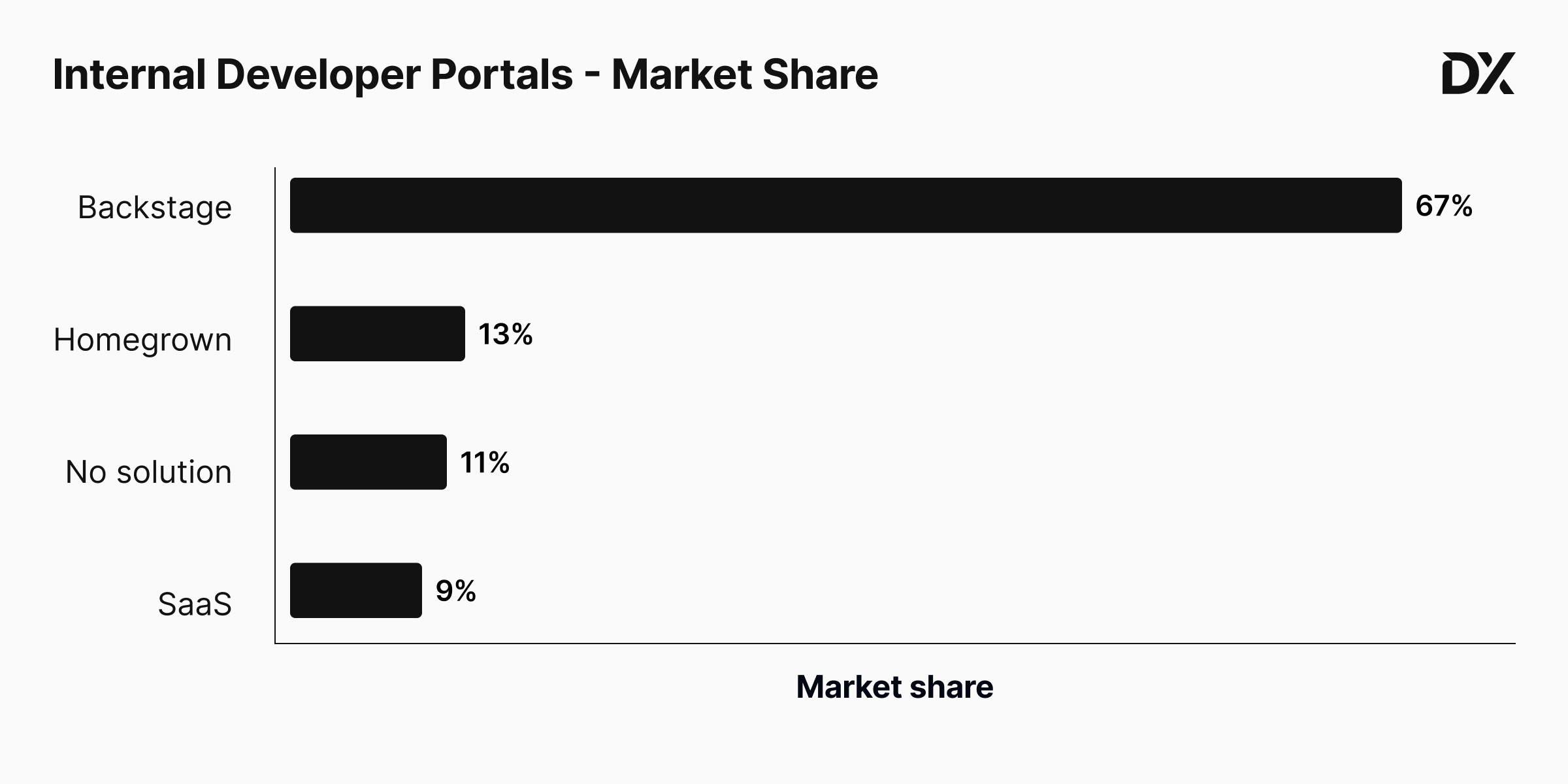 Backstage leads the IDP market with a 67% share, according to DX research.
Backstage in 60 Seconds
At its core, Backstage functions as a service catalog. It provides a centralized hub where developers can access comprehensive details about every microservice and component, including documentation, ownership, dependencies, onboarding procedures, and more.
Beyond the catalog, Backstage offers two major advantages:
- Scaffolder: Provides templates for quickly setting up new services, embedding best practices from the start.
- Plugins: Offers a wide array of functionalities, from scorecards to security checks, with a strong likelihood that you'll end up developing many custom ones.
Interestingly, not all teams fully utilize the service catalog. For some, the scaffolder alone provided sufficient value to justify its adoption.
A word of caution: Your initial approach can significantly impact the success of your initiative. Rolling out too many features simultaneously can lead to wasted effort, unclear value propositions, and user confusion. Ensure you maintain a sharp focus and a clear Return on Investment (ROI) argument before commencing. As one user aptly put it:
“Don’t try to pull in every Backstage tool at once. Start with one (catalog, docs, or scaffolder), roll it out, get feedback, then add the next.”
— Zeshan Ziya (Axelerant)
When Backstage Makes Sense (and When It Doesn’t)
Backstage is not a panacea. It delivers value only when aligned with your organization's size, culture, and willingness for a DIY approach, and when directly addressing a clear pain point (e.g., microservice sprawl, slow onboarding, inconsistent templates, tool proliferation). Use this quick self-assessment to determine if it’s a good fit before committing.
Backstage makes sense if:
- You’re experiencing scale-related pain: Multiple teams and dozens (or hundreds) of services make it difficult to ascertain "who owns what."
- You desire a developer-first home base that can be extensively customized with proprietary plugins, processors, and data enrichments.
- You can allocate approximately 3–5+ engineers for its development and ongoing maintenance.
- You have (or can secure) top-down management support to encourage (or mandate) IDP usage.
- Your "paved-road" or "golden-path" strategy primarily targets new services rather than existing, legacy systems.
- Your culture embraces iterative rollouts and experimentation: Start with the catalog or onboarding, prove value, then expand.
- You prefer documentation living alongside code (e.g., Markdown files managed via source control alongside services).
Backstage may not be right if:
- You operate as a very lean organization (< ~30-40 engineers) or have only one (or zero) part-time maintainers.
- You expect a turnkey developer portal that functions immediately out-of-the-box.
- Your platform/SRE team lacks frontend/TypeScript capacity and has no budget to acquire it.
- Your primary need is leadership dashboards (e.g., Scorecards, DORA metrics) rather than a developer-centric homepage.
- You lack executive backing (the "build it and they will come" strategy rarely works for Backstage).
- You don’t have 6-12 months to properly build your IDP and achieve widespread adoption.
- You are already deeply invested in DIY solutions that are not worth replacing with Backstage.
“We already built so much DevEx infra that was highly specific to our company. We tried retrofitting Backstage, but at that point it was just a UI layer and it didn’t seem worth it.”
— Yeshwanth Shenoy (Okta, ex-Rakuten)
Rule of thumb: If the time currently lost to identifying owners, bootstrapping infrastructure, or repeatedly explaining onboarding materials easily amounts to several engineer-months annually, Backstage can justify its cost. Otherwise, consider lighter alternatives or a vendor solution.
Is Backstage Free?
“The homepage literally says ‘an open-source framework for building developer portals’. It doesn’t say ‘a free developer portal.’ You still have to build the thing.”
— Marcus Crane (Halter, ex-Lightspeed)
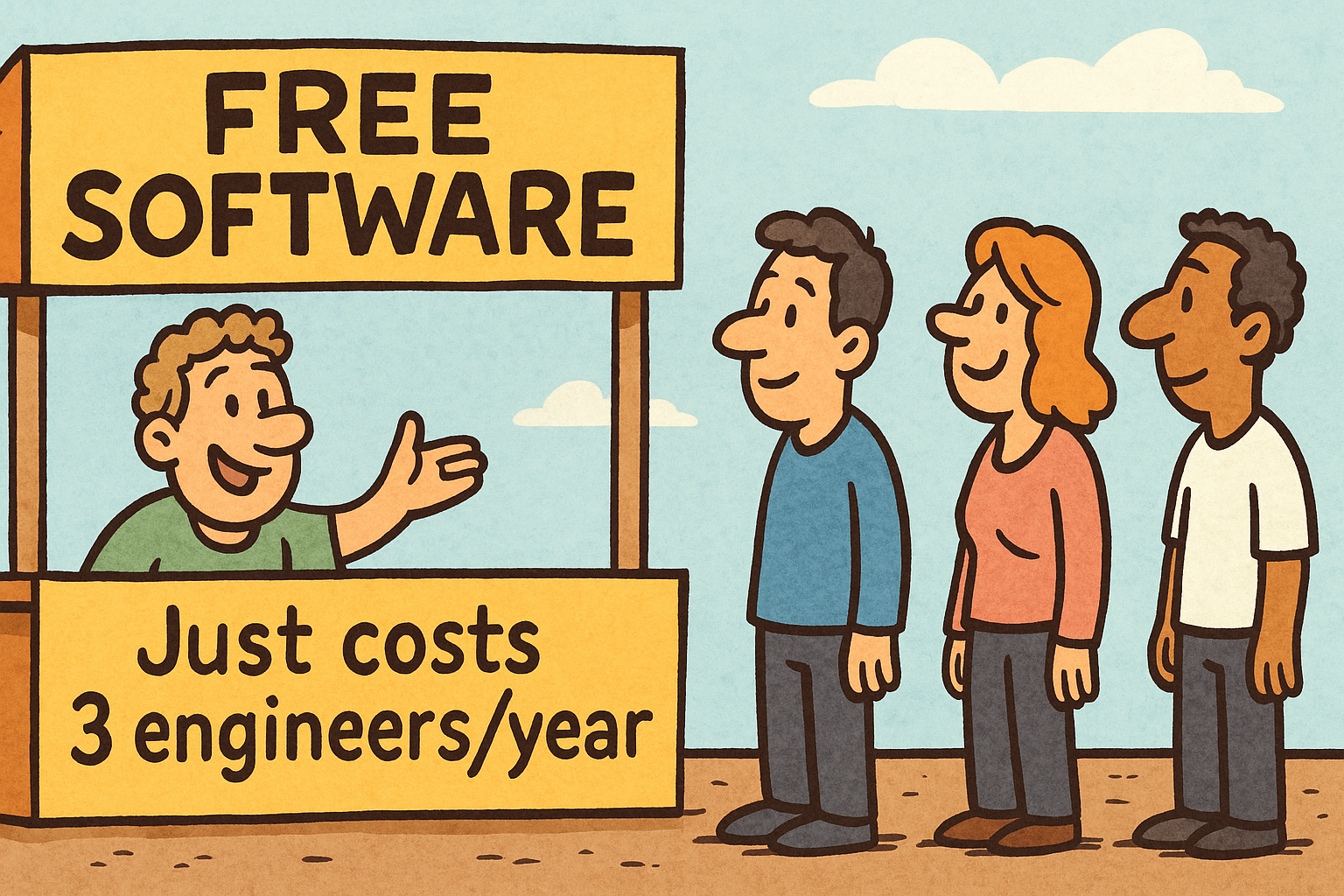 Open-source software isn't always "free."
It bears repeating: open-source ≠ free, and Backstage is a prime example. Even if you never pay Spotify a single cent, you will incur real costs (both financial and in calendar time) in four key areas:
- Engineering hours: A Backstage support team typically requires 3-5 full-time engineers; teams with fewer often struggle with the workload.
- Front-end expertise: Plugins are built with React/TypeScript, necessitating that several Platform teams either upskill existing members or hire dedicated front-end talent.
- Infrastructure & SRE: You are responsible for hosting and operating the system, including CI/CD, authentication, PostgreSQL, monitoring, backups, and staging environments.
- Commercial add-ons: Some plugins, like Spotify’s own Soundcheck, are paid and can be as costly as standalone vendor solutions.
The SRE costs should not be underestimated. As one user observed:
“Once people started relying on Backstage, it really needed to be treated like a production service. It had to be up and reliable all the time, otherwise we literally couldn’t ship or troubleshoot anything.”
— Julio Zynger (Zenjob, ex-SoundCloud)
Back-of-the-napkin numbers:
- DIY Backstage with 3 engineers in a mid-size organization: US $380-650k per year (including modest infrastructure).
- Fully managed SaaS IDP for 200 engineers @ $35/dev/mo: $84K per year.
- Hybrid DIY core + premium plugins with fewer (1-2) developers: $150-250k per year.
Your specific costs will vary, but the clear lesson is that building an IDP is a significant investment that must be planned with a clear ROI in mind.
Common Pitfalls with Backstage
Based on my conversations with over 20 Backstage teams, these are some of the most frequently encountered challenges.
1. Under-estimating headcount (and FE skills)
“You need someone who can actually write TypeScript if you want to keep building plugins. That’s hard when your org is all Go devs.”
— Lucas Weatherhog (Giant Swarm)
Most successful Backstage teams dedicate 3-5 engineers, including at least one proficient in React/TypeScript. Understaffing this effort can significantly impede meaningful progress. One engineer supporting 130 users on Backstage shared this perspective:
“Almost all my time goes into keeping the catalog data accurate. There’s no bandwidth left to build plugins.”
— Alexandr Puzeyev (Tele2 Kazakhstan)
2. Docs for everyone? Not quite.
“TechDocs works great for the engineers, but when we asked the designers and PMs to learn GitHub and write Markdown, it just wasn’t going to happen. They stuck with Confluence.”
— Rory Scott (Duo Security, ex-Fanatics)
Backstage excels at documenting code-adjacent information. However, non-engineering teams typically prefer and continue to use their own specialized tools, and that’s perfectly acceptable.
“Backstage feels like it’s built for developers first. The UI, the YAML, the whole mindset. Tools like Cortex look great on a leadership dashboard, but they don’t speak to engineers the way Backstage does.”
— Adam Tester (Deel)
3. Chasing 100% adoption
I’ve previously discussed this topic on platformengineeringisdead.com (as part of a PlatformCon stunt). Successful Backstage initiatives typically aim for approximately 80% use-case coverage. Pushing for the final 20% often consumes disproportionately more time and effort than the value it yields, especially with the Scaffolder, where retro-templating legacy services can quickly create a massive backlog.
If your objective is universal standards, consider tools that enforce them outside the template path (e.g., Earthly Lunar). In the meantime, leverage automation to reduce the catalog’s manual load:
“We generate the catalog-info.yml files automatically from our internal service registry. Developers only jump in to tweak things if the script gets something wrong.”
— Andy Vaughn (AppFolio)
4. Missing exec sponsorship
“If you’re a big, tech-heavy organization and you really have leadership support to invest in developer experience, then you should adopt something like Backstage. But if leadership support isn’t there, don’t even go down that road.”
— Yaser Toutah (Talabat, ex-Expedia Group)
Securing sufficient capacity to support Backstage and convincing other teams to adopt it requires strong leadership backing. Teams that treated Backstage as an extracurricular side project, waiting for organic uptake, typically stalled within months.
How to Succeed with Backstage (and Prove ROI)
Building an Internal Developer Portal demands considerable effort, but many teams observe clear benefits once they can quantify the advantages.
Backstage requires tangible proof of value. If you cannot present hard numbers, your portal risks being the first line-item cut in the next budget review. Here are several example metrics to transform your "nice portal" into a demonstrable "business win."
| Use-case | What to track | How to frame it |
|---|---|---|
| Developer-experience | Quarterly pulse surveys | "DX score jumped from 6.4 → 8.1." |
| New-hire onboarding | Days to first merged PR | "Ramp-up shrank from 14 days to 5." |
| Service scaffolding | Hours DevOps spent vs. self-service template time | "60 sec template vs. 4–6 weeks manual build." |
| Developer throughput | DORA lead-time & deployment-frequency | "Ship frequency up 30%, lead-time down 25%." |
| Incident response | PagerDuty / OpsGenie MTTR before vs. after service dashboard | "Mean time-to-resolve fell from 90 min to 55 min." |
| Docs find-time | Small time-in-motion study → extrapolate org-wide hours saved | "We free ~2 FTEs a year just by centralising docs." |
“We proved we could deliver a microservice into an environment in about 60 seconds. It used to take four to six weeks.”
— Matt Law (The Warehouse Group)
A simple playbook:
- Anchor on a pain with a price-tag: An investment of three to five engineers for 6–12 months represents real money. Clearly demonstrate what this investment will save or enable.
- Run a laser-focused pilot: If documentation sprawl is the primary issue, address only TechDocs first. Partner with one or two cooperative teams.
- Publish the numbers: Compare pilot metrics against baseline data. Transform these wins into a concise one-pager for executives and an internal demo for peers.
- Scale with advocacy: Utilize leadership sponsorship, testimonials from early adopters, and "brown-bag" demos to engage the next wave of teams.
- Rinse & repeat for a new use-case: Once the catalog is fully operational, return to step 1 to address the Scaffolder, plugins, and other use cases.
Keep the loop small, measurable, and relentlessly tied to business value. Backstage will ultimately sell itself through its quantifiable results.
So… Is Backstage Really Worth It?
When successfully implemented, the payoff is substantial: teams report significantly reducing boilerplate work, accelerating onboarding, and spending less time searching for ownership details. However, for every smooth rollout, there's a cautionary tale where DIY efforts escalated faster than the ROI could keep pace.
For a deeper exploration of Backstage's history and current adoption trends, read "Backstage Is at The Peak of Its Hype."
If you commit to Backstage, remember: managing it is akin to launching an internal startup. You’ll need a clear problem statement, executive investors, a defined roadmap, and a team that treats fellow engineers as customers. (P.S. If the startup life appeals to you, we’re hiring).
Ready to raise the bar in engineering excellence?
Earthly Lunar is the SDLC monitoring platform designed for the complex realities of engineering at scale. It offers production-like monitoring for everything that occurs before production, providing real-time visibility across your entire development lifecycle—from commit to deploy—without altering your existing dev infrastructure.
Policy Engine for your SDLC
Lunar monitors your code and CI systems to collect SDLC metadata (e.g., config files, test results, IaC usage, dependency declarations, security scans). It continuously evaluates this data against your organization’s engineering standards and enforces those policies by delivering feedback directly to developers in their Pull Requests.
It also integrates seamlessly with your existing Backstage or other software catalogs.
About the Author
Brandon Schurman
Brandon is a founding member of the Earthly team and a Platform Engineer at heart. When he’s not at home hacking on the latest Earthly tech, you’ll probably find him off the grid, relaxing at a campsite with his family.
Updated: September 25, 2025 Published: October 1, 2025