Buildkite Changelog Roundup: Latest Updates in Test Engine, Pipelines, and Package Registries
Buildkite's latest update: Test Engine gains workflows, better filtering; Pipelines get GitHub merge queues, simplified secrets, HTML artifacts; Package Registries add NuGet, GCP storage, webhooks.
Welcome to another edition of the Changelog Roundup, our ongoing series that provides an easily digestible summary of the latest features and improvements from the Buildkite Changelog.
This month, we're excited to share a wealth of updates spanning the entire Buildkite platform:
- What's new in Test Engine: Introducing Test Engine workflows, enhanced filtering and layout controls in the dashboard, and automated removal of the
flakytest label. - What's new in Pipelines: First-class support for GitHub merge queues, plugin-free secrets in pipeline YAML, improved controls for blocking and unblocking builds, in-page rendering of HTML artifacts, and Xcode 26 on macOS hosted agents.
- What's new in Package Registries: Native support for .NET packages with NuGet registries, Private Storage Link for Google Cloud Platform, and webhook notifications for package-creation events.
What's new in Test Engine
Since our last update, we've shipped several new features in Test Engine, focusing on more powerful workflows, flexible filters and layouts, and intelligent automation.
Introducing workflows
Test Engine now supports definable workflows that enable you to map observations about your test suite to specific actions. With workflows, you can:
- Use multiple heuristics to identify and label your tests.
- Change the state of a test (enabled, muted, skipped).
- Send Slack notifications and webhooks.
- Integrate with external task-management applications like Linear to automatically create issues for follow-up work.
Learn more by checking out the release blog or watching the three-minute intro walkthrough below.
Improved filtering and layout controls
A range of new filtering capabilities in Test Engine allows you to filter by branch, state, result, owner, label, and tags. Metrics cards now dynamically reflect your selected filters, providing high-level insights, and column selection is consistent across Test Engine and Pipelines pages.
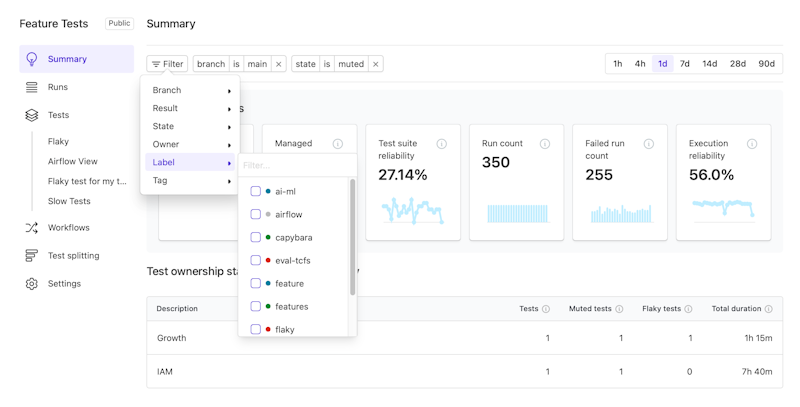 Improved filtering and layout controls in Test Engine
Automatic removal of the flaky label
The flaky test label is now automatically removed from tests that do not report as both failed and passed on the same commit SHA within 100 executions or seven days. This automated process enhances label accuracy, minimizes noise, and eliminates the need for manual label removal.
Learn more about flaky-test detection in the documentation.
What's new in Pipelines
We've also added a host of new features to Pipelines, designed to help you ship faster, simplify your pipeline code, and gain greater control over pipeline operations and configurations.
Support for GitHub merge queues
Buildkite now offers first-class support for GitHub merge queues. This allows you to create and cancel builds based on merge_group webhook events from GitHub. Merge-queue builds are clearly identified in the Buildkite UI, and pipeline behavior can be adjusted using conditionals and environment variables that indicate a build's origin from a merge queue.
With this new integration, you can:
- Create builds when a merge group is added to the merge queue.
- Cancel in-progress builds when a merge group becomes invalid.
- Identify merge queue builds in the Buildkite UI.
- Vary pipeline behavior for merge queue builds.
- Skip unnecessary work using the
if_changedattribute of a pipeline step.
To learn more, check out the documentation or the video below for a quick introduction.
Easier use of secrets in pipeline YAML
Buildkite secrets is an encrypted key-value store for managing sensitive data like API tokens and passwords within your pipelines. The latest release introduces two new features:
-
Direct integration in YAML steps: You can now load secrets directly into your jobs' environments using the new
secretskey. For example:# Loaded into environment for all steps in the build secrets: - API_ACCESS_TOKEN steps: - command: scripts/deploy.sh # Loaded into environment for this step only secrets: - DEPLOY_KEY - command: scripts/lint.sh -
Policy-based access control: Policies allow you to configure access to secrets within a cluster based on build context, ranging from broad cluster-wide access to specific conditions like particular pipelines, branches, or users. For example, to limit access from builds of the
mainbranch to a given team on a specific pipeline:- pipeline_slug: "my-pipeline" build_branch: "main" build_creator_team: "e2b7c3f4-1a5d-4e6b-9c8d-2f3a4b5c6d7e"
For more details on YAML integration and policy-based access controls for secrets, refer to the secrets documentation.
Team permissions for block and input steps
You can now specify which teams are allowed to unblock a build or submit an input step using the allowed_teams field. This new field enables you to separate the permission to create a build from the permission to unblock it, creating more flexible and secure delivery workflows.
For example, to allow only members of the platform_engineering team to apply changes to production infrastructure with a block step:
steps:
  - label: "Plan"
    command: "terraform init && terraform plan -input=false -out=tfplan"
    plugins:
      - artifacts:
          upload: "tfplan"

  - block: "Apply changes?"
    allowed_teams: ["platform-engineering"]

  - label: "Apply"
    command: "terraform apply -input=false tfplan"
    plugins:
      - artifacts:
          download: "tfplan"
Or to allow only wizards to cast spells with an input step:
steps:
  - input: "🧙"
    allowed_teams: "wizards"
    fields:
      - text: "What spell would you like to cast?"
        key: "spell-of-the-day"
For more information, see the documentation for block steps and input steps.
More control over API access token creation
Buildkite organization administrators can now restrict non-admins from creating new API access tokens. This new security setting is available in the Security > API tab of your organization's Settings page. (Previously existing tokens are unaffected by this setting change.)
To learn more about managing API access tokens, consult the access tokens documentation.
Native support for HTML artifacts
Testing frameworks and code-coverage tools often generate rich HTML reports, which can be cumbersome to download and navigate. Now, when you upload a collection of related HTML, CSS, and JavaScript assets as a build artifact, Buildkite will render them inline as an HTML widget, allowing for easier drilling into and navigation of these reports.
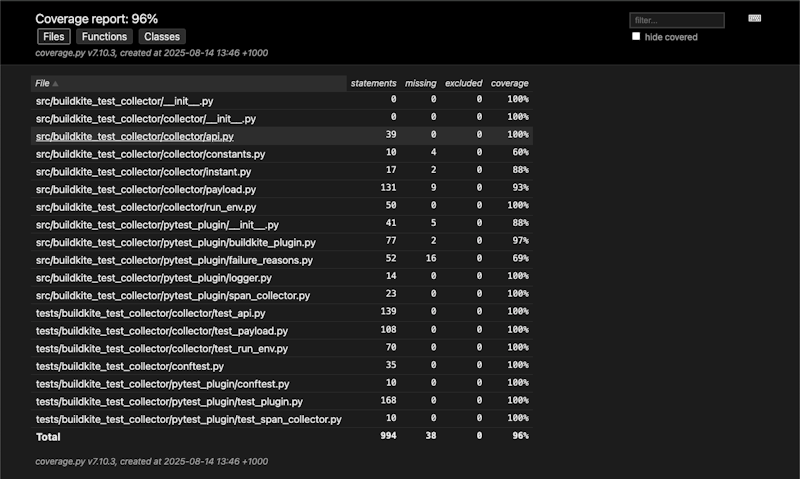 A Python code-coverage report in the Buildkite dashboard
For more details, check out the Changelog post.
Xcode 26 in macOS hosted agents
We've also added the latest version of Xcode to our macOS hosted instances, which can be selected with macOS Sequoia (15.6.1) and Tahoe (26). You can set the Xcode version in the Base Image tab of your hosted agent's queue configuration page.
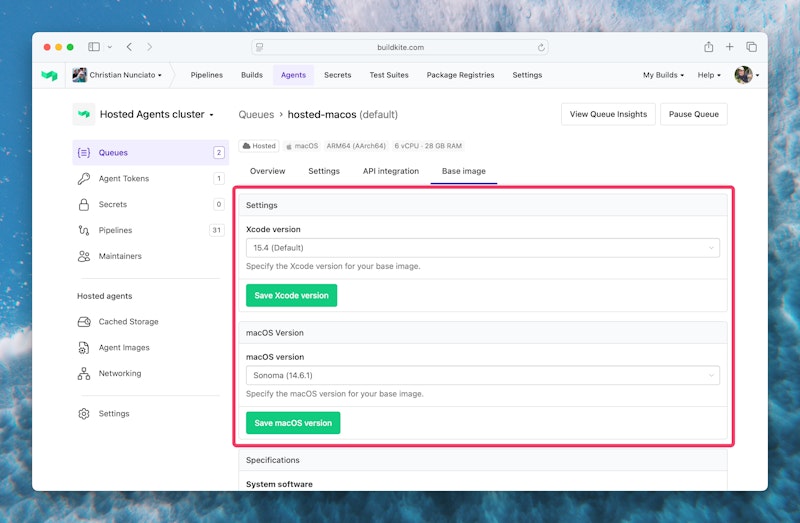 Configuring the Xcode and macOS versions of a hosted agent's base image
What's new in Package Registries
Finally, we've introduced several new features to Package Registries that expand our ecosystem coverage, provide greater control over package storage, and facilitate integration with third-party systems.
NuGet registries for .NET packages
Package Registries now support NuGet, the standard package manager for the .NET ecosystem. This means you can use Package Registries to manage any .NET package supported by NuGet — C#, F#, or VB.NET.
To learn more about creating and managing NuGet package registries with Buildkite, see the Package Registries documentation.
Private Storage Link for Google Cloud Platform
We've expanded our support for Private Storage Link — a feature allowing you to store packages in your team's cloud object storage — to include Google Cloud Platform. Now, you can choose either Amazon S3 or Google Cloud Storage (GCS) when configuring your global and per-registry storage locations. This offers greater flexibility to keep your packages within your security perimeter and close to the build runners that need them.
To learn more about setting up Private Storage Link with GCS, see the documentation.
Webhook notifications
Package Registries now support outbound webhooks – configurable HTTP requests emitted whenever a new package is created. This building block can help trigger more event-based flows in your software delivery lifecycle, such as initiating a vulnerability scan on a newly published package.
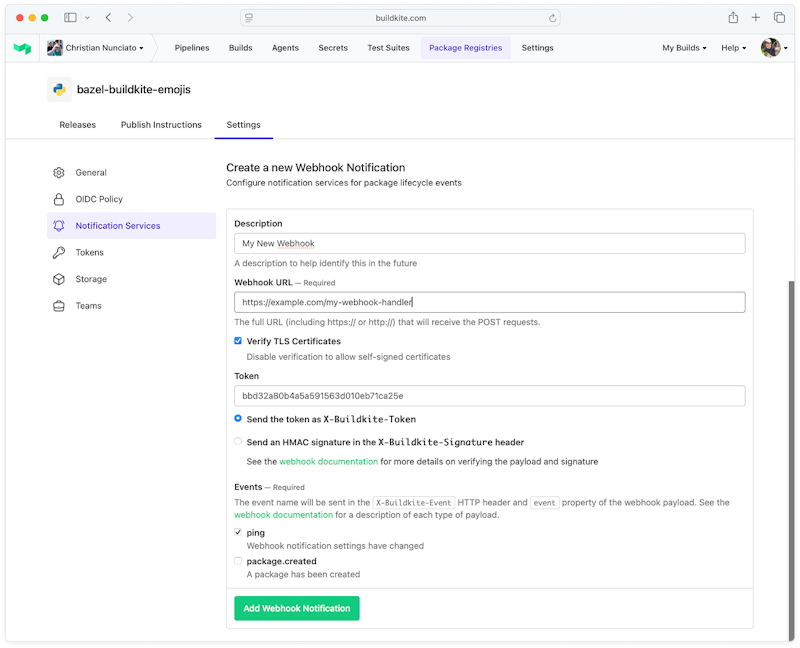 Configuring a new Package Registries webhook notification
Webhooks are available for all supported ecosystems. See the webhooks documentation to learn more.
Wrapping up
That's all for now! We hope these latest updates enhance your experience with Buildkite. 🚀
Have thoughts, questions, or ideas for further improvements? Drop us a line in the forum — and if you haven't already, be sure to bookmark the Changelog (or better yet, subscribe to the RSS feed) to keep up with all our latest features, updates, and announcements.
Until next time! 👋
Written by
 Christian Nunciato