Chrome Update: CSS Width/Height Animations Now Composited When Values Are Static
Chrome 144+ optimizes CSS `width`/`height` animations. If values are constant, they now run on the Compositor, bypassing Main Thread layout, greatly improving performance for web developers.
A significant performance enhancement for web animations has landed in Chrome Canary: CSS width and height animations can now run on the Compositor thread, rather than being forced onto the Main Thread, provided their values remain constant throughout the animation.
Historically, animating CSS width and height has been considered detrimental to performance. This is because such animations typically trigger layout calculations in the rendering pipeline, a costly operation that forces the animation to run on the Main Thread. This principle still holds true; animating width or height generally requires layout. However, a new optimization in Chrome addresses scenarios where layout might be redundant.
Blink, Chrome's rendering engine, performs various checks to determine if an animation can be offloaded to the Compositor. Previously, the mere presence of width or height (among other non-composable properties) in an animation's keyframes would automatically force it onto the Main Thread.
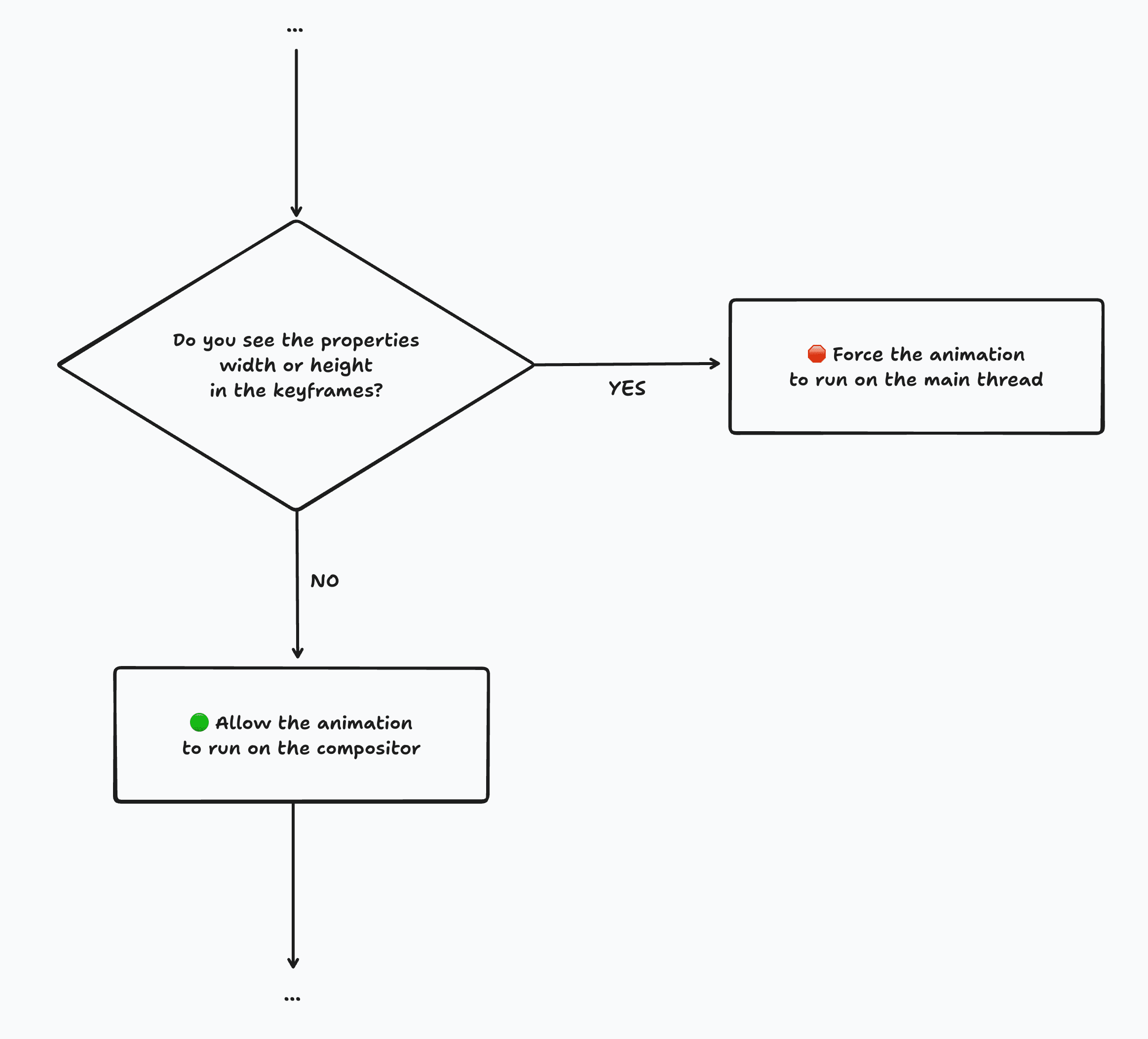 (Simplified) Flowchart illustrating Blink's animation compositing check pre-Chrome 144.0.7512.0, showing how
 width/height would force Main Thread execution.
This previous check was quite blunt. Even if width or height didn't actually change throughout the animation (e.g., height: 100px to height: 100px), the animation would still be forced onto the Main Thread. In such cases, the Layout step would consistently yield the same results, making the calculation a wasted effort.
@keyframes anim {
  from {
    height: 100px;
    opacity: 0;
  }
  to {
    height: 100px;
    opacity: 1;
  }
}
Despite height remaining constant, animations using these keyframes were previously forced to run on the Main Thread (pre-Chrome 144.0.7512.0).
With Chrome 144.0.7512.0 (currently in Canary), this width/height check has been refined. It now verifies whether the width or height values actually change.
💡 The breakthrough: If width/height values do not change across keyframes, there's no need to calculate layout. Consequently, the animation is no longer forced to the Main Thread and can execute efficiently on the Compositor.
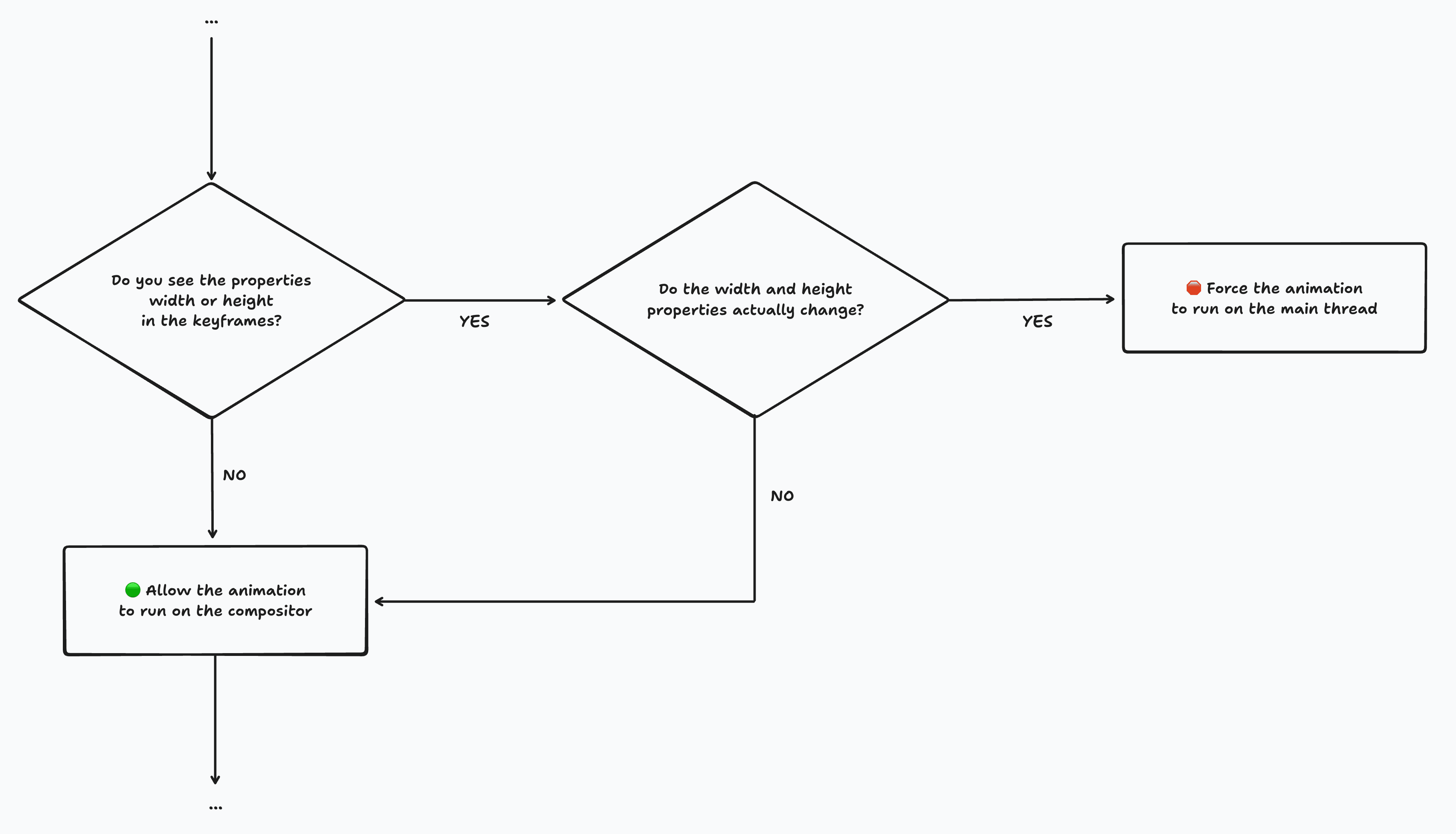 Updated flowchart demonstrating Blink's refined check from Chrome 144.0.7512.0 onwards, allowing composited animations for static
 width/height.
(It's important to note that this is just one of many checks; other factors can still necessitate Main Thread animation.)
Developing this refined check involved addressing various scenarios, including implicit keyframes and keywords like auto. Blink has covered these complexities to ensure robust behavior.
Browser Compatibility Note: This optimization is currently exclusive to Chrome/Chromium. We hope other browsers like Firefox and Safari will adopt similar improvements, as this represents a significant performance win for the web as a whole.
Update (November 20, 2025): Strictness & Fuzzy Matching
Initially, the check was very strict, treating minor floating-point differences (e.g., 97.984px vs. 97.9844px) as distinct values, even if visually indistinguishable. This would still force Main Thread execution. However, a patch enabling "fuzzy matching" has since landed in Chrome Canary 144.0.7536.0. Now, minimal differences like these will correctly allow animations to run on the compositor. 🎉
This enhancement has immediate benefits for many View Transitions animations. The ::view-transition-group(*) pseudo-elements often have width and height defined in their keyframes, but these values frequently do not change during the transition.
Here are screenshots from Chrome DevTools, showcasing a trace of the https://view-transitions.chrome.dev/cards/spa-auto/ demo before and after this update:
 Performance trace in Chrome DevTools (Chrome < 144.0.7512.0). The selected
 ::view-transition-group(*) animation is shown running on the Main Thread.
 Performance trace in Chrome DevTools (Chrome > 144.0.7512.0). The selected
 ::view-transition-group(*) animation is now running on the Compositor (in this specific demo, where width and height are static).
You can easily identify non-composited animations in Chrome DevTools by the red triangle indicator, a feature I contributed!
What About Changing width/height?
For keyframes where width and height do change, Blink doesn't automatically optimize them for composited animation, as several factors need consideration. There's a rough idea to give developers more control over this, as discussed in w3c/csswg-drafts/issues/13064.
In the interim, you can manually optimize such animations by converting width/height changes into scale transformations. This technique has been detailed on this blog previously, particularly in the context of View Transitions, and is even employed by Google Search in production. Many animation frameworks, like Motion, offer clever ways to achieve this, often counteracting distortions in the process.
In summary, CSS width and height animations can now run efficiently on the Compositor in Chrome when their values remain constant throughout the animation, delivering a significant performance boost.
Spread the Word: Feel free to share this update on social media:
Stay Connected: Want to keep up with the latest?
- 🦋 Follow @bram.us on Bluesky
- 🔸 Follow bram.us using RSS You can also find me on 𝕏 Twitter and 🐘 Mastodon, though I post there sporadically.
About the Author:
Bramus! is a frontend web developer from Belgium and a Chrome Developer Relations Engineer at Google. He has been passionate about the web since discovering view-source in 1997.
Unless otherwise noted, the contents of this post are licensed under the Creative Commons Attribution 4.0 License and code samples under the MIT License.