Enhance GitHub Copilot with MS Learn MCP Server for Up-to-Date .NET Development
Discover how the MS Learn Model Context Protocol (MCP) server enhances GitHub Copilot by providing real-time, up-to-date Microsoft documentation and code samples for .NET development. Learn to integrate it with VS, VS Code, CLI, and Coding Agent for improved code suggestions and faster problem-solving.
Have you encountered instances where GitHub Copilot struggled with recent technologies like Aspire 13 or the new Agent Framework, either providing inaccurate information or stating their non-existence? This often occurs because its training data predates these innovations, leaving it unable to offer relevant assistance. In today's rapidly evolving AI landscape, developers require an assistant equipped with the most current information.
This article introduces the MS Learn Model Context Protocol (MCP) server tools. We will explore how the Learn MCP server significantly enhances the developer experience with Copilot, present practical examples, and offer clear integration instructions for Visual Studio, Visual Studio Code, the Copilot Command Line Interface, and the Copilot Coding Agent.
What is the MS Learn MCP Server?
The MS Learn MCP server acts as a managed content provider, seamlessly furnishing Copilot with high-quality, up-to-date, and context-aware Microsoft product documentation, code samples, and learning resources. This ensures Copilot possesses the latest information to deliver optimal results to developers. Whether you're constructing a novel AI agent or refining an existing WinForms application, the Learn MCP server guarantees Copilot has access to the necessary data.
Enhancing the Developer Experience
Integrating the Learn MCP server with Copilot provides .NET developers with a more intelligent and responsive coding environment, offering several key advantages:
- Improved Code Suggestions: Copilot now delivers code suggestions and explanations underpinned by authoritative Microsoft Learn content, significantly reducing the likelihood of outdated or erroneous guidance.
- Context Awareness: The MCP server intelligently retrieves documentation and code samples tailored precisely to your current scenario, whether you're developing with .NET 10, experimenting with Aspire, or crafting C# APIs.
- Faster Problem Solving: Eliminate the need to exit your editor to search for documentation. Receive immediate, in-context answers and code references, thereby accelerating your development workflow.
- Learning While Coding: Gain access to relevant MS Learn modules and tutorials, facilitating real-time skill enhancement directly within your project.
Key Use Cases: MCP Server in Action with Copilot
The Learn MCP server, integrated with Copilot, offers practical benefits across various development scenarios:
-
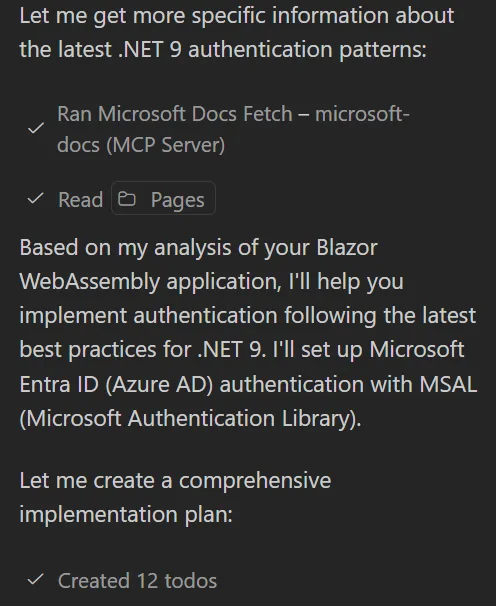
On-Demand API References: When implementing authentication in ASP.NET Core, Copilot, empowered by the Learn MCP server, delivers inline references to the most current Microsoft Identity documentation and code samples pertinent to your framework version.
-
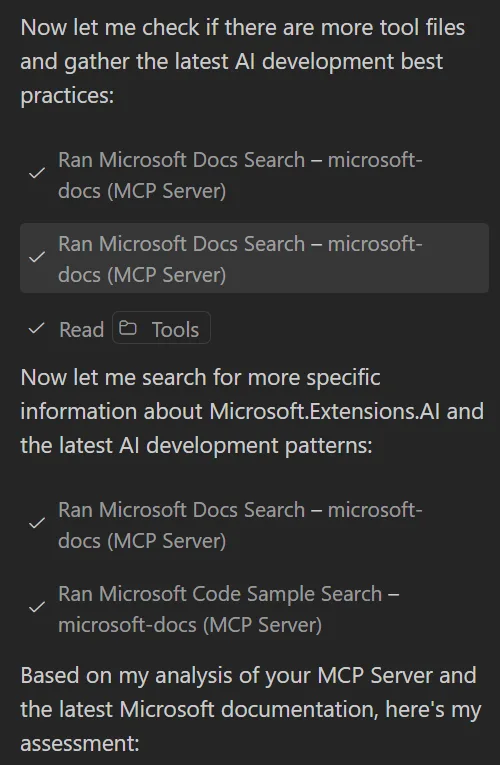
Best Practice Recommendations: As you develop a new MCP Server, Copilot proactively surfaces best practices from Microsoft Learn, ensuring your implementation adheres to contemporary guidelines.
-
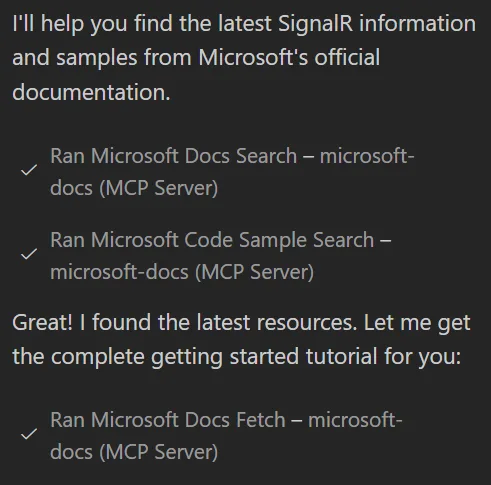
Learning New Frameworks or Libraries: While exploring technologies such as gRPC or SignalR, Copilot can suggest relevant MS Learn modules and code samples, significantly expediting onboarding and knowledge acquisition.
Integration Instructions
Ready to leverage the power of the Learn MCP server with Copilot? Here are step-by-step guides for integrating the MCP server into your preferred development environments:
Visual Studio
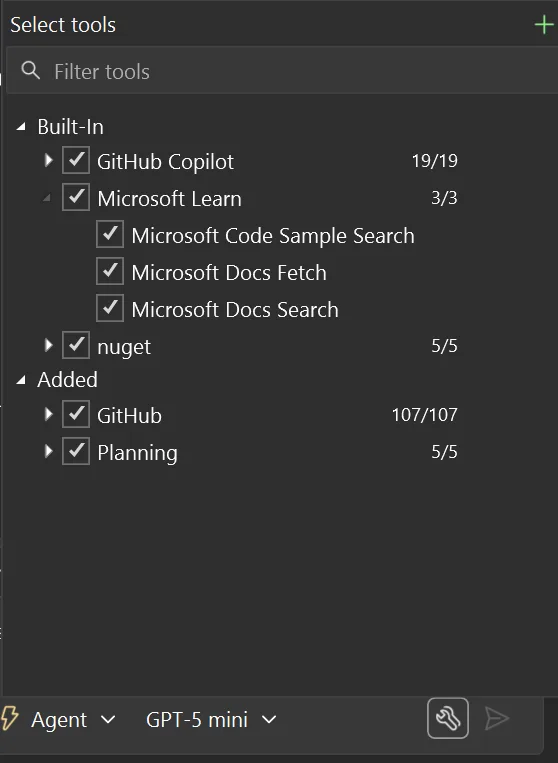
Ensure you are using Visual Studio 2026 or Visual Studio 2022 version 17.14. The MS Learn MCP Server is built-in and ready for use; simply ensure it's enabled when submitting your chat queries.
Visual Studio Code
- Open VS Code and navigate to the Extensions view.
- Verify that the GitHub Copilot Chat extension is installed.
- Go to the "MCP Server-Installed" section and click the search icon.
- Search for "Microsoft Docs" and select "Install."
Copilot CLI
- In the Copilot CLI, type
/mcp add. - Name it "microsoft-docs."
- Select "2" for HTTP.
- Provide the remote URL:
https://learn.microsoft.com/api/mcp. - Press
Ctrl+Sto save the server.
Copilot Coding Agent (CCA)
-
Within your repository, access your settings and navigate to
Copilot > Coding Agent. -
Scroll down to the "Model Context Protocol" section.
-
Add the following JSON configuration to the text box:
{
    "mcpServers": {
        "microsoft-docs": {
            "type": "http",
            "url": "https://learn.microsoft.com/api/mcp",
            "tools": ["*"]
        }
    }
}
Conclusion
Integrating the Microsoft Learn MCP server with Copilot profoundly enhances your development workflow, delivering trusted, up-to-date, and context-aware content precisely when and where it's needed. This augmented experience translates to faster problem-solving, improved code quality, and continuous learning, all without necessitating a departure from your preferred development tools. We encourage you to integrate the Learn MCP server today and discover a more intelligent and interconnected approach to .NET development!