GSoC 2025: Building a Semantic Search Engine for Any Video
Akash Kumar, a GSoC 2025 mentee, developed an innovative semantic video search engine for openSUSE. Learn how multi-modal AI and hybrid embeddings enable natural language search within any video, eliminating tedious manual scrubbing.
Hello, openSUSE community!
My name is Akash Kumar, and I had the privilege of being a Google Summer of Code (GSoC) 2025 mentee with the openSUSE organization. This blog post details the exciting project I developed during this mentorship program, made possible by openSUSE and my dedicated mentors.
This summer, I embarked on a project titled "Create open source sample microservice workload deployments and interfaces." The core goal was to build a functional, open-source workload capable of delivering relevant analytics for a specific use case.
For my project, I decided to tackle a prevalent yet complex challenge: efficiently searching for specific content within a video. This post outlines the outcome of my GSoC endeavor: a complete, end-to-end semantic video search engine.
The Problem: Beyond Keywords
Have you ever struggled to find a particular moment in a lengthy video? You might vividly recall a crucial speech or a beautiful landscape shot but can't pinpoint the exact timestamp. This often leads to endless scrubbing, wasting valuable minutes or even hours.
Traditional video search methods rely solely on titles, descriptions, and manual tags, which are inherently limited. They fail to understand and locate content inside the video itself.
As part of my GSoC deliverable, I aimed to solve this. I envisioned a system that allows users to search through video content using natural language. Imagine being able to ask, "find the scene where they discuss the secret plan in the warehouse," and getting an instant, precise result.
The Big Picture: A Two-Act Play
The entire semantic video search system is architecturally divided into two primary components:
- The Ingestion Pipeline (The Heavy Lifting): An offline process that takes a raw video file, employs a suite of AI models to analyze and comprehend its content, and then stores this understanding in a specialized database.
- The Search Application (The Payoff): A real-time web application, comprising a backend API and a frontend UI, enabling users to perform searches and interact with the results.
Let's explore how this all works, step by step.
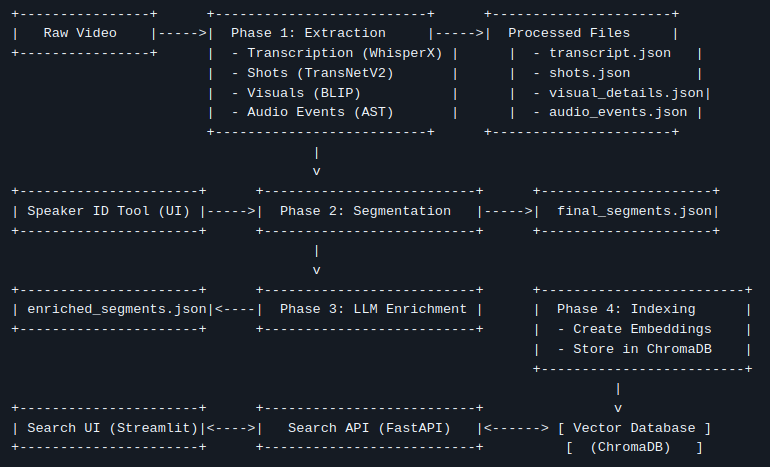
Part 1: The Ingestion Pipeline – Teaching the Machine to Watch TV
This is where the transformative process begins. We take a single .mp4 file and deconstruct it into a rich, multi-modal dataset.
Step 1: Deconstructing the Video (Extraction)
First, the video is broken down into its fundamental elements: shots, sounds, and spoken words. I utilized a series of specialized AI models for this:
- Shot Detection (TransNetV2): The video is scanned to identify every camera cut, creating a structural "skeleton" of the video.
- Transcription & Diarization (WhisperX): The audio is extracted, and WhisperX transcribes all spoken dialogue into text. Crucially, it also performs diarization, identifying who spoke and when, assigning generic labels like
SPEAKER_00andSPEAKER_01. - Visual Captioning (BLIP): For each identified shot, a keyframe is extracted, and the BLIP model generates a concise, one-sentence description of what it sees (e.g., "a man in a suit is standing in front of a car").
- Action & Audio Recognition (VideoMAE, AST): Going deeper, video clips are analyzed to detect actions ("talking," "running"), and the audio is processed to identify non-speech events ("music," "applause," "engine sounds").
At the culmination of this step, we have a substantial amount of raw, timestamped data.
Step 1.5: The Human in the Loop (Speaker ID)
While AI can differentiate between speakers, it doesn't know their names. This is where human intelligence proves invaluable. The pipeline automatically pauses and launches a simple web tool. Within this tool, I can review all dialogue attributed to SPEAKER_00, play audio clips to hear their voice, and then map them to their actual name, such as "John Wick." This straightforward, one-time manual step dramatically enhances the utility of the final data.
Step 2: Finding the Narrative (Intelligent Segmentation)
Searching through hundreds of tiny, 2-second shots offers a poor user experience. The solution lies in grouping related shots into coherent scenes or segments. For instance, a single conversation might span 20 individual shots but represents one unified event.
To address this, I developed a "Boundary Scoring" algorithm. This algorithm iterates through every shot, calculating a "change score" relative to the next one. This score is based on a weighted combination of factors:
- Has the topic of conversation changed significantly? (semantic text similarity)
- Have the visuals undergone substantial alteration?
- Did the person speaking change?
- Did the background sounds or actions change?
If the cumulative change score is high, a "hard boundary" is declared, initiating a new segment. This transforms a fragmented list of shots into a clean, meaningful sequence of scenes.
Step 3: Adding a Layer of Genius (LLM Enrichment)
With our coherent segments now defined, we introduce a Large Language Model (LLM), such as Google's Gemini, to act as an expert video analyst. For each segment, we feed the LLM all the contextual information gathered—the transcript, identified speakers, visual descriptions, and detected actions—and prompt it to generate:
- A short, descriptive Title.
- A concise 2-3 sentence Summary.
- A list of 5-7 relevant Keywords.
This process adds a layer of human-like understanding, further enriching the data and making it even more searchable.
Step 4: Preparing for Search (Indexing)
The final step in the ingestion pipeline is to prepare this enriched data for lightning-fast search. We employ a vector database (ChromaDB). The core principle involves converting text and visual data into numerical representations known as embeddings.
A key innovation here is our hybrid embedding strategy. For each segment, two distinct embeddings are created:
- Text Embedding: Based on the segment's transcript and summary, representing what was said.
- Visual Embedding: Based on the visual captions and detected actions, representing what was shown.
These sophisticated embeddings are then stored in ChromaDB. At this point, the video is fully processed and ready to be searched.
Part 2: The Search Application – Reaping the Rewards
This is where all the extensive offline processing culminates. The search application is composed of a backend "brain" and a frontend "face."
The Brains: The FastAPI Backend
The backend API serves as the powerful engine of our search system. Upon receiving a user query, it executes a precise, high-speed process:
- Vectorize Query: The user's natural language query is converted into the same type of numerical vector using the identical embedding model from the indexing step.
- Hybrid Search: It simultaneously queries ChromaDB twice—once against the text embeddings and once against the visual embeddings.
- Re-Rank & Fuse: Both sets of results are then merged and re-ranked using an algorithm called Reciprocal Rank Fusion (RRF). This is immensely powerful: a segment that ranks highly in both the text and visual searches (e.g., a character says "Look at the helicopter" while a helicopter is visibly on screen) receives a substantial score boost, propelling it to the top of the results list.
- Respond: The backend retrieves the full metadata for the top-ranked results and transmits it back to the frontend as a clean JSON response.
The Face: The Streamlit UI
The frontend is a straightforward, clean web interface built with Streamlit. It features an intuitive search bar, an integrated video player, and a dedicated results area. When a user clicks "Play" on a search result, the video player instantly jumps to the precise start time of that segment. The experience is fast, intuitive, and remarkably satisfying.
The Final Result & GSoC Experience
Imagine searching for "a tense negotiation in a warehouse." The system locates the relevant segment in mere seconds because:
- The Text Search matches dialogue pertaining to "the deal," "the money," and "the terms."
- The Visual Search matches AI-generated captions like "two men sitting at a table" and "a dimly lit, large room."
- The RRF algorithm recognizes that both signals strongly point to the same segment, ranking it as the #1 result.
This project was a truly fascinating journey into the capabilities of multi-modal AI. It powerfully demonstrates that by synergistically combining the strengths of various AI models, we can deconstruct unstructured data like video and reassemble it into a smart, searchable, and genuinely useful asset.
I want to extend my deepest gratitude to my mentor, @bwgartner, and the entire openSUSE community for their unwavering support and guidance throughout the summer. Participating in GSoC with openSUSE has been an invaluable and enriching learning experience.
The days of aimless video scrubbing may soon be a thing of the past. If you're interested in exploring the project further or contributing, you can find the entire codebase on GitHub: https://github.com/AkashKumar7902/video-seach-engine.