Implementing the Strategy Pattern with Dependency Injection in ASP.NET Core
Explore the Strategy design pattern and its implementation with Dependency Injection in ASP.NET Core. Learn how to manage complex conditional logic, improve maintainability, and adhere to the Open/Closed Principle for flexible algorithm selection.
Managing selection logic is a common challenge in many applications. While simple if-else or switch statements can suffice for basic scenarios, increasing conditions or complex algorithm selection can quickly lead to exhaustive and difficult-to-maintain code. The Strategy pattern offers a robust solution, upholding the Open/Closed Principle and ensuring logical modularity. This article will walk you through a practical example of the Strategy pattern: dynamically choosing between Regular, VIP, and Student discount strategies at runtime.
What is the Strategy Pattern?
The Strategy design pattern is a behavioral pattern used when an application needs to switch between different algorithms at runtime. It encapsulates various algorithms into separate, interchangeable classes and allows the client to select the appropriate one based on input. This pattern provides a flexible, maintainable solution to algorithm-selection problems, resulting in cleaner and more extensible code. To add a new algorithm, you simply introduce a new class, avoiding modifications to existing logic and thereby adhering to the Open/Closed Principle.
The Problem Without the Strategy Pattern
To understand the utility of the Strategy pattern, we first need to identify the challenges posed by its absence. Consider a scenario where different discounts are offered to users based on their membership type. A naive solution would involve using if-else statements or a switch case. Let's implement this approach and evaluate its drawbacks.
Step 1: Create a Console Application
dotnet new console -n StrategyPatternDemo
cd StrategyPatternDemo
Step 2: Create DiscountService Class
In this service, discount calculation is defined with conditional statements.
public class DiscountService
{
    public decimal GetDiscount(string customerType, decimal amount)
    {
        if (customerType.ToLower() == "regular")
        {
            return amount * 0.05m;
        }
        else if (customerType.ToLower() == "vip")
        {
            return amount * 0.20m;
        }
        else
        {
            return 0;
        }
    }
}
Step 3: Use the Service in Program.cs
using StrategyPatternDemo;

Console.Write("Enter customer type (regular/vip): ");
var type = Console.ReadLine();

Console.Write("Enter amount: ");
var amount = decimal.Parse(Console.ReadLine());

var service = new DiscountService();
var discount = service.GetDiscount(type, amount);
var final = amount - discount;

Console.WriteLine($"Discount: {discount}");
Console.WriteLine($"Final Price: {final}");
Step 4: Run and Test
Execute the application:
dotnet run
Output:
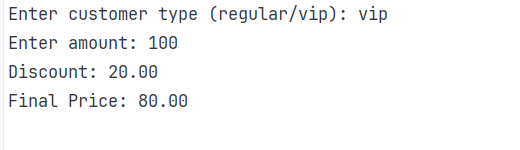
While functional, this code exhibits significant design and maintainability flaws:
- Violation of the Open/Closed Principle: Adding a new membership type requires modifying the core
GetDiscountmethod (e.g., adding anelse-ifblock). - Tight Coupling and Lack of Separation of Concerns: All discount logic is tightly coupled within a single class, violating the Single Responsibility Principle.
- Challenging Testing: The conjoined code makes isolated unit testing difficult, often necessitating comprehensive testing for minor changes.
- Conditional Sprawl: As conditions grow (e.g., 20 membership types), the codebase quickly becomes a maintenance nightmare.
Implementing the Strategy Pattern in a Console Application
Let's address the aforementioned issues by implementing the Strategy Pattern.
Step 1: Define Strategy Interface
First, define an interface for discount strategies.
public interface IDiscountStrategy
{
    decimal ApplyDiscount(decimal amount);
}
Step 2: Add Concrete Strategies
Next, implement separate classes for each specific discount algorithm.
Regular Discount:
public class RegularDiscount : IDiscountStrategy
{
    public decimal ApplyDiscount(decimal amount) => amount * 0.05m;
}
VIP Discount:
public class VipDiscount : IDiscountStrategy
{
    public decimal ApplyDiscount(decimal amount) => amount * 0.20m;
}
Note: These strategy implementations intentionally omit validation or error handling to keep the focus on the separation of business logic. In real-world applications, such considerations would be crucial.
Step 3: Define Context Class
The DiscountService now acts as the context, holding a reference to an IDiscountStrategy.
public class DiscountService
{
    private readonly IDiscountStrategy _strategy;

    public DiscountService(IDiscountStrategy strategy)
    {
        _strategy = strategy;
    }

    public decimal GetDiscount(decimal amount) => _strategy.ApplyDiscount(amount);
}
In the Strategy pattern, the Context class (DiscountService in this case) holds a reference to a strategy interface (IDiscountStrategy). It receives a strategy from an external source and delegates the actual work to it, rather than implementing the logic itself.
Step 4: Use the Strategy in Program.cs
The Program.cs file will now dynamically select and inject the appropriate strategy.
Console.WriteLine("Enter customer type (regular/vip): ");
string type = Console.ReadLine()?.ToLower();

IDiscountStrategy strategy;

// Manually picking strategy — no switch needed, but you *can* if you want.
if (type == "vip")
    strategy = new VipDiscount();
else
    strategy = new RegularDiscount();

var service = new DiscountService(strategy);

Console.Write("Enter amount: ");
decimal amount = decimal.Parse(Console.ReadLine());

var discount = service.GetDiscount(amount);
var finalPrice = amount - discount;

Console.WriteLine($"Discount applied: {discount}");
Console.WriteLine($"Final price: {finalPrice}");
Output:
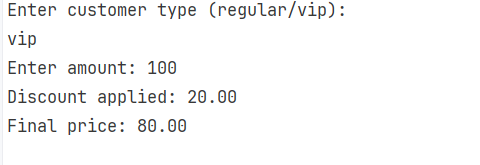
Having understood the basic principles of the Strategy pattern, we can now proceed to implement it within an ASP.NET Core API, integrating with its Dependency Injection capabilities.
Implementing the Strategy Pattern in an ASP.NET Core API
This section details how to implement the Strategy pattern within an ASP.NET Core API, leveraging its built-in Dependency Injection (DI) container.
Step 1: Create a .NET Core API Project
Run the following command in your terminal:
dotnet new webapi -n StrategyPatternApi
cd StrategyPatternApi
Step 2: Add Concrete Strategies
Implement the discount algorithms as separate classes, similar to the console application.
Regular Discount:
public class RegularDiscount : IDiscountStrategy
{
    public decimal ApplyDiscount(decimal amount) => amount * 0.05m;
}
VIP Discount:
public class VipDiscount : IDiscountStrategy
{
    public decimal ApplyDiscount(decimal amount) => amount * 0.20m;
}
Step 3: Define the Context Class
The DiscountService now takes a factory delegate to resolve strategies, integrating seamlessly with Dependency Injection.
public class DiscountService
{
    private readonly Func<string, IDiscountStrategy> _strategyFactory;

    public DiscountService(Func<string, IDiscountStrategy> strategyFactory)
    {
        _strategyFactory = strategyFactory;
    }

    // Public API: Request a discount by customer type
    public decimal GetDiscount(string customerType, decimal amount)
    {
        var strategy = _strategyFactory(customerType);
        return strategy.ApplyDiscount(amount);
    }
}
Here, DiscountService plays the context role. It holds a Func<string, IDiscountStrategy> delegate, _strategyFactory, which acts as a factory, returning the appropriate IDiscountStrategy implementation based on the given customer type. This Func delegate allows the service to request a strategy at runtime by a key/name without needing to know the internals of the DI container or concrete types.
Step 4: Add a Controller with the Endpoint
Create an API controller to expose the discount functionality.
[ApiController]
[Route("api/[controller]")]
public class PricingController : ControllerBase
{
    private readonly DiscountService _pricingService;

    public PricingController(DiscountService pricingService)
    {
        _pricingService = pricingService;
    }

    [HttpGet]
    public IActionResult Get([FromQuery] string type, [FromQuery] decimal amount)
    {
        var discount = _pricingService.GetDiscount(type, amount);
        var final = amount - discount;
        return Ok(new { type = type ?? "regular", amount, discount, final });
    }
}
Step 5: Configure Program.cs
Configure Dependency Injection in the Program.cs file to register the concrete strategy services and the factory responsible for resolving them.
using StrategyPatternApi;

var builder = WebApplication.CreateBuilder(args);
var services = builder.Services;

builder.Services.AddEndpointsApiExplorer();
builder.Services.AddSwaggerGen();

// Register concrete strategy types so they can be resolved by the factory
services.AddTransient<RegularDiscount>();
services.AddTransient<VipDiscount>();

services.AddSingleton<Func<string, IDiscountStrategy>>(sp => key =>
{
    var k = (key ?? "").Trim().ToLowerInvariant();
    return k switch
    {
        "vip" => sp.GetRequiredService<VipDiscount>(),
        // add more cases if you add more strategies
        _ => sp.GetRequiredService<RegularDiscount>()
    };
});

// Register the service that uses the factory
services.AddScoped<DiscountService>();

// Add controllers (or leave for minimal endpoints)
services.AddControllers();

var app = builder.Build();

if (app.Environment.IsDevelopment())
{
    app.UseSwagger();
    app.UseSwaggerUI();
}
app.MapControllers();
app.Run();
The decisive part in the DI configuration is:
services.AddSingleton<Func<string, IDiscountStrategy>>(sp => key =>
{
    var k = (key ?? "").Trim().ToLowerInvariant();
    return k switch
    {
        "vip" => sp.GetRequiredService<VipDiscount>(),
        // add more cases if you add more strategies
        _ => sp.GetRequiredService<RegularDiscount>()
    };
});
As explicitly stated, the switch condition resolves the appropriate concrete strategy via DI based on the provided key (customer type). If no condition matches, RegularDiscount is set as the default choice. The concrete strategies are registered as Transient because they are stateless, making it appropriate to create a new instance each time.
Step 6: Run and Test
To run the project:
dotnet run
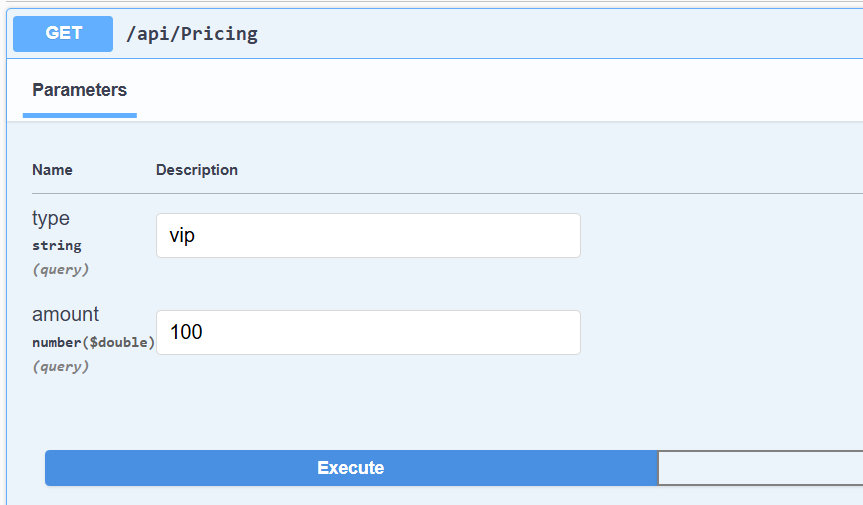
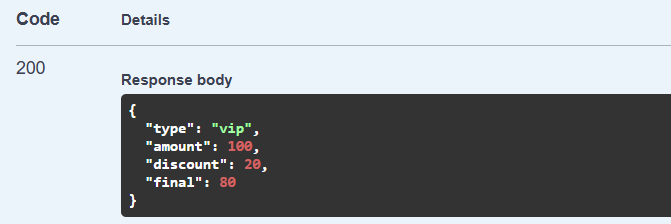
Outputs from API testing (e.g., via Swagger UI):
Extending Algorithms in the ASP.NET Core Strategy Pattern
The Open/Closed Principle is one of the core benefits of the Strategy Pattern. This section demonstrates how effortlessly a new discount strategy can be added while adhering to this principle.
Step 1: Add the Student Discount's Concrete Strategy
Create a new class for the student discount.
public class StudentDiscount : IDiscountStrategy
{
    public decimal ApplyDiscount(decimal amount) => amount * 0.10m;
}
Step 2: Register a New Service
Add the StudentDiscount to the Dependency Injection container in Program.cs.
services.AddTransient<StudentDiscount>();
Step 3: Update Factory Switch
Modify the factory delegate in Program.cs to include the new StudentDiscount case.
services.AddSingleton<Func<string, IDiscountStrategy>>(sp => key =>
{
    var k = (key ?? "").Trim().ToLowerInvariant();
    return k switch
    {
        "vip" => sp.GetRequiredService<VipDiscount>(),
        "student" => sp.GetRequiredService<StudentDiscount>(),
        _ => sp.GetRequiredService<RegularDiscount>()
    };
});
To add a new strategy implementation, you simply need to create the strategy code and register it dynamically via DI, without altering existing strategy classes or the core DiscountService logic.
Step 4: Run and Test
Run the application to test the new strategy:
dotnet run
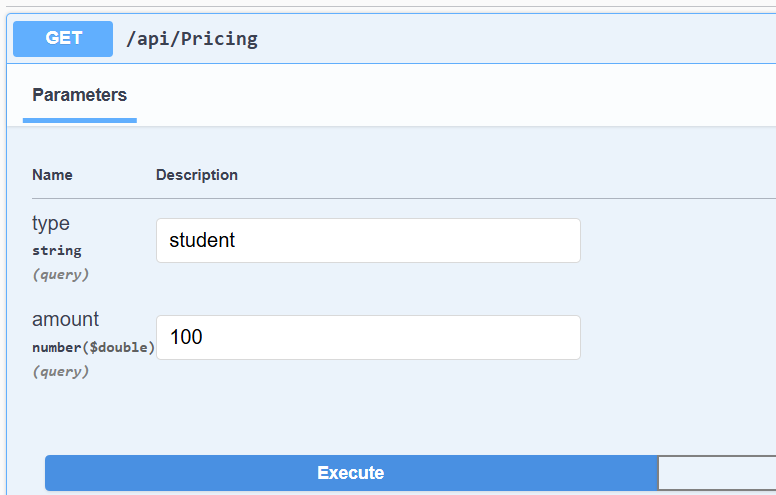
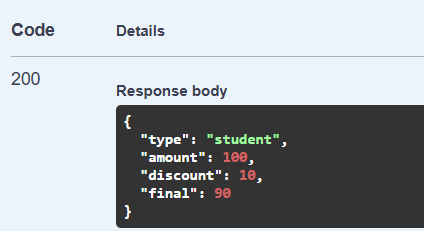
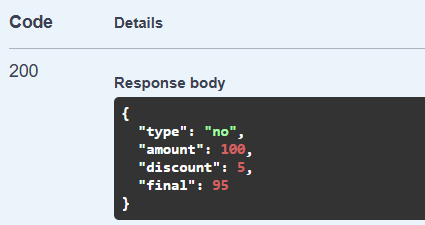
Test with "student" type:
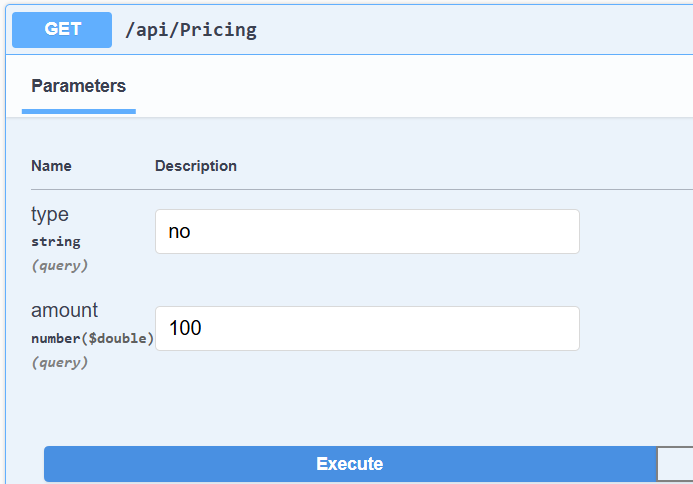
Test with a default value (e.g., an unrecognized type):
Conclusion
Managing complex conditional logic through extensive if-else or switch statements often leads to inflexible, difficult-to-maintain code. The Strategy pattern provides a modular and extensible solution, enabling dynamic selection and effortless extension of algorithms without altering existing components. This post highlighted the necessity and demonstrated the implementation of the Strategy pattern, both in a basic console application and integrated with Dependency Injection in an ASP.NET Core API.
Example Code
- Console Application Demo: https://github.com/elmahio-blog/StrategyPatternDemo
- ASP.NET Core API Demo: https://github.com/elmahio-blog/StrategyPatternApi