Masonry: Things You Won’t Need A Library For Anymore
Discover how CSS Masonry and other evolving native web platform features are empowering developers to replace JavaScript libraries for common UI patterns. Learn about the performance, responsiveness, and code simplicity benefits of leveraging built-in browser capabilities.
CSS Masonry is on the horizon, promising a significant evolution for web developers. This article explores what this long-awaited feature means for web development and how it can be leveraged in projects.
Approximately 15 years ago, the landscape of web development saw a surge in single-page applications and custom UI frameworks. Developers often created extensive component libraries, including solutions for features as basic as rounded corners, which were challenging to implement consistently across browsers at the time.

This era was marked by the revolution of JavaScript, AJAX, and dynamic HTML, enabling interactive experiences without full page reloads. Jeff Atwood's popular quote, “Any application that can be written in JavaScript will eventually be written in JavaScript,” resonated deeply, encouraging extensive reliance on JavaScript for virtually all functionalities. Consequently, many developers, myself included, focused on JS solutions, often overlooking the evolving capabilities of HTML and CSS. This approach was influenced by significant browser inconsistencies, with Internet Explorer dominating and requiring extensive workarounds, and the limited native features available on the web platform at the time. While a deeper understanding of the platform might have reduced some code, its impact would have been marginal given the prevalent browser fragmentation and lack of built-in features.

Today, the web development landscape has transformed dramatically. The platform now offers an unprecedented array of capabilities, which are being standardized and implemented at an accelerating pace. A thorough understanding of current web platform features is crucial, offering a significant advantage to developers. For engineers focused on performance, accessibility, responsiveness, or UI development, leveraging available native tools facilitates faster and more effective goal achievement.
Some Things You Might Not Need A Library For Anymore
With modern browser support, many once-complex UI challenges no longer require custom libraries. For instance, basic features like rounded corners, which once necessitated creative workarounds, are now universally supported by the border-radius CSS property, with advanced options like corner-shape on the horizon. This section highlights recently standardized features available across major browser engines (Chromium, WebKit, and Gecko) that can reduce reliance on third-party dependencies. While a complete overhaul of existing codebases might not be immediately feasible, understanding these native capabilities allows for strategic adoption based on project-specific browser support requirements.
Popovers And Dialogs
The native Popover API, the <dialog> HTML element, and the ::backdrop pseudo-element provide robust solutions for popups, tooltips, and dialogs. These built-in features offer accessibility and focus management out-of-the-box, are highly customizable with CSS, and are easily animatable, eliminating the need for libraries like Floating UI, Tippy.js, Tether, or React Tooltip.
Accordions
The <details> element, its name attribute for mutually exclusive elements, and the ::details-content pseudo-element offer a native alternative for accordions. Leveraging these platform features simplifies code, enhances understandability for developers familiar with HTML/CSS, and provides immunity from library breaking changes or discontinuation. Furthermore, it reduces code download and execution, with mutually exclusive details elements handling opening, closing, and animation without JavaScript.
CSS Syntax
Modern CSS features such as Cascade layers for organized codebases, CSS nesting for compactness, new color functions (relative colors, color-mix()), and new math functions (abs(), sign(), pow()) significantly reduce the need for CSS pre-processors, utility libraries like Bootstrap and Tailwind, and even runtime CSS-in-JS solutions. A notable game-changer is the :has() pseudo-class, a long-requested feature that minimizes the need for complex JavaScript-based alternatives.
JS Utilities
Modern JavaScript additions like Array.prototype.findLast() and Array.prototype.at(), alongside new Set methods such as Set.prototype.difference(), Set.prototype.intersection(), and Set.prototype.union(), can reduce dependencies on utility libraries like Lodash.
Container Queries
Container queries enable UI components to adapt based on their container's size rather than the viewport, greatly improving reusability across diverse contexts. This eliminates the need for JavaScript-heavy UI libraries or polyfills for responsive component design.
Layout
While Grid, subgrid, Flexbox, and multi-column layouts have been available for some time, adoption has often been cautious among developers, as indicated by the State of CSS surveys. These features, now considered Baseline for a significant period, can replace dependencies on framework-specific grid systems like Bootstrap’s, Foundation Framework’s flexbox utilities, Bulma's fixed grid, Materialize grid, or Tailwind columns. It's important to note that abandoning an adopted framework entirely might be a substantial undertaking. However, exploring the capabilities of the web platform without third-party wrappers offers considerable advantages.
Things You Might Not Need Anymore In The Near Future
Beyond currently stable features, several upcoming web platform additions promise to further reduce reliance on external libraries.
Anchor Positioning
CSS anchor positioning will streamline the placement of popovers and tooltips relative to other elements, ensuring they remain in view even during scrolling, resizing, or element movement. This feature complements the Popover API, simplifying migration away from performance-intensive JavaScript solutions.
Navigation API
The Navigation API offers a native approach to managing client-side navigation in single-page applications, potentially serving as a powerful alternative or complement to routing solutions like React Router, Next.js routing, or Angular routing tasks.
View Transitions API
The View Transitions API enables seamless animations between different page states. For single-page applications, this provides smooth transitions with ease, potentially replacing animation libraries such as Anime.js, GSAP, or Motion.dev. Crucially, this API also supports multi-page applications, offering a solution to the 'white flash' of page reloads that historically drove the adoption of SPAs for better user experience.
Scroll-driven Animations
Scroll-driven animations allow animations to progress based on the user's scroll position rather than time, making them ideal for storytelling and product tours. While excessive use can be distracting, when implemented thoughtfully, this feature is a highly effective design tool that can replace libraries like ScrollReveal, GSAP ScrollTrigger, or WOW.js.
Customizable Selects
The long-awaited arrival of customizable <select> elements promises full control over appearance and content while maintaining accessibility and performance. This built-in solution will eliminate the need for complex and often hard-to-maintain JavaScript code used for custom select components.
CSS Masonry
Finally, CSS Masonry, another eagerly anticipated web platform feature, is set to revolutionize layout design. It enables complex, often challenging-to-achieve layouts with existing CSS primitives like Flexbox or Grid, often requiring third-party JavaScript libraries such as the Masonry JS library. More details on Masonry will be explored further in this article.
Why You Should Care
The prevalence of JavaScript frameworks in the industry often leads to questions about the necessity of learning native web platform primitives. Why invest in platform features when libraries already provide solutions? Browser vendors actively collaborate with library authors to improve underlying platform capabilities, but directly leveraging the platform offers significant benefits.
Sending Less Code To Devices
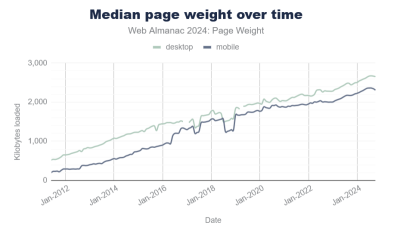
A primary advantage of using native features is significantly reducing the amount of code shipped to client devices. According to the 2024 Web Almanac, JavaScript now accounts for the majority of HTTP requests (median 23 per site) and contributes to the growing median page weight (around 2MB, up 1.8MB in a decade). While internet speeds have increased, device capabilities and network conditions vary globally. Relying on third-party code for functionalities achievable natively often means shipping more code, potentially leading to higher abandonment rates and negative brand perception due to poor loading performance.
Running Less Code On Devices
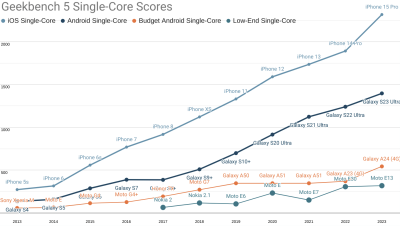
Furthermore, code leveraging fewer JavaScript abstractions atop the platform tends to run faster, resulting in more responsive and accessible experiences by default. This directly contributes to higher user satisfaction. Alex Russell's yearly performance inequality gap blog consistently highlights how wealth inequality creates a growing disparity in device performance, impacting billions of users who lack premium devices. Optimizing for the web platform helps bridge this gap.
Built-in Masonry Layout
One highly anticipated web platform feature is CSS Masonry, poised to become a game-changer for layout design.
What Is Masonry
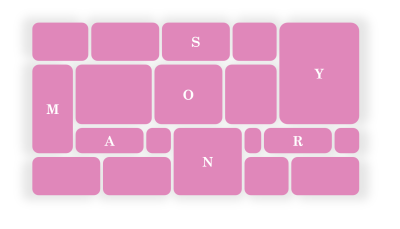
Masonry is a dynamic layout popularized by platforms like Pinterest. It arranges content items into independent tracks (columns or rows), packing them closely to minimize vertical or horizontal gaps. While often associated with photo galleries, Masonry is highly flexible and extends beyond simple waterfall-like layouts.

In a Masonry layout:
- Tracks can be columns or rows:

- Tracks of content don’t all have to be the same size:
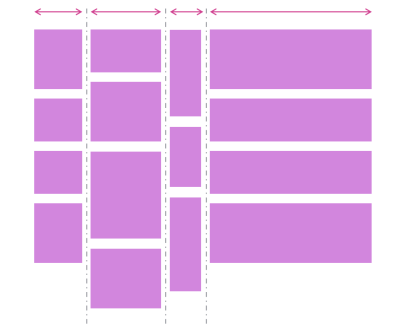
- Items can span multiple tracks:

- Items can be placed on specific tracks; they don’t have to always follow the automatic placement algorithm:

Demos
Here are several simple demonstrations showcasing the capabilities of the upcoming CSS Masonry implementation in Chromium.
- A photo gallery demo, showing how items (the title in this case) can span multiple tracks:
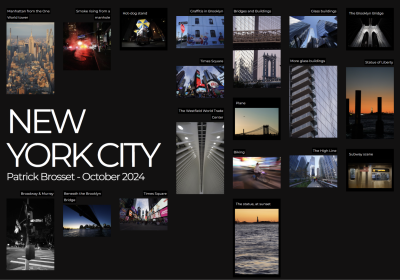
- Another photo gallery showing tracks of different sizes:

- A news site layout with some tracks wider than others, and some items spanning the entire width of the layout:

- A kanban board showing that items can be placed onto specific tracks:
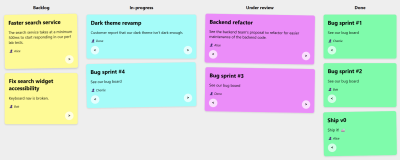
Note: The previous demos were made with a version of Chromium that’s not yet available to most web users, because CSS Masonry is only just starting to be implemented in browsers. However, web developers have been happily using libraries to create Masonry layouts for years already.
Sites Using Masonry Today
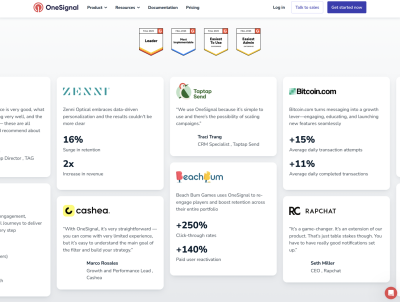
Masonry layouts are already prevalent across the web. Beyond Pinterest, here are several examples:


And a few more, less obvious, examples:
A row-direction Masonry layout.

Different size tracks.

Workarounds
Before native Masonry, developers often resorted to workarounds. One common technique involved using a Flexbox layout with flex-direction: column and flex-wrap: wrap. This simulates a Masonry-like appearance by placing items of varying heights into multiple, independent columns.
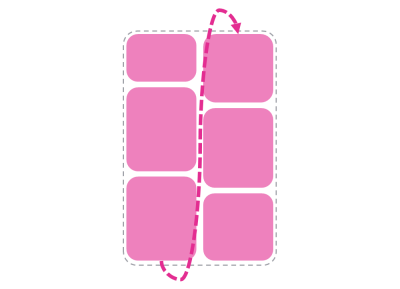
However, this workaround has two key limitations: First, the item order differs from true Masonry, as Flexbox fills columns sequentially, whereas Masonry prioritizes tracks with available space. Second, it requires a fixed height for the Flexbox container to enable wrapping, which restricts layout flexibility.
Third-party Masonry Libraries
For more advanced Masonry implementations, developers commonly used JavaScript libraries. The most well-known is the Masonry JS library, which sees over 200,000 weekly downloads on NPM. Platforms like Squarespace also offer no-code Masonry layout components. Both approaches rely on JavaScript to dynamically position layout items.
Built-in Masonry
The emergence of built-in CSS Masonry as a native browser feature is a significant development. Eventually, Masonry will be usable directly via CSS, similar to Grid or Flexbox, eliminating the need for workarounds or third-party code. Browser vendors, including Microsoft (contributing to Chromium), Mozilla (pioneering experimental implementation in 2020), and Apple, are actively involved in its standardization. The CSS working group has reached agreement on its direction, including a new display: grid-lanes type. Developers can track its progress and learn more through dedicated CSS Masonry resources. Once Masonry becomes a Baseline feature, it will offer superior performance, enhanced responsiveness, and simplified code.
Better Performance
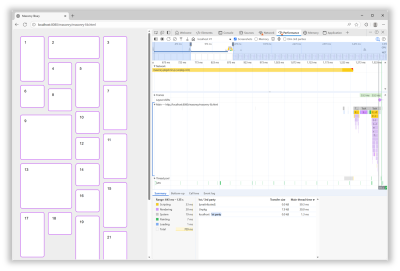
Custom or third-party JavaScript-based Masonry solutions typically involve render-blocking JavaScript to position items. This delays the rendering of main content, negatively impacting metrics like Largest Contentful Paint (LCP) and perceived performance. For example, testing the Masonry JS library on a slow 4G connection showed a 600ms load time with no other rendering activity during that period, followed by script parsing, compilation, and execution, all blocking page rendering. A built-in browser implementation of Masonry will eliminate this overhead, handling layout calculations natively during initial page rendering without JavaScript dependencies.
Better Responsiveness
Browser window resizing also triggers layout re-rendering. While a loaded Masonry JS library doesn't need to reload, it still executes JavaScript to reposition elements. Although often fast, the library's animation of items during resize can be jarring and contribute to a perception of slower responsiveness. Native Masonry avoids this JavaScript execution entirely, providing smoother, faster adaptations to size changes.
Ease Of Use And Simpler Code
Developer experience is critical for maintainability. Native web features offer significant advantages in this regard: they integrate seamlessly with existing HTML, CSS, and JS knowledge, are designed for consistency with the web platform, and carry virtually no risk of breaking changes, deprecation, or lack of maintenance. Built-in CSS Masonry, as a layout primitive, will be used directly from CSS, just like Grid or Flexbox, requiring no JavaScript. Standard CSS properties like gap will function as expected, simplifying complex layouts. In contrast, the Masonry JS library requires a <script> tag, intricate CSS to define track-sizer and gutter-sizer, and a data-masonry attribute with a JSON configuration. Spanning columns requires manual width calculations, including gutter sizes: width: calc(40% + 1rem). In contrast, the upcoming CSS Masonry API offers a far simpler approach. A container with display: grid-lanes and grid-lanes: repeat(4, 20%) defines the layout, with gap: 1rem for spacing. Spanning columns is as straightforward as grid-column: span 2, mirroring CSS Grid functionality without complex calculations.
<script src="https://unpkg.com/masonry-layout@4.2.2/dist/masonry.pkgd.min.js"></script>
<style>
  .track-sizer,
  .item {
    width: 20%;
  }
  .gutter-sizer {
    width: 1rem;
  }
  .item {
    height: 100px;
    margin-block-end: 1rem;
  }
  .item:nth-child(odd) {
    height: 200px;
  }
  .item--width2 {
    width: calc(40% + 1rem);
  }
</style>

<div class="container"
  data-masonry='{ "itemSelector": ".item", "columnWidth": ".track-sizer", "percentPosition": true, "gutter": ".gutter-sizer" }'>
  <div class="track-sizer"></div>
  <div class="gutter-sizer"></div>
  <div class="item"></div>
  <div class="item item--width2"></div>
  <div class="item"></div>
  ...
</div>
<style>
  .container {
    display: grid-lanes;
    grid-lanes: repeat(4, 20%);
    gap: 1rem;
  }
  .item {
    height: 100px;
  }
  .item:nth-child(odd) {
    height: 200px;
  }
  .item--width2 {
    grid-column: span 2;
  }
</style>

<div class="container">
  <div class="item"></div>
  <div class="item item--width2"></div>
  <div class="item"></div>
  ...
</div>
How To Know What’s Available And When It’s Available?
The question isn't whether to use built-in Masonry over a JS library, but rather when. The Masonry JS library has successfully filled a platform gap for years, providing valuable solutions. However, developers often struggle to keep track of new web platform features. Staying informed about the rapid evolution of browser capabilities can be challenging, and learning prioritization varies among companies. Several resources exist to help developers stay updated:
- The Web platform features explorer site (particularly its release notes page): For RSS users, consider the release notes feed, and the Baseline Newly Available and Widely Available feeds.
- The Web Platform Status dashboard: Explore its various Baseline year pages.
- Chrome Platform Status’ roadmap page.
- For more detailed information, consult browser vendors’ release notes: Chrome, Edge, Firefox, Safari.
- Additional resources can be found in the Navigating the Web Platform Cheatsheet.
My Thing Is Still Not Implemented
Another challenge developers face is ensuring their specific needs and desired features are heard and implemented by browser vendors. This can be frustrating when waiting for bug fixes or missing features. However, browser vendors do listen. They actively participate in cross-organizational teams that discuss developer signals and feedback from diverse sources, including public forums, open-source projects, blogs, and surveys. To influence browser development, consider the following:
- Participate in annual surveys like State of JS, State of CSS, and State of HTML, as their results significantly impact browser vendors' prioritization.
- For specific standard-based APIs needing consistent implementation across browsers, consider submitting a proposal to the Interop project iteration. Detailed wish lists, such as those shared by Shopify and RUMvision, are highly valuable for prioritization.
- More links to influence browser vendors are available in the Navigating the Web Platform Cheatsheet.
Conclusion
In conclusion, this article aims to highlight the impending arrival of CSS Masonry and other transformative web features, encourage the adoption of new web platform capabilities, identify opportunities to replace custom or third-party code with built-in features, and provide resources for staying informed and influencing browser development. Ultimately, the goal is to underscore the substantial benefits of harnessing the full potential of the web platform.