.NET 10 Networking Enhancements: HTTP, WebSockets, Security, and Primitives
Explore the latest .NET 10 networking improvements, including HTTP performance optimizations, the new WebSocketStream API, enhanced TLS security, and additions to networking primitives like Server-Sent Events and IP address validation.
The .NET 10 release brings significant advancements to the .NET networking stack, focusing on HTTP improvements, new WebSockets APIs, critical security enhancements, and various additions to networking primitives.
HTTP Enhancements
This section details the latest improvements in the HTTP space, including a key performance optimization for WinHttpHandler, the introduction of a new HTTP verb, and a minor but impactful change to cookie handling.
WinHttpHandler Performance
A notable performance boost in .NET 10 is the optimization of server certificate validation within WinHttpHandler. Traditionally, validation is handled by the native WinHTTP implementation. However, scenarios requiring custom control over this process utilize WinHttpHandler's ServerCertificateValidationCallback. Previously, registering this callback forced the managed layer to invoke it for every request, as there was no native WinHTTP event correlating connection establishment with server certificate provision for validation.
To mitigate this, a cache for already validated certificates, keyed by server IP address, has been implemented. Now, WinHttpHandler can skip the certificate chain building and custom callback invocation if a certificate for a given server IP has been previously validated. For security, this cache is cleared for a specific server IP upon a new connection to ensure re-validation on connection recreation.
This performance feature (tracked as dotnet/runtime#111791 on GitHub) is opt-in and hidden behind an AppContext switch:
AppContext.SetSwitch("System.Net.Http.UseWinHttpCertificateCaching", true);
The following example demonstrates the effect of enabling this switch:
using System.Net.Security;

AppContext.SetSwitch("System.Net.Http.UseWinHttpCertificateCaching", true);

using var client = new HttpClient(new WinHttpHandler()
{
    ServerCertificateValidationCallback = static (req, cert, chain, errors) =>
    {
        Console.WriteLine("Server certificate validation invoked");
        return errors == SslPolicyErrors.None;
    }
});

Console.WriteLine((await client.GetAsync("https://github.com")).StatusCode);
Console.WriteLine((await client.GetAsync("https://github.com")).StatusCode);
Console.WriteLine((await client.GetAsync("https://github.com")).StatusCode);
With the switch enabled, the callback is invoked only once:
Server certificate validation invoked
OK
OK
OK
Without it, the callback is invoked for each request:
Server certificate validation invoked
OK
Server certificate validation invoked
OK
Server certificate validation invoked
OK
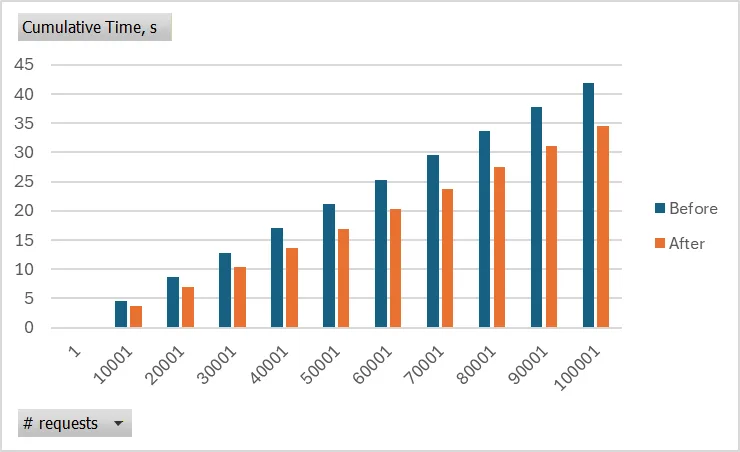
The cumulative time saved with certificate caching, as the number of requests increases, is illustrated below:
New HTTP QUERY Verb
Another significant addition is the QUERY HTTP verb. This verb is designed to allow clients to send query details within the request body, maintaining the characteristics of a safe and idempotent request. This is particularly useful when query details exceed URI length limits, or when servers do not support sending body content with GET requests. The QUERY verb is currently undergoing standardization as part of "The HTTP QUERY Method" proposal. Consequently, a full helper method implementation (tracked as dotnet/runtime#113522) has been postponed until the RFC is published. For now, only the string constant for HttpMethod.Query (tracked as dotnet/runtime#114489) has been added, which can be used as follows:
using var client = new HttpClient();
var response = await client.SendAsync(new HttpRequestMessage(HttpMethod.Query, "https://api.example.com/resource"));
Public CookieException Constructor
A minor but requested change involved making the CookieException constructor public (tracked as dotnet/runtime#95965). This change, contributed by a community member (@deeprobin in dotnet/runtime#109026), allows developers to manually throw CookieException instances, enabling more explicit error handling for cookie-related issues:
throw new CookieException("🍪");
WebSockets Stream Abstraction
Working with raw WebSocket APIs often involves managing low-level details such as buffering, framing, encoding, and creating custom wrappers for stream or channel integration. This complexity can hinder the development of transport layers and streaming protocols.
.NET 10 introduces WebSocketStream, a powerful stream-based abstraction over WebSockets that dramatically simplifies reading, writing, and parsing data for both text and binary protocols.
Key advantages of WebSocketStream:
- Stream-first design: Integrates seamlessly with
StreamReader,JsonSerializer, compressors, and various serializers. - No manual plumbing: Eliminates the need for manual message framing and leftover data handling.
- Supports diverse scenarios: Ideal for JSON-based protocols, text-based protocols like STOMP, and binary protocols such as AMQP.
Common usage patterns include:
- Reading a complete JSON message (text): Use
CreateReadableMessageStreamwithJsonSerializer.DeserializeAsync<T>(). This approach removes the need for manual receive loops orMemoryStreambuffers, as the stream naturally concludes at the message boundary, allowingDeserializeAsyncto complete when the message is fully read. - Streaming a text protocol (e.g., STOMP-like, line-oriented): Utilize
Createto obtain a transport stream, then layer aStreamReaderon top. This enables line-by-line parsing while the stream remains open across frames, leveraging automatic UTF-8 handling and composable reads with standard text parsers. - Writing a single binary message (e.g., AMQP payload): Use
CreateWritableMessageStreamand write data chunk-by-chunk. CallingDisposeautomatically sends the end-of-message (EOM) signal. This one-message write semantic avoids manualEndOfMessagehandling, making the send path resemble any other stream write operation.
In summary:
- Prefer
CreateReadableMessageStreamandCreateWritableMessageStreamfor message-oriented workflows. - For continuous protocols, use
Createwith appropriateleaveOpenandownsWebSocketsemantics in layered readers/writers. - Dispose streams to ensure graceful completion of EOM and connection closure. Use
closeTimeoutto control the maximum wait time for a graceful close handshake.
The following code snippet illustrates the simplification offered by WebSocketStream when reading a complete JSON message:
// BEFORE: manual buffering
static async Task<AppMessage?> ReceiveJsonManualAsync(WebSocket ws, CancellationToken ct)
{
    var buffer = new byte[8192];
    using var mem = new MemoryStream();
    while (ws.State == WebSocketState.Open)
    {
        var result = await ws.ReceiveAsync(buffer, ct);
        if (result.MessageType == WebSocketMessageType.Close)
        {
            return null;
        }
        await mem.WriteAsync(buffer.AsMemory(0, result.Count), ct);
        if (result.EndOfMessage)
        {
            break;
        }
    }
    mem.Position = 0;
    return await JsonSerializer.DeserializeAsync<AppMessage>(mem, cancellationToken: ct);
}

// AFTER: message stream
static async Task<AppMessage?> ReceiveJsonAsync(WebSocket ws, CancellationToken ct)
{
    using Stream message = WebSocketStream.CreateReadableMessageStream(ws);
    return await JsonSerializer.DeserializeAsync<AppMessage>(message, cancellationToken: ct);
}
The "after" version significantly reduces complexity by eliminating manual buffering, data copies, and EndOfMessage checks through the Stream abstraction.
Security Enhancements
This release includes two important changes in networking security: long-awaited TLS 1.3 support on macOS and a unification of how TLS cipher suite details are exposed.
Client-Side TLS 1.3 on macOS
Support for TLS 1.3 on macOS has been a highly requested feature (tracked as dotnet/runtime#1979) for several releases. Its implementation was complex, necessitating a switch to different native macOS APIs that combine TLS with TCP, whereas .NET exposes these layers independently via SslStream and Socket. Furthermore, the new native APIs only support TLS 1.2 and TLS 1.3, while .NET still maintains support for other deprecated SslProtocols. Given these factors, this functionality is exposed as an opt-in feature (tracked as dotnet/runtime#117428), enabled through an AppContext switch.
Client applications can activate this new support by either setting the switch in their code:
AppContext.SetSwitch("System.Net.Security.UseNetworkFramework", true);
Or by using an environment variable:
export DOTNET_SYSTEM_NET_SECURITY_USENETWORKFRAMEWORK=1
It is important to note that this switch affects the backend SslStream uses for client operations on macOS, thereby limiting supported TLS versions to 1.2 and 1.3. It has no impact on server-side SslStream usage.
Unified Negotiated Cipher Suite Information
SslStream traditionally provided various properties (e.g., KeyExchangeAlgorithm, HashAlgorithm, CipherAlgorithm) to detail the negotiated cipher suite. However, the underlying enumerations for these properties had become outdated, leading to a loss of precision by mapping multiple algorithms from the same family to a single enum value.
Instead of expanding these enums, the decision was made to obsolete them and designate NegotiatedCipherSuite as the sole authoritative source of truth (tracked as dotnet/runtime#100361). The underlying TlsCipherSuite enumeration aligns with the IANA specification for TLS Cipher Suites, providing comprehensive information. The obsoleted properties were merely derivations of NegotiatedCipherSuite and offered no additional unique insights. The full change can be examined in dotnet/runtime#105875.
Furthermore, the NegotiatedCipherSuite property has also been introduced to QuicConnection (tracked as dotnet/runtime#106391), serving as the primary source for negotiated TLS details for established QUIC connections. Discussion for this API addition can be found in dotnet/runtime#70184.
Networking Primitives
This section covers various additions within the System.Net namespace, including new helpers for Server-Sent Events, enhancements to IP address validation, and URI handling improvements.
Server-Sent Events Formatter
Building upon the previous release's support for parsing Server-Sent Events, .NET 10 introduces the complementary formatter for these events (tracked as dotnet/runtime#109294). In its simplest form, for string-typed data, the new API can be used as shown:
using var stream = new MemoryStream();

// Only pass in source of items and stream to serialize into.
await SseFormatter.WriteAsync(GetStringItems(), stream);

static async IAsyncEnumerable<SseItem<string>> GetStringItems()
{
    yield return new SseItem<string>("data 1");
    yield return new SseItem<string>("data 2");
    yield return new SseItem<string>("data 3");
    yield return new SseItem<string>("data 4");
}
The content written to the stream by this code will be:
data: data 1

data: data 2

data: data 3

data: data 4
For scenarios where the data payload is not a simple string, a generic overload with a formatting delegate is available (tracked as dotnet/runtime#109832):
var stream = new MemoryStream();

// The third argument is a delegate taking in SseItem and IBufferWriter into which the item is serialized.
await SseFormatter.WriteAsync<int>(GetItems(), stream, (item, writer) =>
{
    // The data of the item should be converted to a string and that string then converted to corresponding UTF-8 bytes.
    writer.Write(Encoding.UTF8.GetBytes(item.Data.ToString()));
});

static async IAsyncEnumerable<SseItem<int>> GetItems()
{
    yield return new SseItem<int>(1) { ReconnectionInterval = TimeSpan.FromSeconds(1) };
    yield return new SseItem<int>(2);
    yield return new SseItem<int>(3);
    yield return new SseItem<int>(4);
}
The stream content for this example will look like:
data: 1
retry: 1000

data: 2

data: 3

data: 4
The SseFormatter introduces two overloads for writing events:
- A simple one for
string-typed data, without a formatting delegate:WriteAsync(IAsyncEnumerable<SseItem<string>>, Stream, CancellationToken) - A generic one for any data type, requiring a formatting delegate:
WriteAsync<T>(IAsyncEnumerable<SseItem<T>>, Stream, Action<SseItem<T>,IBufferWriter<byte>>, CancellationToken)
Additionally, SseItem<T> has been extended with two new properties for writing:
EventId: To send theidfield.ReconnectionInterval: To send theretryfield.
These fields govern client behavior during connection re-establishment. The EventId maps to LastEventId on the parser side and is used in the Last-Event-ID header if the connection is recreated. ReconnectionInterval maps to the parser's ReconnectionInterval and dictates the waiting period before attempting a new connection.
Collectively, System.Net.ServerSentEvents now offers a complete set of helpers for both client and server sides, enabling full data round-tripping:
var stream = new MemoryStream();

await SseFormatter.WriteAsync<int>(GetItems(), stream, (item, writer) =>
{
    writer.Write(Encoding.UTF8.GetBytes(item.Data.ToString()));
});

stream.Seek(0, SeekOrigin.Begin);

var parser = SseParser.Create(stream, (type, data) =>
{
    var str = Encoding.UTF8.GetString(data);
    return Int32.Parse(str);
});

await foreach (var item in parser.EnumerateAsync())
{
    Console.WriteLine($"{item.EventType}: {item.Data} {item.EventId} {item.ReconnectionInterval} [{parser.LastEventId};{parser.ReconnectionInterval}]");
}

static async IAsyncEnumerable<SseItem<int>> GetItems()
{
    yield return new SseItem<int>(1) { ReconnectionInterval = TimeSpan.FromSeconds(1) };
    yield return new SseItem<int>(2) { EventId = "2" };
    yield return new SseItem<int>(3);
    yield return new SseItem<int>(4);
}
IP Address Enhancements
The IPAddress class receives two new additions. First, a static method IPAddress.IsValid has been introduced (tracked as dotnet/runtime#111282) to validate whether a string represents a valid IP address. It also offers IPAddress.IsValidUtf8 for UTF-8 spans:
if (IPAddress.IsValid("10.0.0.1"))
{ /* ... */ }
if (IPAddress.IsValid("::1"))
{ /* ... */ }
if (IPAddress.IsValid("10.0.1"))
{ /* ... */ }
if (IPAddress.IsValidUtf8("::192.168.0.1"u8))
{ /* ... */ }
if (IPAddress.IsValidUtf8("fe80::9656:d028:8652:66b6"u8))
{ /* ... */ }
Second, following the introduction of IUtf8SpanFormattable in .NET 8, both IPAddress and IPNetwork now also implement IUtf8SpanParsable<T>. The API proposal (tracked as dotnet/runtime#103111) and its implementation (tracked as dotnet/runtime#102144) were done by a community contributor (@edwardneal).
Miscellaneous Networking Primitives
-
URI Length Limit Removal: The length limit on
Urihas been removed (tracked asdotnet/runtime#117287) to better support thedataURI scheme (tracked asdotnet/runtime#96544), as specified in RFC 2397. This scheme allows the URI itself to carry resource data (e.g., a base64 encoded image), and the previous limit of approximately 64 KB was often insufficient for suchdataURIs. An example is:data:image/jpeg;base64,[base64 encoded data of the image]. -
New YAML Media Type: A new constant,
MediaTypesName.Yaml, has been added forymlfiles (tracked asdotnet/runtime#105809anddotnet/runtime#117211), contributed by a community member (@martincostello).