Open-source IntelliJ IDEA: A Simpler Way to Build and Contribute to the Community
IntelliJ IDEA simplifies open-source contributions by integrating GitHub Actions for CI/CD and offering direct access to official builds. Developers can now easily explore, customize, and contribute to this widely used IDE.
For over 15 years, IntelliJ IDEA's source code has been publicly accessible, empowering millions of developers to learn, experiment, contribute, and build their own tools. We are now deepening our commitment to open source by simplifying the process for the community to explore, build, and contribute to the project.
What's New?
CI/CD Pipelines via GitHub Actions
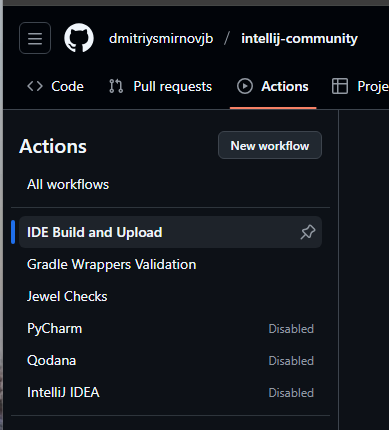
To streamline the build process, we've implemented CI/CD pipelines using GitHub Actions. This integration enables anyone to build their own version of IntelliJ IDEA directly from its source code, eliminating the need for manual build environment configuration.
The necessary GitHub Action and workflows are included in the repository, ready for immediate use upon forking. For more details on managing workflows, please consult the GitHub documentation.
Open-Source Builds
For those who require a pure open-source build without applying custom changes, we now publish official open-source builds of IntelliJ IDEA directly to GitHub. This provides convenient access to ready-to-use builds, removing the necessity of setting up a build environment from scratch.
Build Your Own IDE
Building an open-source version of IntelliJ IDEA is now more straightforward than ever!
1. Fork and Clone the Repository
Begin by visiting the official open-source IntelliJ IDEA GitHub repository to access the source code.
2. Make Changes and Push
3. Utilize CI/CD Pipelines
Leverage GitHub Actions to bypass manual setup. Use the preconfigured pipelines to build IntelliJ IDEA directly from your codebase. This approach eliminates the complexities of dependency configuration and guarantees a consistent build environment.
4. Test and Run
After a successful build, execute IntelliJ IDEA on your system to observe your modifications in real-time.
5. Contribute and Collaborate
For those who develop changes to the codebase, we encourage submitting pull requests, addressing issues, and collaborating with other contributors. This offers an excellent opportunity for professional growth while contributing to the open-source community.
Traditional local building methods remain fully supported. This guide provides detailed steps, whether you’re contributing to IntelliJ Platform (JetBrains’ open-source platform for building IDEs), exploring new capabilities, or simply learning how IntelliJ IDEA works under the hood.
Contribute to the Platform
IntelliJ IDEA's open-source codebase forms the bedrock for IntelliJ IDEA itself and numerous other prominent development tools, including Android Studio, HCL Volt MX Iris, and Adobe AEM Developer Tools. It also drives various internal solutions utilized daily by developers across diverse industries. We are dedicated to maintaining the reliability, efficiency, and future-readiness of IntelliJ IDEA's open-source codebase.
For further details or to contribute, please visit the IntelliJ Platform page and become an active member of the thriving IntelliJ IDEA development community!