Python Extension for VS Code: November 2025 Release Enhances Productivity
The November 2025 VS Code Python extension release enhances productivity with AI-generated docstrings via Copilot, localized hover summaries, explicit import conversion, and improved multi-interpreter debugger support.
The November 2025 release of the Python extension for Visual Studio Code is now available, packed with exciting new features and improvements.
This release includes the following key announcements:
- Add Copilot Hover Summaries as docstring
- Localized Copilot Hover Summaries
- Convert wildcard imports Code Action
- Debugger support for multiple interpreters via the Python Environments Extension
For a full list of improvements, you can check the changelogs for the Python and Pylance extensions.
Add Copilot Hover Summaries as Docstring
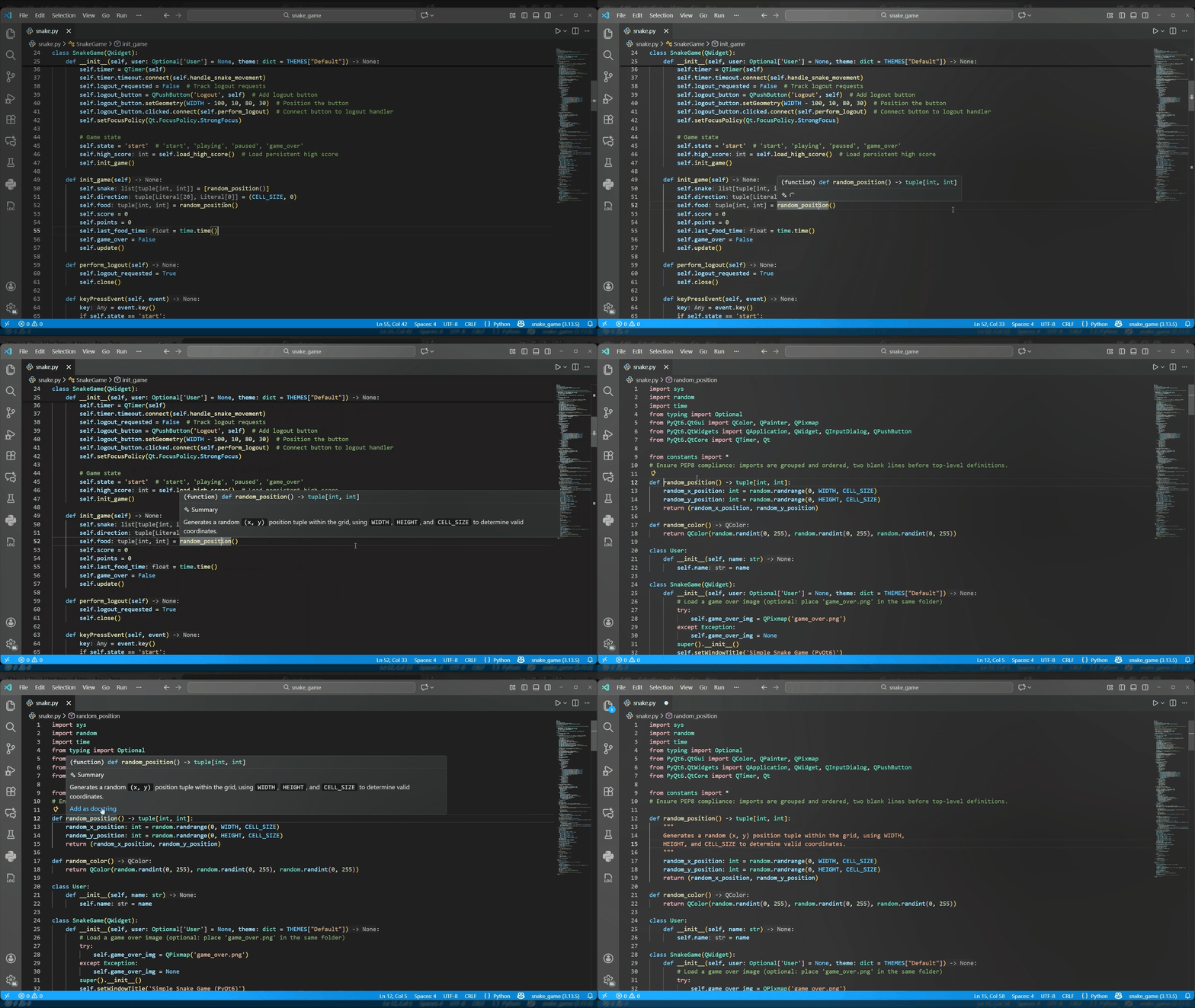
A significant new feature allows users to integrate AI-generated documentation directly into their code as docstrings. With the new Add as docstring command within Copilot Hover Summaries, you can generate a summary for a function or class, hover over its definition, and select the command to insert the formatted docstring directly below your cursor. This streamlines documentation, enhancing code readability and maintainability without manual retyping.
Localized Copilot Hover Summaries
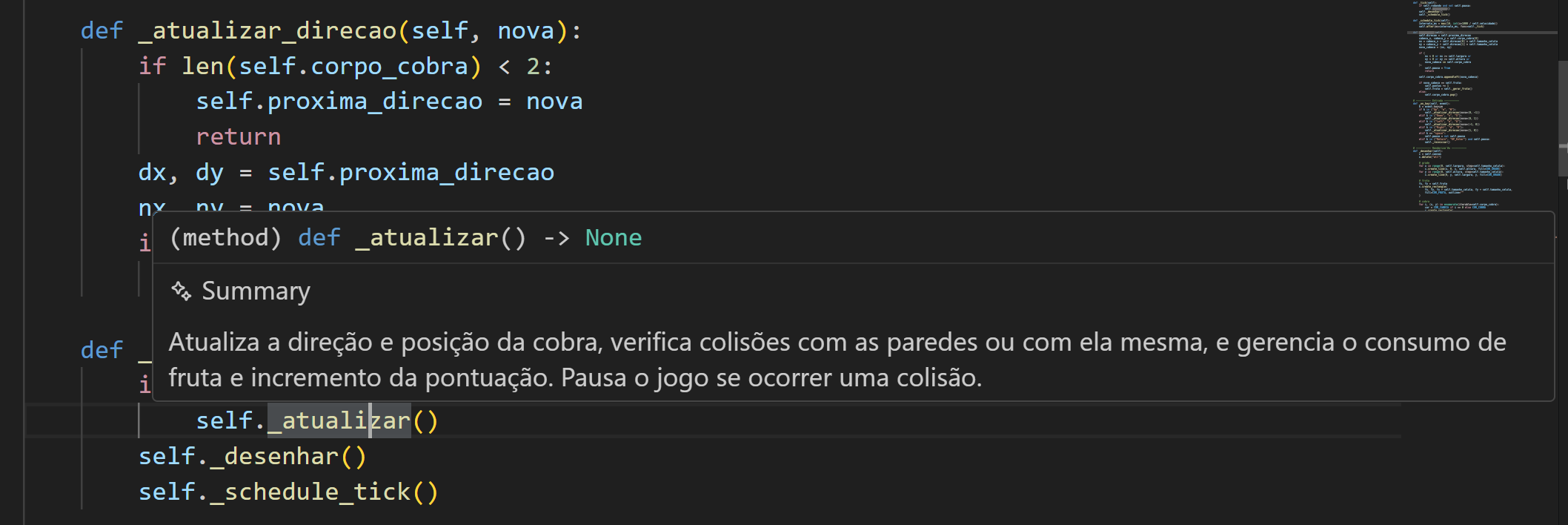
GitHub Copilot Hover Summaries, powered by Pylance, now fully support localization. AI-generated summaries will respect your VS Code display language settings, providing documentation in your preferred language for easier comprehension.
Convert Wildcard Imports Code Action
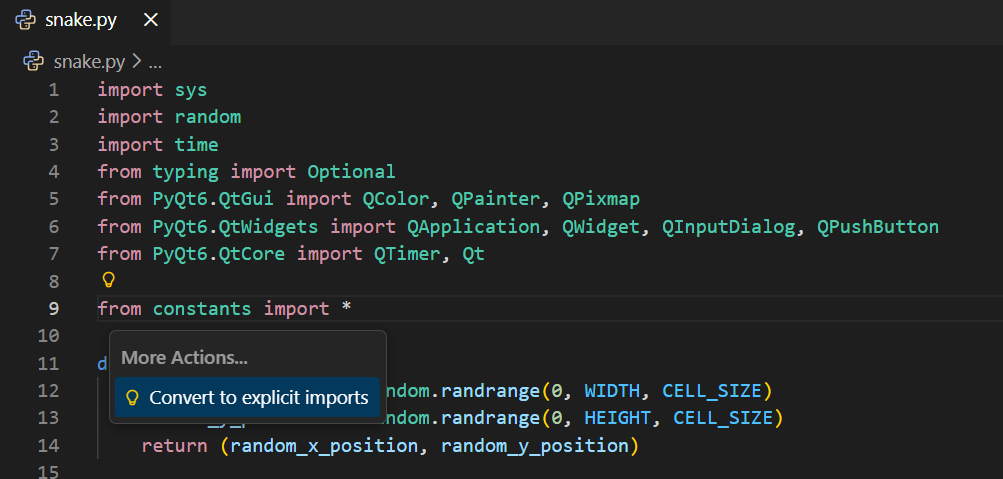
Wildcard imports (from module import *) are generally discouraged in Python due to their potential to pollute namespaces and obscure the origin of imported names, thereby reducing code clarity and maintainability. Pylance now introduces a new Code Action to address this. It automatically converts wildcard imports into explicit symbol imports, preserving any aliases and consolidating the import into a single statement. To use this, simply click on a line with a wildcard import and use Ctrl + . (or Cmd + . on macOS) to select the Convert to explicit imports Code Action.
Debugger Support for Multiple Interpreters
The Python Debugger extension now integrates with the Python Environments Extension (leveraging vscode-python-debugger#849). This enhancement allows the debugger to recognize and utilize distinct interpreters for individual projects within a multi-root workspace. When enabled, the debugger will automatically respect the interpreter selected for each project, as displayed in the status bar during debugging sessions. To activate this feature, set "python.useEnvironmentsExtension": true in your user settings. Report any issues to the Python Debugger repository.
Other Changes and Enhancements
Additional enhancements and user-requested bug fixes are included to further improve the Python development experience in Visual Studio Code. Notable changes are:
- Resolved unexpected blocking during PowerShell command activation (
vscode-python-environments#952) - The Python Environments Extension now respects the
python.poetryPathuser setting for specifying the Poetry executable (vscode-python-environments#918) - The Python Environments Extension now detects
requirements.txtanddev-requirements.txtfiles for automatic dependency installation when creating new virtual environments (vscode-python-environments#506)
Experience these new improvements by downloading the Python extension from the Marketplace or installing it directly via the extensions view in Visual Studio Code (Ctrl + Shift + X or ⌘ + ⇧ + X). For more details, consult the Python support in Visual Studio Code documentation. Should you encounter any issues or have suggestions, please file an issue on the Python VS Code GitHub page.