React Native 0.83 Released: React 19.2, Enhanced DevTools, and Zero Breaking Changes
React Native 0.83 introduces React 19.2 with new <Activity> and useEffectEvent APIs, significant DevTools enhancements including network and performance panels, and a new desktop app. This release also features stable Web Performance APIs, experimental Hermes V1, and iOS architecture improvements, all with no user-facing breaking changes for a smooth upgrade experience.
React Native 0.83 has been officially released, bringing a suite of powerful updates, including React 19.2, substantial enhancements to React Native DevTools, and support for key Web Performance and Intersection Observer APIs (Canary). Notably, this release marks a milestone with no user-facing breaking changes, ensuring a smooth upgrade path for developers.
React 19.2 Integration
This release incorporates React 19.2, introducing the new <Activity> and useEffectEvent APIs to the React Native ecosystem.
Important Security Notice: CVE-2025-55182
While react-native@0.83.0 depends on react@19.2.0, it's crucial to note that React Native is NOT directly affected by the recent Critical Security Vulnerability in React Server Components (CVE-2025-55182). This is because React Native does not rely on the impacted packages: react-server-dom-webpack, react-server-dom-parcel, or react-server-dom-turbopack. However, if your React Native project is part of a monorepo that includes these packages, please ensure they are checked and upgraded immediately. Future patch releases will update all React dependencies to 19.2.1.
The <Activity> API
The <Activity> API allows developers to segment their application into "activities" that can be controlled and prioritized. It offers an alternative to conditional rendering, supporting two primary modes:
hidden: Conceals children, unmounts effects, and defers updates until React completes other tasks.visible: Displays children, mounts effects, and processes updates normally.
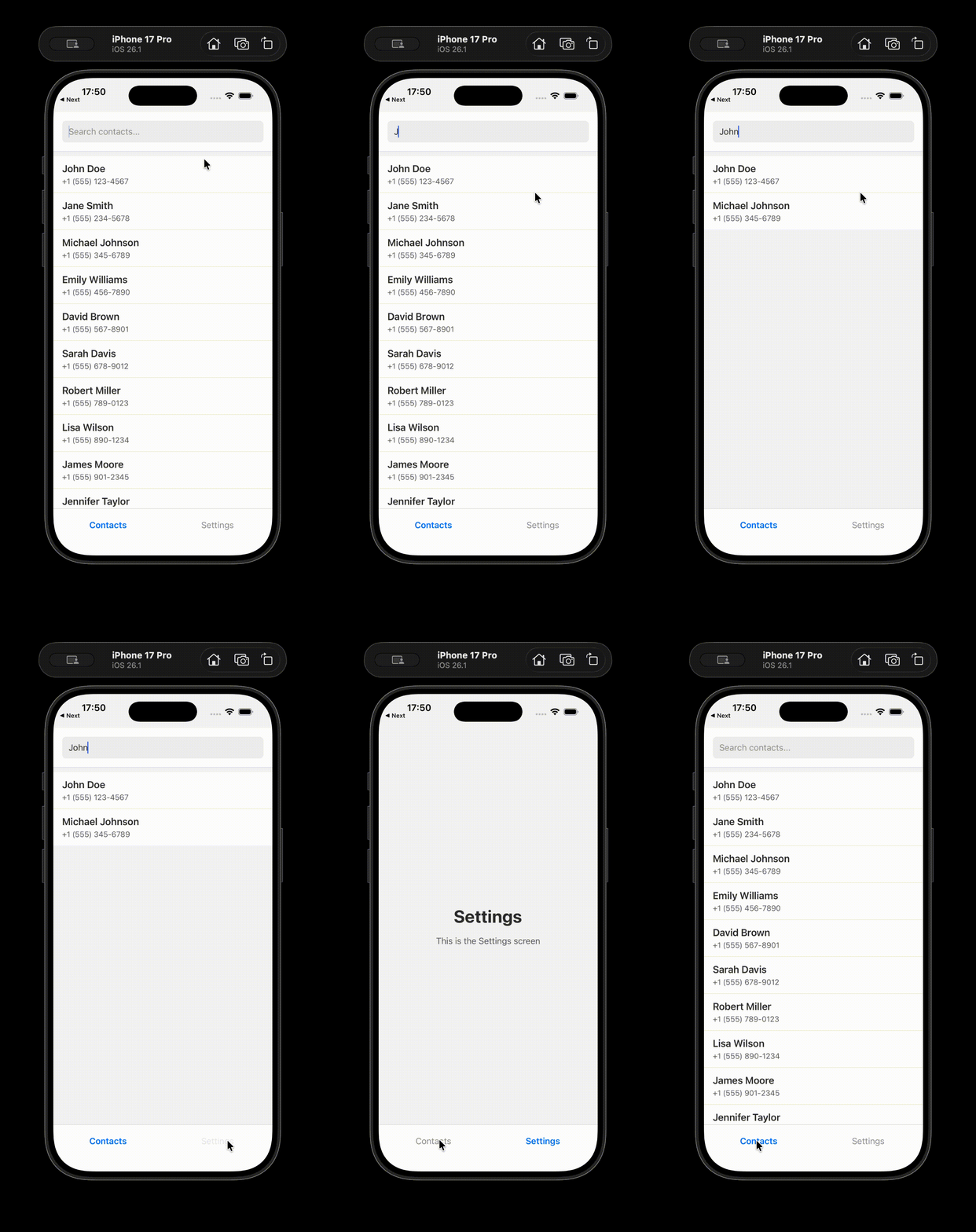
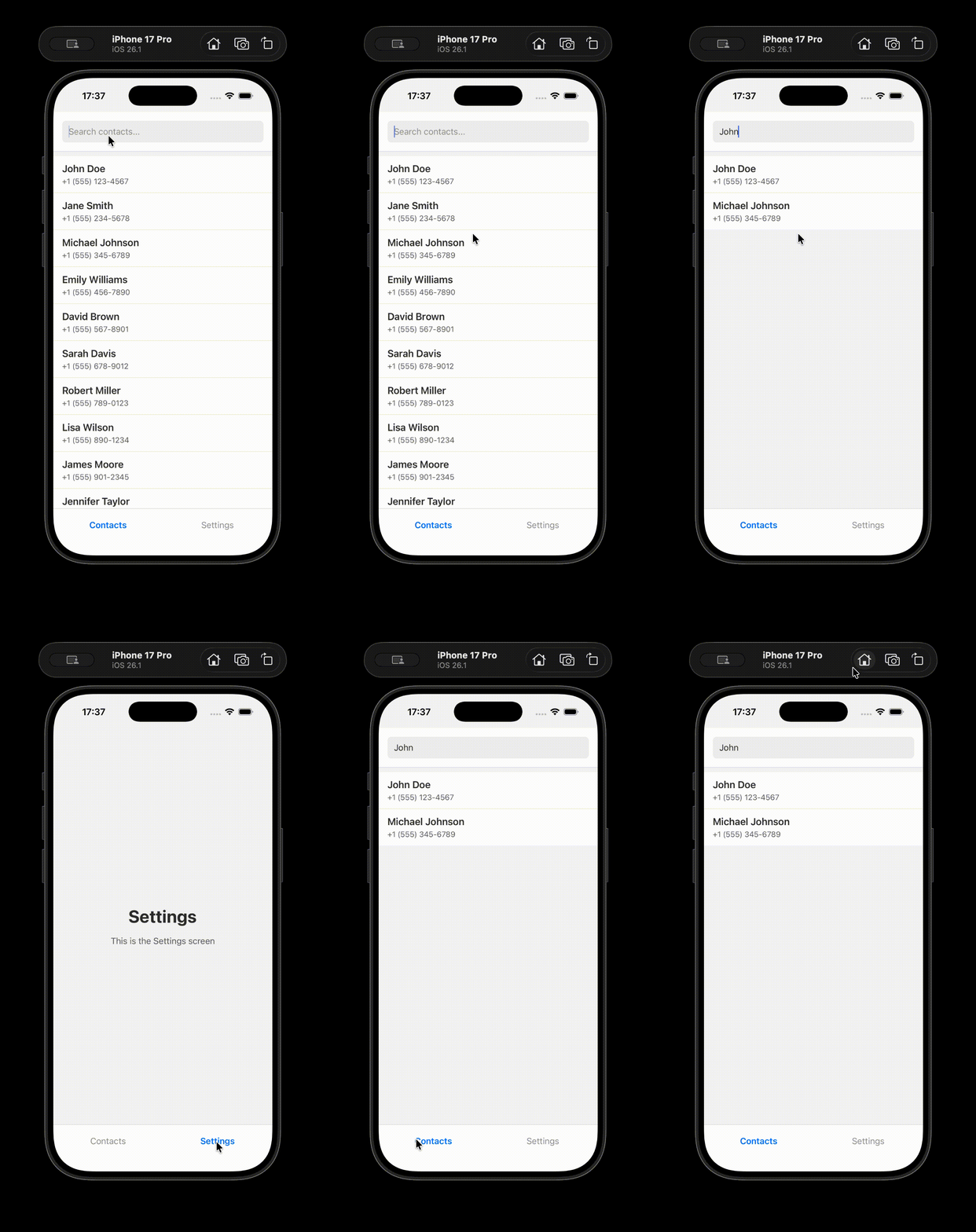
A key advantage of trees hidden with <Activity mode='hidden'> is their state preservation. When an activity becomes visible again, it retains its previous state, such as search status or user selections.
The useEffectEvent Hook
useEffectEvent addresses a common challenge with useEffect where changes to values used within an event notification can cause the entire Effect to re-run. This often leads to disabling lint rules, which can hide potential bugs. By using useEffectEvent, the "event" logic can be cleanly separated from the Effect that triggers it, improving maintainability and preventing unintended re-runs.
Enhanced React Native DevTools
Version 0.83 delivers significant new features and quality-of-life improvements to React Native DevTools. Learn more about these new features and React Performance tracks for deeper insights.
Network and Performance Panels
New Network inspection and Performance tracing capabilities are now available:
- Network Inspection: Provides detailed insights into network requests made by your app. This includes metadata like timings, headers, response previews, and crucially, an "Initiator" tab to pinpoint where in your code a request originated. Currently, it captures calls via
fetch(),XMLHttpRequest, and<Image>, with future support planned for custom networking libraries like Expo Fetch.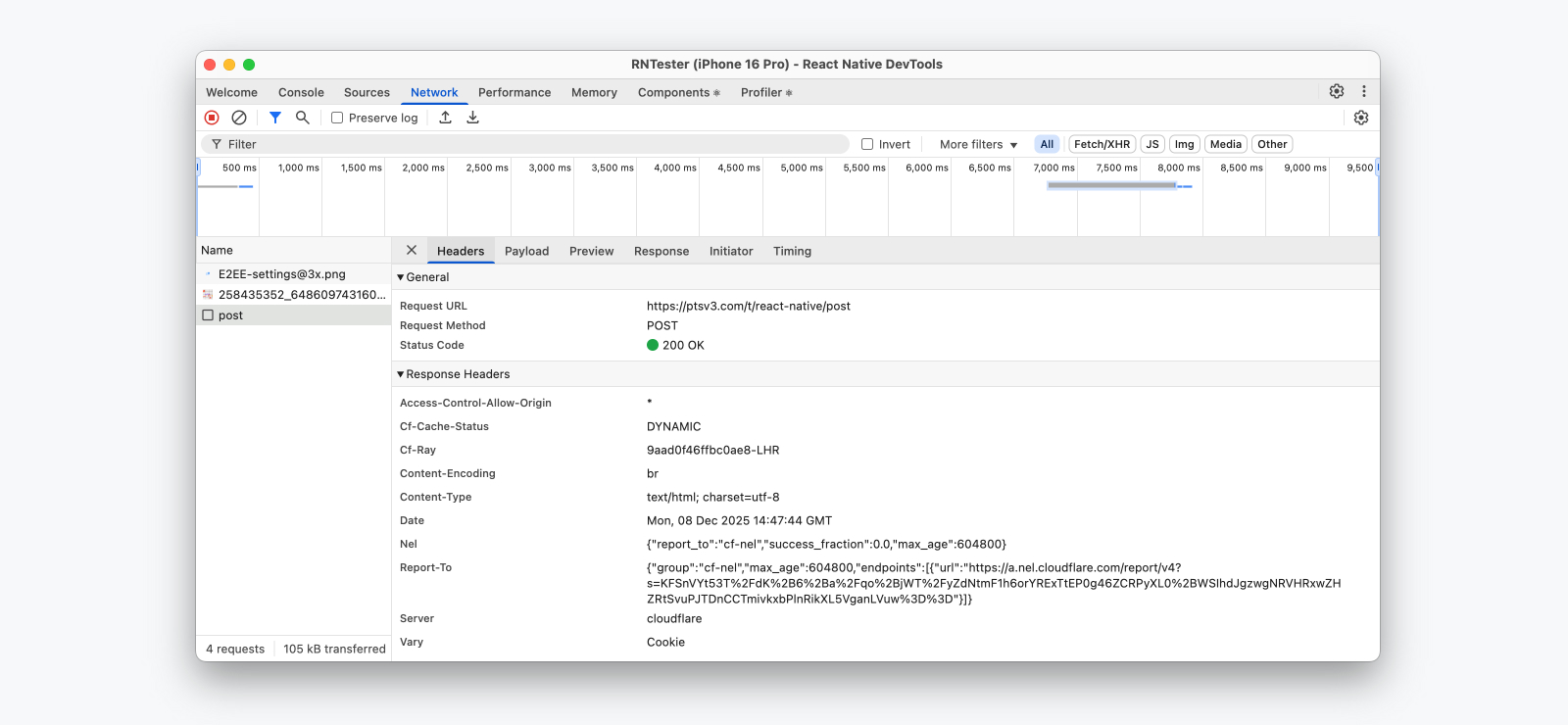
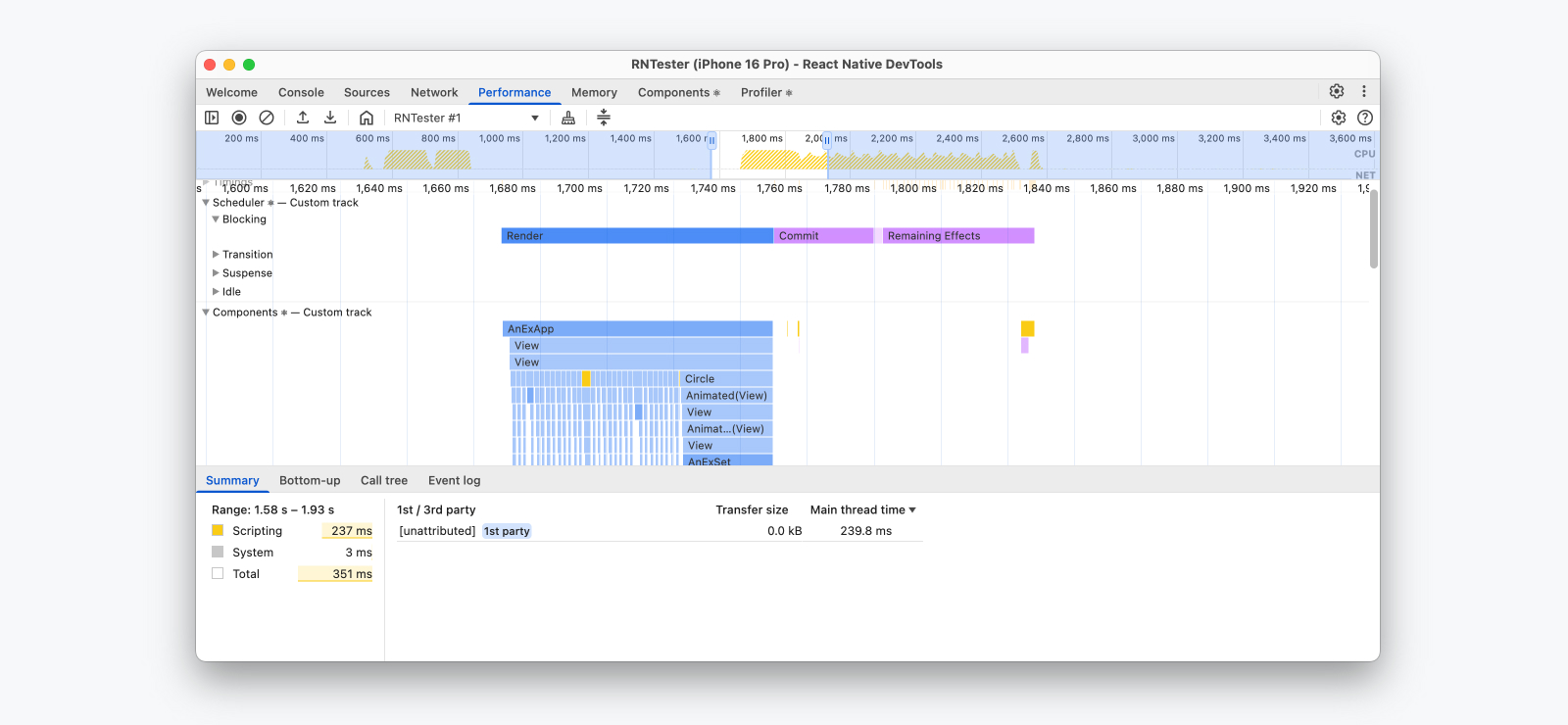
- Performance Tracing: Enables recording performance sessions to analyze JavaScript execution, React Performance tracks, network events, and custom User Timings, all visualized on a unified timeline. This, combined with Web Performance API support, offers deep visibility into app performance bottlenecks.
New Desktop App
React Native DevTools now features a greatly improved desktop application experience, eliminating the previous requirement for a browser window (Chrome or Edge). Key benefits include:
- Zero-install setup without a web browser.
- Faster launch via a lightweight, notarized desktop binary (with a fallback to browser launch if needed).
- Better window management, including improved macOS multitasking, auto-raise on breakpoint, and saved window arrangements.
- Enhanced reliability by running DevTools independently from personal browser profiles, resolving issues caused by certain Chrome extensions.

Web API Adoptions
Intersection Observers (Canary)
As part of the ongoing effort to integrate web APIs into React Native, IntersectionObserver support has been added in the 0.83 canary release. This API allows for asynchronous observation of layout intersections between a target element and its ancestor, enhancing possibilities for lazy loading and visibility tracking. Detailed API and implementation documentation is available for further reference, along with examples in RNTester.
Stable Web Performance APIs
The subset of Web Performance APIs introduced in 0.82 is now stable in 0.83. These APIs empower developers to track various performance aspects, both in DevTools and at runtime (even in production builds via PerformanceObserver):
- High Resolution Time: Defines
performance.now()andperformance.timeOrigin. - Performance Timeline: Defines
PerformanceObserverand methods likegetEntries(),getEntriesByType(),getEntriesByName(). - User Timing: Defines
performance.markandperformance.measure. - Event Timing API: Defines
evententry types forPerformanceObserver. - Long Tasks API: Defines
longtaskentry types forPerformanceObserver.
Experimental Features
Hermes V1
 Hermes V1 represents the next generation of the Hermes JavaScript engine, offering significant performance boosts through compiler and VM improvements. First introduced as an experimental opt-in in 0.82, 0.83 brings further performance enhancements.
Enabling Hermes V1: As Hermes V1 is experimental, it requires building React Native from source.
- Force
hermes-compilerresolution inpackage.json(for experimental phase versioning):- Yarn:
"resolutions": { "hermes-compiler": "250829098.0.4" } - NPM:
"overrides": {
  "hermes-compiler": "250829098.0.4"
}
- Yarn:
- Enable for Android by adding
hermesV1Enabled=trueinandroid/gradle.properties:hermesV1Enabled=true - Configure React Native to build from source by editing
android/settings.gradle:includeBuild('../node_modules/react-native') { dependencySubstitution { substitute(module("com.facebook.react:react-android")).using(project(":packages:react-native:ReactAndroid")) substitute(module("com.facebook.react:react-native")).using(project(":packages:react-native:ReactAndroid")) substitute(project(":packages:react-native:ReactAndroid:hermes-engine")).using(module("com.facebook.hermes:hermes-android:250829098.0.1")) } } - Enable for iOS by installing pods with
RCT_HERMES_V1_ENABLED=1:RCT_HERMES_V1_ENABLED=1 bundle exec pod installRCT_USE_PREBUILT_RNCORE.
To verify Hermes V1 is running, execute the following in your app or DevTools console. The returned version should match 250829098.0.1:
HermesInternal.getRuntimeProperties()['OSS Release Version'];
Compile Out Legacy Architecture on iOS
A new iOS flag, RCT_REMOVE_LEGACY_ARCH=1, allows apps already using the New Architecture to compile out the legacy architecture codebase. This can lead to reduced build times and smaller app sizes. For instance, in tests with a new app without dependencies, build time decreased from 73.0 to 58.2 seconds, and app size from 51.2 Mb to 48.2 Mb. This flag is incompatible with React Native precompiled binaries, requiring a build from source.
Debug Precompiled Binaries on iOS
This release introduces the ability to debug React Native code shipped within a precompiled binary, particularly useful for library maintainers or native module developers.
To debug precompiled binary code:
- From your project's
iosfolder, run:bundle exec pod cache clean --all bundle exec pod deintegrate RCT_USE_RN_DEP=1 RCT_USE_PREBUILT_RNCORE=1 RCT_SYMBOLICATE_PREBUILT_FRAMEWORKS=1 bundle exec pod installRCT_SYMBOLICATE_PREBUILT_FRAMEWORKSflag instructs CocoaPods to download and expand React Native dSYM files. - Open your project's
.xcworkspace. - Set a breakpoint (e.g., in
AppDelegate.swift), build, and run the app from Xcode. - When the app pauses, open the Xcode console and run the LLDB command, adjusting the path for simulator or physical device:
- Simulator:
add-dsym <path-to-your-app>/ios/Pods/React-Core-prebuilt/React.xcframework/ios-arm64_x86_64-simulator/React.framework/dSYMs/React.framework.dSYM - Physical Device:
add-dsym <path-to-your-app>/ios/Pods/React-Core-prebuilt/React.xcframework/ios-arm64/React.framework/dSYMs/React.framework.dSYM
- Simulator:
You can now step into React Native code.
Breaking Changes and Deprecations
React Native 0.83 is the first release with no user-facing breaking changes, making upgrades from 0.82 exceptionally straightforward.
Two Android-specific deprecations are included:
- Networking: The
sendRequestInternalmethod is being phased out. - Animation:
startOperationBatchandfinishOperationBatchare now deprecated.
Acknowledgements
This release reflects the collective effort of numerous contributors, with over 594 commits from 56 individuals. The React Native team extends its gratitude to the community for their invaluable contributions to these significant advancements.
Upgrading to 0.83
For existing projects, utilize the React Native Upgrade Helper and the official Upgrading documentation to manage code changes.
To initiate a new project with React Native 0.83:
npx @react-native-community/cli@latest init MyProject --version latest
Expo users can expect React Native 0.83 to be available in SDK 55, scheduled for release in January 2026.
Support Policy
React Native 0.83 is now the latest stable version. Consequently, version 0.80.x is no longer supported. Please refer to the React Native support policy for detailed information on supported versions.