Redesigning Zed's Settings Editor: An Architectural Deep Dive
Dive into the architectural and UI complexities behind Zed's new Settings Editor. Discover how distributed settings were centralized into a strongly typed system and how GPUI was refined for a seamless and intuitive user experience.
This fall, Zed unveiled a new Settings Editor. While it presents a familiar interface with categories on the left and controls on the right, its development necessitated a fundamental rethinking of how settings are modeled across our codebase and new capabilities for our UI framework, GPUI. This article delves into the design and implementation journey behind this seemingly simple feature.
The Intricate Nature of Settings
Settings are crucial for a code editor like Zed, where minor inconveniences can quickly escalate. Furthermore, they are deeply integrated with project contexts, encompassing user, project, and server-specific configurations. The goal for the new editor was to provide a unified interface for easily discovering and managing this diverse range of settings. Previously, users could only interact with Zed's extensive options through the settings.json file, which inherently limited discoverability, despite efforts to make it user-friendly.
Challenges with Distributed Settings and Runtime Registration
Before this refactoring, Zed's settings were defined in a distributed manner, with each crate declaring its necessary settings and the application dynamically consolidating them at runtime to interpret a single JSON file. This approach helped maintain manageable compile times but resulted in a fragmented, weakly-typed model of all settings. Definitions were scattered, making it difficult to trace a setting's origin or implement changes without unforeseen side effects.
The Macro Approach: A Detour
Our initial attempt at building the Settings Editor involved a macro-based strategy. The idea was to declare a setting in Rust, augment it with UI metadata, and have a macro generate the necessary code to integrate it into the editor. We aimed to leverage Rust's type system for a clean UI without extensively altering the underlying architecture.
However, this approach clashed with Zed's crate graph structure, which broadly consists of "pre-UI" (core data, network) and "UI" (components like dropdowns, buttons) regions. Some settings naturally belonged to the core, others to the UI. Attempting to bridge UI concerns into non-UI crates via macros and shared data structures led to a convoluted system with multiple intermediate layers, adding complexity without resolving the core issue of an ill-structured settings model.
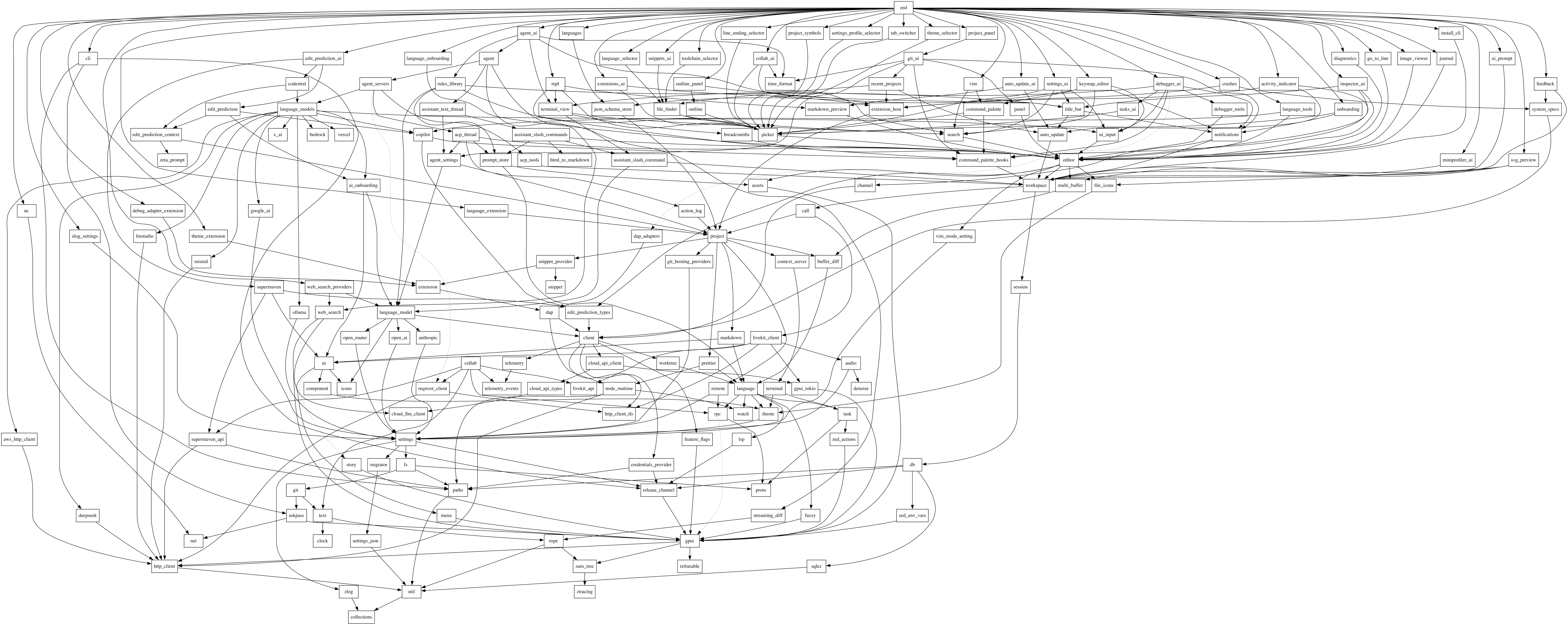
Architectural Red Flags: The Auto-Update Bug
During this period, we also sought to resolve long-standing quirks in settings behavior, such as distinguishing between unset and intentionally 'nothing' values—distinctions vital for reset logic and configuration merging. While making these adjustments within the distributed architecture, we inadvertently broke the app's auto-update functionality, forcing users to manually install new versions. This incident served as a stark indicator that too many components were interacting in non-obvious ways, necessitating a simpler, more centralized model.
Centralizing Settings with Strong Types
The solution involved consolidation: instead of scattering settings definitions across numerous crates, we brought them into a single location and expressed them as clear, strongly typed structures that directly correspond to configuration files. This led to the introduction of two primary types: UserSettings for global configuration and ProjectSettings for per-project overrides. This shift transformed a patchwork of values into a concise, coherent model, simplifying parsing and validation, providing the Settings Editor with a single authoritative source, and making changes far easier to reason about. This robust foundation then informed the UI design.
Files as the Organizing Principle
Initially, we viewed settings files merely as storage. However, we realized that these files serve as a fundamental organizing principle for both the UI and the underlying code. We debated between a separate window (common in native apps) and an integrated tab (like VS Code).
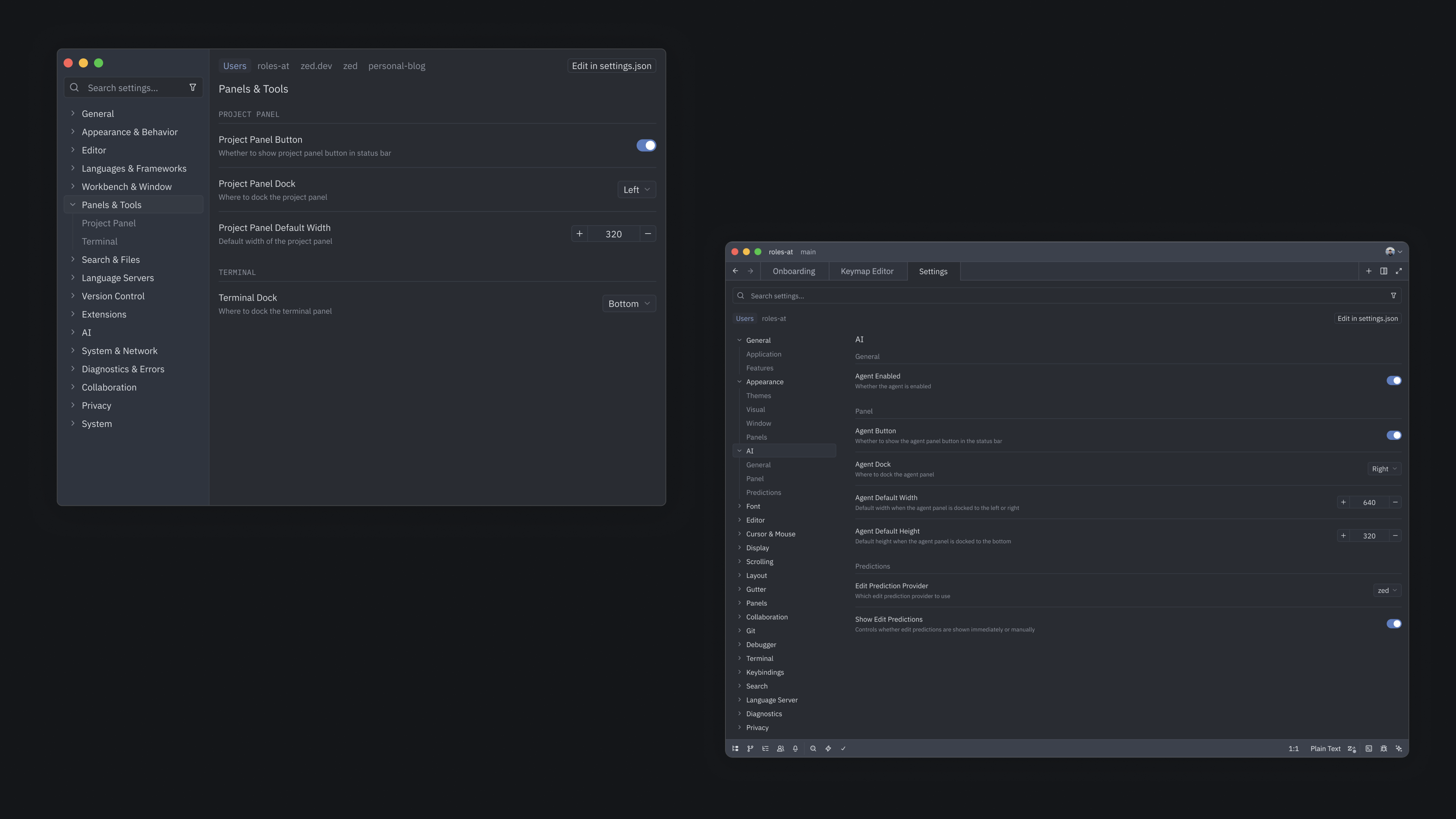
The decision hinged on how settings files should be represented. Zed's main workspace is conceptually focused on a project. User settings, however, apply globally, while project settings apply to a subset of files within a project. Integrating the Settings Editor as "just another tab" would mix these distinct concepts of location. Opting for a separate window allowed the Settings Editor to operate in its own conceptual space, with its own focus, potentially unrelated to the current project. This separation was mirrored in the implementation, with UserSettings and ProjectSettings becoming distinct, clearly scoped types, enabling the UI to work directly from them. Had we adopted this principled relationship between settings files and code earlier, the detour into the macro approach and its associated complexity could have been avoided.
Enhancing GPUI for the Settings Editor
Refactoring the settings model was one half of the challenge; the other was to integrate UI automation into GPUI, our custom UI framework, to ensure a seamless user experience. GPUI was originally optimized for highly interactive, custom UI elements like terminals and code editors, which manage their own focus and state. The Settings Editor, however, required the opposite: a large form with structured controls, sections, and web-like interaction patterns. We needed to expand GPUI's capabilities, particularly in focus navigation and state management for numerous small, interactive components.
Automated Focus Handling and Tab Groups
GPUI offers fine-grained focus management via FocusHandle, but using it extensively for the settings UI would be error-prone. Inspired by the web's tabindex API, we introduced "tab groups" – local scopes that reset the tab index within their region. This innovation allowed us to largely automate keyboard navigability within the UI.
fn render_page(
    &mut self,
    window: &mut Window,
    cx: &mut Context<SettingsWindow>,
) -> impl IntoElement {
    let page_content;
    v_flex()
        .id("settings-ui-page")
        .track_focus(&self.content_focus_handle.focus_handle(cx))
        .bg(cx.theme().colors().editor_background)
        .child(
            div()
                .flex_1()
                .size_full()
                .tab_group() // <- Tagging this container as a local navigable scope
                .tab_index(CONTENT_GROUP_TAB_INDEX)
                .child(page_content),
        );
}
Bringing State Closer to Usage
In Zed's core interfaces, state is often centralized (e.g., a text buffer representing a document). The Settings Editor, conversely, comprises many small components—dropdowns, toggles, text fields—each with simple, ephemeral state. Centralizing every dropdown's open/closed status isn't necessary. To accommodate this, we extended GPUI with an API that allows state to reside directly within the UI tree, similar to React's useState hook, but tailored for our engine's update model.
struct MyComponent;

impl RenderOnce for MyComponent {
    fn render(self, window: &mut Window, cx: &mut App) {
        let state: Entity<String> = window.use_state(cx, |_, _| "initial value");
        // ...
    }
}
This change significantly reduced boilerplate and improved the development-time reasoning about the UI. While early versions faced challenges like memory leaks and subtle scoping bugs, iterating on these issues led to a more ergonomic and reliable pattern for future UIs.
The Benefits Unlocked
Despite a complex development process, we designed the Settings Editor to feel intuitive. While the settings.json file remains available for granular control, we are proud of this new UI and its potential to facilitate more intricate features. This project has established a cleaner foundation: settings are now robustly modeled with strong, well-defined types, and GPUI has matured significantly. These advancements will benefit not only this project but also many forthcoming Zed features. Explore the new Settings Editor by opening it with cmd/ctrl-, in Zed; its simple appearance belies the substantial work beneath the surface and the groundwork it lays for future innovations.