Reverse Engineering iOS to Fix SDK Crashes
Investigate how iPadOS 26 introduced an unexpected type casting behavior in UIPrintPanelViewController's `isKindOfClass:`, leading to Sentry SDK crashes. Explore the reverse engineering and the runtime fix.
The article discusses a perplexing issue encountered when type casting in Swift, specifically an unexpected behavior introduced in iPadOS 26 that led to SDK crashes. While Swift type casting usually provides confidence in type safety, a particular scenario emerged where a cast would seemingly succeed, yet the object was not the expected type.
This anomaly required a deep dive into Objective-C's dynamic runtime and reverse engineering of Apple's private frameworks. The core problem was that iPadOS 26 changed how UIPrintPanelViewController handles isKindOfClass:, causing it to return true for UISplitViewController casts, even though UIPrintPanelViewController is not a subclass of UISplitViewController. This led to crashes when attempting to access UISplitViewController specific methods that didn't exist on the UIPrintPanelViewController instance. A fix was subsequently released in Sentry Cocoa SDK v8.57.3.
The Beginning of the Problem
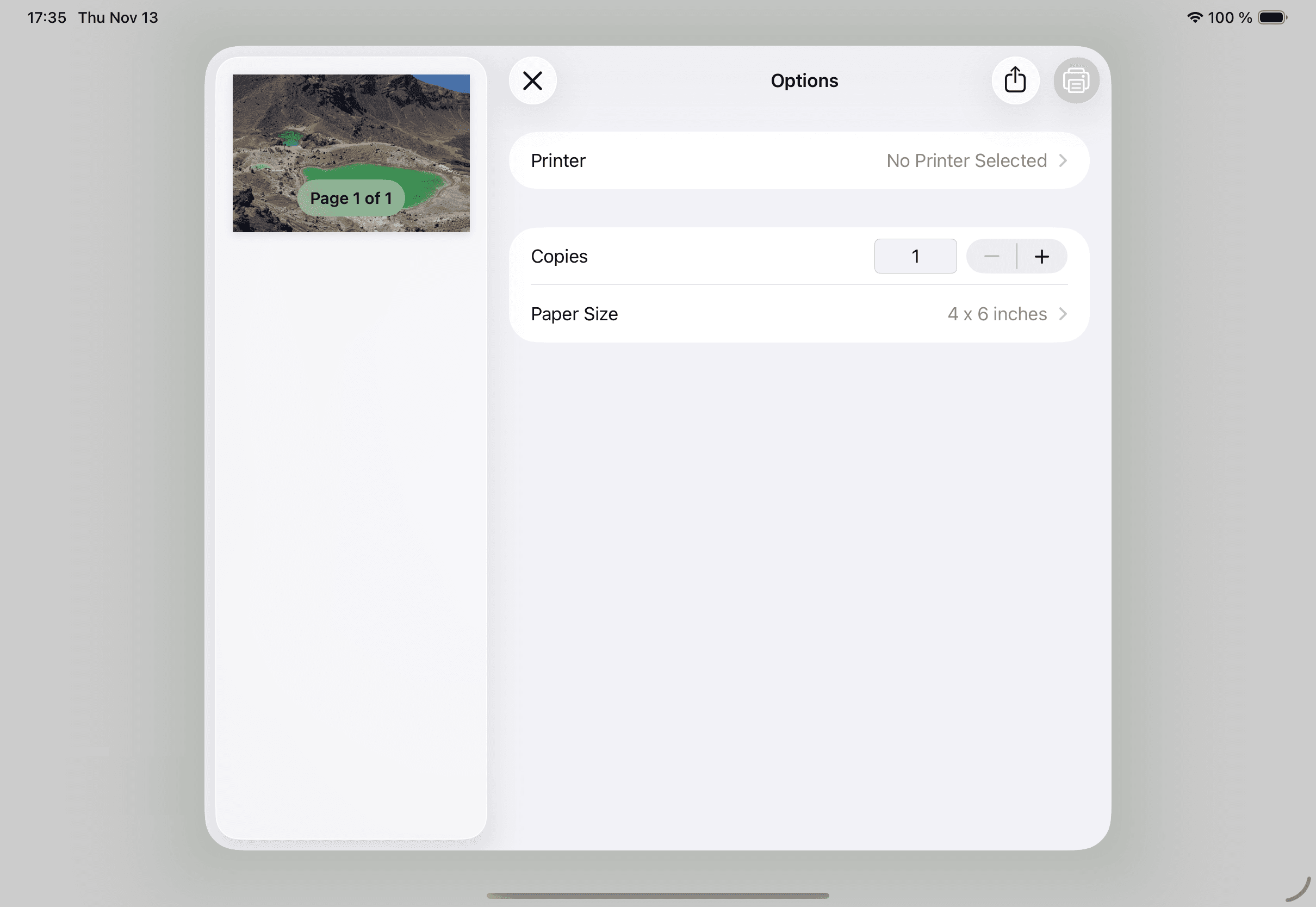
On November 9th, 2025, a user reported an issue in the Sentry Cocoa SDK repository. The Sentry SDK was causing app crashes on iPadOS 26 when using the standard iOS UIPrintInteractionController with Sentry's User Interaction Tracing enabled. The crash log indicated an NSInvalidArgumentException: -[UIPrintPanelViewController viewControllers]: unrecognized selector sent to instance.
An "unrecognized selector sent to instance" error is critical, as it signifies an attempt to access a property or method that doesn't exist on an object instance, which should ideally be caught during compilation. Fortunately, the customer provided sample code, allowing for quick reproduction of the issue. The problem was traced to specific lines in the SDK:
if let splitViewController = vc as? UISplitViewController {
    if splitViewController.viewControllers.count > 0 {
        return splitViewController.viewControllers
    }
}

The Search for Answers
Having a reproducible crash scenario was invaluable for debugging. The SDK code showed a conditional cast of a UIViewController (vc) to UISplitViewController. If successful, it would access the viewControllers property. The immediate question was: How could a cast succeed if the object wasn't the expected type?
Debugging revealed the actual type of vc was UIPrintPanelViewController, an undocumented private class within the UIPrintUI framework. This confirmed that the generic cast to UISplitViewController was succeeding, despite UIPrintPanelViewController not being a subclass of UISplitViewController.
// Output from debugger
(lldb) po type(of: vc)
UIPrintPanelViewController

(lldb) po splitViewController as? UISplitViewController
▿ Optional<UISplitViewController>
- some : <UIPrintPanelViewController: 0x10380d200>

(lldb) po type(of: splitViewController).isSubclass(of: UISplitViewController.self)
false
This paradoxical situation—a successful cast to UISplitViewController for an object that is not its subclass—was puzzling. A quick online search showed similar crashes reported in the Google Mobile Ads SDK, suggesting a broader issue.
Unraveling the Mystery
Further investigation involved looking at class headers. On iOS 17, UIPrintPanelViewController was a subclass of UIViewController, not UISplitViewController. However, iOS 26 introduced significant internal UI hierarchy changes, partly due to "Liquid Glass" (a hypothetical UI concept, likely placeholder for a new UI paradigm). For example, the view hierarchy of UISlider also changed drastically.
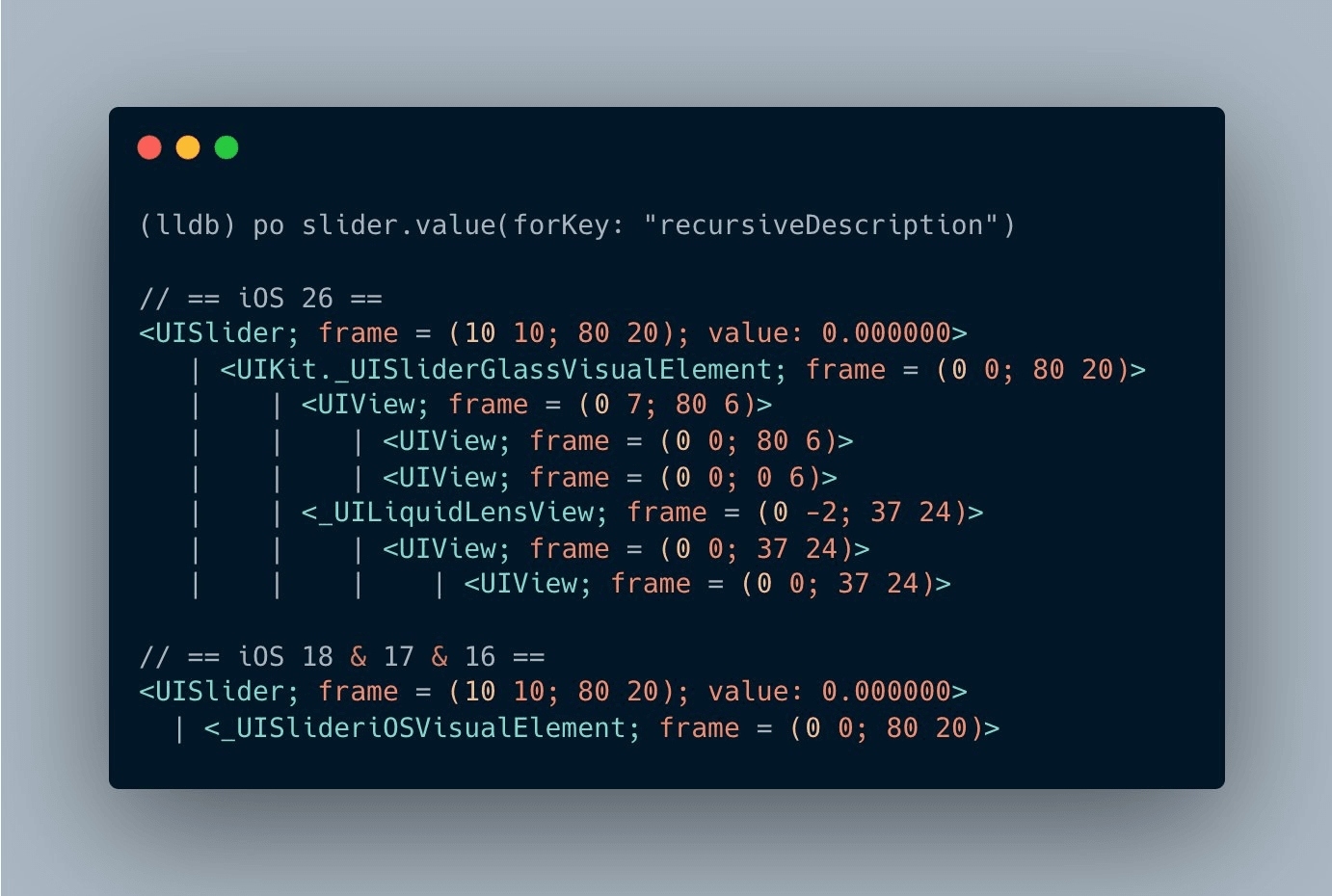
Using a Runtime Header Analyzer on iOS 26 confirmed UIPrintPanelViewController was still not a UISplitViewController subclass, but it was a UISplitViewControllerDelegate. This led to questioning the fundamental principles of Swift and Objective-C casting.
A recursive superclass resolver was used to trace the full inheritance chain:
func describe(object: AnyObject) {
    print("Swift type(of:)", type(of: object))
    if let cls = object_getClass(object) {
        print("object_getClass:", NSStringFromClass(cls))
        print("Superclass chain:")
        var c: AnyClass? = cls
        while let cc = c {
            print(" ->", NSStringFromClass(cc))
            c = class_getSuperclass(cc)
        }
    } else {
        print("object_getClass returned nil")
    }
    print("obj is UISplitViewController? ->", object is UISplitViewController)
    print("as? UISplitViewController ->", (object as? UISplitViewController) != nil)
}
// Output:
// Swift type(of): UIPrintPanelViewController
// object_getClass: UIPrintPanelViewController
// Superclass chain:
// -> UIPrintPanelViewController
// -> UIViewController
// -> UIResponder
// -> NSObject
// obj is UISplitViewController? -> true
// as? UISplitViewController -> true
The output consistently showed UIPrintPanelViewController as a UIViewController subclass, yet the cast to UISplitViewController succeeded. This strongly suggested that the Swift as? operator was relying on Objective-C's isKindOfClass: method, which might have been overridden.
Understanding Objective-C's Dynamic Runtime
Objective-C's dynamic runtime handles method calls by looking up the appropriate function based on the method's selector (name) at runtime, rather than directly jumping to fixed memory addresses. This dynamic "method lookup" system is what enables techniques like swizzling.
Swizzling allows developers to replace the runtime's pointer for a method, redirecting calls to a custom wrapper function before potentially forwarding to the original implementation. While powerful for auto-instrumentation, swizzling must be used cautiously due to its app-wide behavioral changes and potential for conflicts if not handled correctly.
This dynamic nature was key to investigating if isKindOfClass: was overridden in UIPrintPanelViewController. All Objective-C types inherit from NSObject and are expected to use its default isKindOfClass: implementation unless overridden.
Checking the implementation address for isKindOfClass: in NSObject and UIViewController:
(lldb) po class_getMethodImplementation(NSClassFromString("NSObject"), NSSelectorFromString("isKindOfClass:"))!
▿ 0x0000000180097bc8

(lldb) po class_getMethodImplementation(NSClassFromString("UIViewController"), NSSelectorFromString("isKindOfClass:"))!
▿ 0x0000000180097bc8
Both point to the same address, confirming no override up to UIViewController. However, when checking UIPrintPanelViewController:
(lldb) po class_getMethodImplementation(NSClassFromString("UIPrintPanelViewController"), NSSelectorFromString("isKindOfClass:"))!
▿ 0x000000024132b1b8
A different address indicated that isKindOfClass: had been overridden in UIPrintPanelViewController, likely to support internal split view handling in the printing UI.
Reverse-Engineering to Confirm
To further validate this, the isKindOfClass: method was decompiled from the private framework using Hopper. The decompiled code showed a suspicious usingSplitView check and register operations, strongly indicating special handling for UISplitViewController.
/* @class UIPrintPanelViewController */
- (int)isKindOfClass:(int)arg2 {
    // Regular registers stuff
    // Probably the super.isKindOfClass
    r0 = loc_25fdf2cf0(&var_30, 0x1fab10310, arg2);
    r20 = r0;
    // Checks for some special class, possibly UISplitViewController
    if (loc_25fdf2d00(*0x2782877d0) == arg2) {
        r20 = [r19 usingSplitView];
    }
    r0 = r20;
    return r0;
}
This solidified the conclusion: UIPrintPanelViewController's overridden isKindOfClass: method was returning true for UISplitViewController comparisons, despite not being a true subclass, leading to invalid casts and SDK crashes.
The Fix
Given that this was an internal Apple behavior beyond direct control, the solution involved adding a runtime check using respondsToSelector: to ensure the instance actually possessed the viewControllers method before attempting to access it.
if let splitViewController = vc as? UISplitViewController {
    // Check if the selector exists as a double-check mechanism
    // See: https://github.com/getsentry/sentry-cocoa/issues/6725
    if !splitViewController.responds(to: NSSelectorFromString("viewControllers")) {
        SentrySDKLog.warning("Failed to get viewControllers from UISplitViewController. This is a known incompatibility in iOS 26.1")
    } else if splitViewController.viewControllers.count > 0 {
        return splitViewController.viewControllers
    }
}
This pragmatic fix, though not the "prettiest" code, successfully prevented the SDK from crashing, allowing for a quick hotfix release. As one of our engineers aptly put it, "We write the dirty code, so our customers don't have to!"