Sonner's Success: Deconstructing the Design Principles of a Popular Toast Library
Explore the design and technical decisions behind Sonner, the successful React toast library. This article delves into its unique naming, innovative animations, enhanced user experience features like swipe gestures and hover states, and its intuitive developer API that led to rapid adoption and widespread use.
In 2023, the Sonner toast library was developed, quickly achieving over 7,000,000 weekly downloads on npm and adoption by prominent companies such as Cursor, X, and Vercel. It also serves as the default toast component in shadcn/ui. Despite a crowded market for toast notifications, Sonner distinguished itself. This article explores the design decisions that contributed to its rapid success and widespread preference over established alternatives.
Naming
The naming strategy for Sonner aimed for uniqueness and elegance, moving away from function-based names like react-toast or react-snackbar, which often feel generic. The name "Sonner" was chosen from French words related to notifications; it translates to "to ring" (e.g., Sonner la cloche - Ring the bell; Sonner à la porte - Give a ring). While this approach might slightly reduce immediate discoverability, it imparts a distinctive and refined identity, crucial for standing out in a saturated component landscape.
Animations
A key factor in Sonner's immediate popularity was its distinctive stacking animation, a feature previously implemented by some companies but never open-sourced. This smooth, intuitive motion deeply resonated with users and developers alike.
The initial implementation used CSS keyframes, which proved problematic due to their non-interruptible nature. This led to abrupt "jumps" when multiple toasts were added rapidly, rather than fluid transitions. To overcome this, CSS transitions were employed instead, allowing for interruptible and retargetable animations.
For the entry animation, a useEffect hook sets a mounted state to true after the initial render. This transitions the toast from translateY(100%) to translateY(0), with styles applied via data attributes.
React.useEffect(() => {
  setMounted(true);
}, []);

//...
<li data-mounted={mounted}>
.sonner-toast {
  transition: transform 400ms ease;
}
[data-mounted="true"] {
  transform: translateY(0);
}
[data-mounted="false"] {
  transform: translateY(100%);
}
Modern CSS offers a simpler solution with the @starting-style at-rule, which could streamline this implementation in future updates.
Stacking Toasts
The stacking effect is achieved by calculating each toast's y position using its index multiplied by a predefined gap. Toasts utilize position: absolute for simplified layering, and a depth perception is added by scaling them down by 0.05 * index.
For example:
- Y(0), scale(1)
- Y(-14px), scale(0.95)
- Y(-28px), scale(0.9)
A simplified CSS snippet illustrating this:
[data-sonner-toast][data-expanded="false"][data-front="false"] {
  --scale: var(--toasts-before) * 0.05 + 1;
  --y: translateY(calc(var(--lift-amount) * var(--toasts-before))) scale(calc((-1 * var(--toasts-before) * 0.05) + 1));
}
A challenge arises with toasts of varying heights, where the stacking might appear uneven. The solution involves normalizing all toasts to the height of the front-most toast when in stacked mode, ensuring visual consistency.
Swiping
Sonner incorporates a swipe-to-dismiss gesture, particularly beneficial on touch-enabled devices where users are accustomed to dismissing notifications this way. This functionality also extends to desktop environments.
Dismissal is achieved by swiping toasts downwards, implemented with a simple event listener that updates a variable controlling the translateY value. A simplified code example:
// This is a simplified version of the code
const onMove = (event) => {
  const yPosition = event.clientY - pointerStartRef.current.y;
  toastRef.current.style.setProperty("--swipe-amount", `${yPosition}px`);
};
The swipe mechanism is momentum-based, meaning dismissal isn't solely dependent on dragging past a fixed threshold. A sufficiently fast swipe, even over a short distance, will also dismiss the toast by checking the velocity of the gesture. The calculation involves measuring the time elapsed since the drag began and dividing the absolute drag distance by this time to determine velocity. Toasts are dismissed if the swipe amount exceeds a SWIPE_THRESHOLD or if the velocity surpasses a dynamically determined value (e.g., 0.11).
const timeTaken = new Date().getTime() - dragStartTime.current.getTime();
const velocity = Math.abs(swipeAmount) / timeTaken;

if (Math.abs(swipeAmount) >= SWIPE_THRESHOLD || velocity > 0.11) {
  removeToast(toast);
}
Expanding Toasts
In stacked mode, hovering over the toast area expands them to reveal all individual toasts. The expanded position for each toast is computed by summing the heights of all preceding toasts and the intervening gaps. This cumulative value is then applied as the new translateY value upon hover.
const toastsHeightBefore = React.useMemo(() => {
  return heights.reduce((prev, curr, reducerIndex) => {
    // Calculate offset up until current toast
    if (reducerIndex >= heightIndex) {
      return prev;
    }
    return prev + curr.height;
  }, 0);
}, [heights, heightIndex]);

const offset = React.useMemo(
  () => heightIndex * GAP + toastsHeightBefore,
  [heightIndex, toastsHeightBefore],
); // This value is then used as a CSS variable, "--offset": ${offset}px
This expanded view can also be set as the default behavior by adding the expand prop to the <Toaster /> component, ensuring all toasts are always visible.
Developer Experience
A core focus during Sonner's development was ensuring an excellent developer experience (DX). A dedicated, custom documentation site was created, featuring interactive examples and readily usable code snippets. This approach allows developers to explore and understand the library's functionality hands-on before integrating it into their projects.
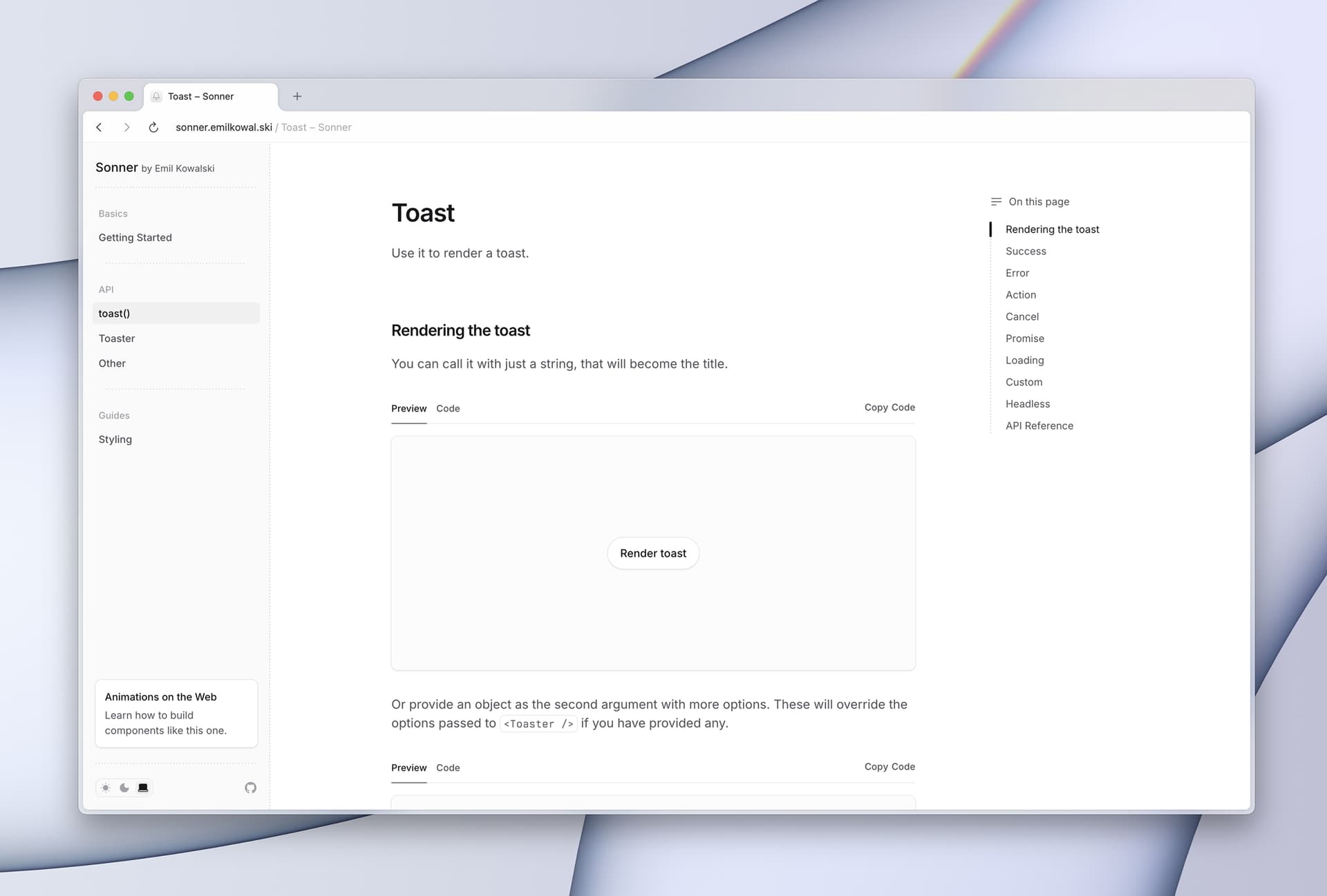
High-quality documentation is critical for reducing barriers to adoption and is often an undervalued aspect of product development.
Technically, Sonner avoids React's Context API, opting instead for the Observer Pattern for state management. The <Toaster /> component subscribes to an observable object. When the toast() function is invoked, the <Toaster /> is notified and updates its state, rendering all toasts using Array.map().
function Toaster() {
  const [toasts, setToasts] = React.useState([]);

  React.useEffect(() => {
    return ToastState.subscribe((toast) => {
      setToasts((toasts) => [...toasts, toast]);
    });
  }, []);

  // ...
  return (
    <ol>
      {toasts.map((toast, index) => (
        <Toast key={toast.id} toast={toast} />
      ))}
    </ol>
  );
}
Creating a new toast is simplified: developers merely import and call the toast() function, eliminating the need for hooks or context, making it accessible from any part of the application.
import { toast } from "sonner";

// ...
toast("My toast");
Sonner's promise API is particularly well-received. Developers can pass a promise and define the toast messages for its loading, success, and error states. This intuitive design, praised for its efficiency, streamlines the management of toast states with minimal code.
"Sonner is so cracked holy shit. The
toast.promiseAPI is SO good. Never had such good toast states with so little code. It’s like React Query for toasts and I didn’t know I needed it until now."
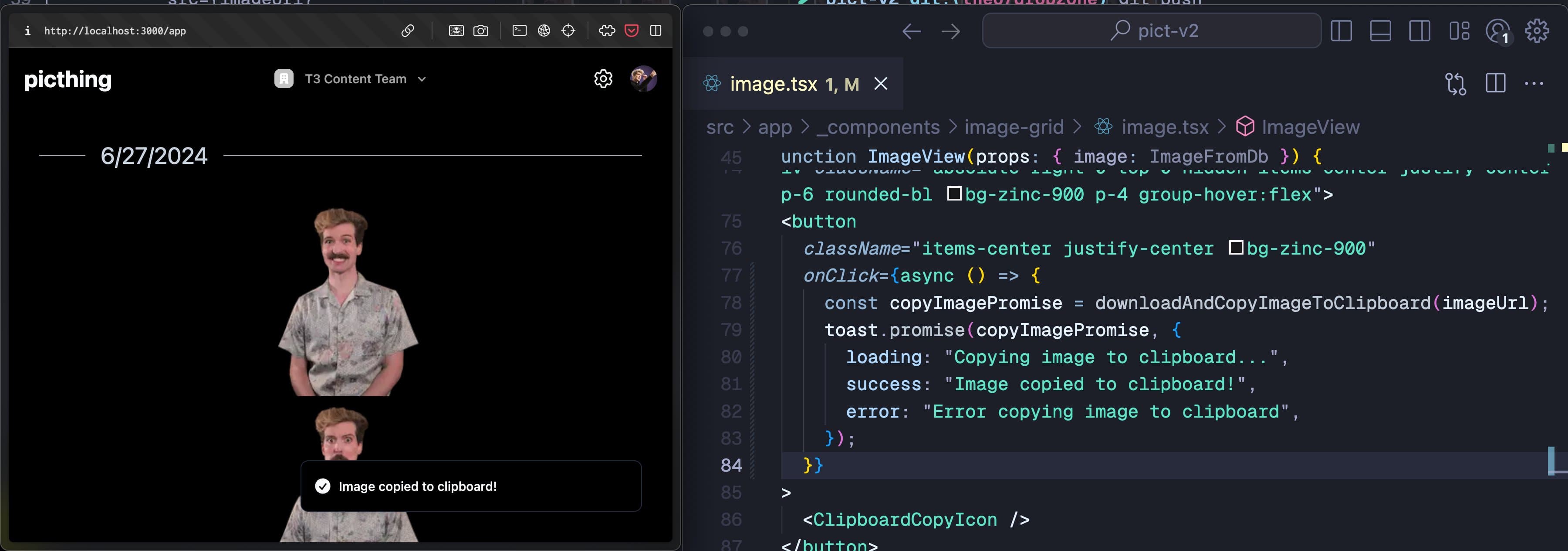
The API design draws inspiration from react-hot-toast, particularly in its toast rendering approach, while employing a distinct state management strategy.
The Subtle Details
Sonner's appeal is also attributed to several subtle, yet impactful, design details that enhance the overall user experience.
Document Visibility for Timers
By default, toasts dismiss after 4 seconds unless hovered. However, if a user switches tabs, the toast might disappear unnoticed. To prevent this, a useIsDocumentHidden hook checks the document's visibility state. If the tab is hidden, the toast timer is paused, ensuring the notification remains visible when the user returns.
export const useIsDocumentHidden = () => {
  const [isDocumentHidden, setIsDocumentHidden] = React.useState(
    document.hidden,
  );

  React.useEffect(() => {
    function handleVisibilityChange() {
      setIsDocumentHidden(document.hidden);
    }
    document.addEventListener("visibilitychange", handleVisibilityChange);
    return () =>
      document.removeEventListener("visibilitychange", handleVisibilityChange);
  }, []);

  return isDocumentHidden;
};

// ...
const isDocumentHidden = useIsDocumentHidden();
if (isDocumentHidden) {
  pauseTimer();
}
This ensures an intuitive experience where toasts "freeze" in inactive tabs, aligning with user expectations.
Maintaining Hover State Across Gaps
When multiple toasts are displayed, gaps exist between them that are not part of any specific toast element. Hovering over these gaps would typically cause toasts to lose their hover state. To counter this, an :after pseudo-element is used to visually fill these inter-toast spaces, ensuring a consistent and uninterrupted hover experience.
Consistent Pointer Capture During Drag
If a pointer moves outside a toast during a drag gesture, the drag event would normally cease. Sonner addresses this by capturing all future pointer events to the toast once dragging begins. This ensures that the toast remains the target of pointer events, even if the cursor or finger drifts outside its bounds, thereby maintaining continuous and fluid dragging.
Furthermore, a subtle "friction" effect is applied when dragging toasts upwards. Instead of abruptly stopping upward movement, the toast decelerates and gradually halts, providing a more natural and less jarring interaction.
These meticulously crafted details, though often unnoticed consciously by users, collectively contribute to Sonner's polished and intuitive feel. As Paul Graham notes in "Hackers and Painters":
"All those unseen details combine to produce something that’s just stunning, like a thousand barely audible voices all singing in tune."
The less users have to consciously think about how an interface works, the more intuitive and appreciative their experience becomes, even if only on a subconscious level.
Why Sonner Stands Out
Sonner's success can be attributed primarily to two factors:
- Exceptional Developer Experience: The library offers a straightforward API. Developers simply integrate the
<Toaster />component once and use a directtoast()function call to create notifications, eliminating the need for complex hooks or context providers. - Aesthetic Appeal and Animation: Sonner distinguishes itself with elegant default designs and sophisticated animations. In a software landscape where aesthetics are often secondary, Sonner leverages beautiful design as a primary differentiator, demonstrating that visually appealing components significantly enhance user preference.