TypeScript Discriminated Unions and Generics: Complete Guide with Examples
Master TypeScript's discriminated unions and generics for robust, type-safe applications. This guide tackles common pitfalls like tuple deduplication and unresolved unions, providing advanced solutions with conditional types and `infer`.
TypeScript Discriminated Unions and Generics: Complete Guide with Examples

Welcome to this session!
As developers, we often require a mechanism for narrowing types based on an assigned value linked to another in the same object or array. This is where discriminated unions and generic types excel.
This article explores type discrimination with TypeScript to reduce a set of potential objects down to one specific object, as well as utilizing generic types to provide a robust developer experience (DX) and a reduced, error-prone system at scale.
Table of Contents
- What are the terms 'discrimination' and 'generic'?
- Practicing with discriminated union
- First bottleneck: Deduplication of tuples
- Second bottleneck: The hidden unresolved union types
- The root cause of deduplicated tuples
- Solution for the hidden unresolved union types
- Making a generic type
- Creating basic generics
- Typescript conditional types
- Using infer keyword to extract something from a matched type
- The comprehensive solution for the deduplicated tuples
- Creating a runtime function that wraps everything
- Bottom Line
What are the terms 'discrimination' and 'generic'?
The term discrimination (/dɪˌskrɪmɪˈneɪʃn/) is the process of making distinctions between people based on groups, classes, and categories. It emerged in the early 17th century in the English language to distinguish particular characteristics such as race, gender, age, class, and so on.
In the TypeScript language, this concept is adopted as a way of categorizing and granting privilege within an associated context.
Meanwhile, the term generic (/dʒɪˈnɛrɪk/) refers to something general, common, or not specific, much like a 'generic name' for a class of things (e.g., 'generic brand'). In computer programming, the context indicates a 'generic procedure'.
In other words, generics represent a style of coding where algorithms and data structures are written in terms of types that are specified later, at the time the code is used.
Practicing with discriminated unions
A common practice in the community involves distinguishing vehicle properties. However, a more relatable example for this discussion is authorization — assigning privileges that define what a user can do.
Assume we're working on a dashboard application and need to implement role-based access control (RBAC). Some roles will likely have similar duties. A typical dashboard app often contains sections with standalone inner-modules, and there must be restrictions for these sections depending on the user role. Therefore, certain sections are prohibited. Nevertheless, an employee might access what an editor cannot.
To implement our code based on roles, let's start by defining the Role literal type:
type Role =
  "user" |
  "admin" |
  "employee" |
  "editor" |
  "guest";
Let's define the privileges granted for each user type:
- guest: Demo sections such as dashboard, settings.
- user: User-based sections such as profile management, order history.
- editor: Content management sections such as article editing, media library uploads, and publications.
- employee: Employee-specific tools like timesheets, internal directories, and everything an editor can access.
- admin: Simply put, everything mentioned above, plus finance.
Now, let's define the Section type for these sections:
type Section =
  "dashboard" |
  "settings" |
  "profile" |
  "orders" |
  "timesheets" |
  "directory" |
  "articles" |
  "media" |
  "publications" |
  "users" |
  "finance";
These primitive instances, represented as a union type of literal string types, are sufficient for now to build our interfaces.
It's important to note that these examples are simplified and do not reflect real-world RBAC scenarios with nested objects inside interfaces.
Now, it's time to define our user interfaces:
interface Guest {
  role: "guest";
  allowed: Extract<Section, "dashboard" | "settings">[];
}

interface Client {
  role: "user";
  allowed: Extract<Section, "dashboard" | "settings" | "profile" | "orders">[];
}

interface Editor {
  role: "editor";
  allowed: Extract<
    Section,
    "dashboard" | "settings" | "articles" | "media" | "publications"
  >[];
}

interface Employee {
  role: "employee";
  // An 'Employee' gets everything an editor has, plus their own sections
  allowed: Extract<Section, Editor["allowed"] | "timesheets" | "directory">[];
}

interface Admin {
  role: "admin";
  // No limit here as it's your boring admin..
  allowed: Section[];
}
Hot take: What is the Extract utility type and why not Pick instead?
So far, our interfaces utilize the powerful Extract utility type to process sections. The Employee interface inherits all permissions from Editor, avoiding redundancy. While this setup appears robust, there are subtle bottlenecks to address. We will refine this implementation later in the article.
Before delving into these issues, let's look at an example of a discriminated union to create a UserProfile.
export type UserProfile = {
  id: string;
} & (
  | Guest
  | Client
  | Editor
  | Employee
  | Admin
);
Using it in our application:
import type { UserProfile } from "@/types";

const User: UserProfile = {
  id: "1212",
  role: "guest",
  allowed: ["dashboard", "settings"],
};

export default User;
With this, our IDE provides proper section suggestions based on the role property's defined value.
However, as mentioned, there are still bottlenecks:
First bottleneck: Deduplication of tuples
When attempting to assign section types to the User object, we encounter indefinite, unnecessary type recommendations that are already present, leading to an endless loop.
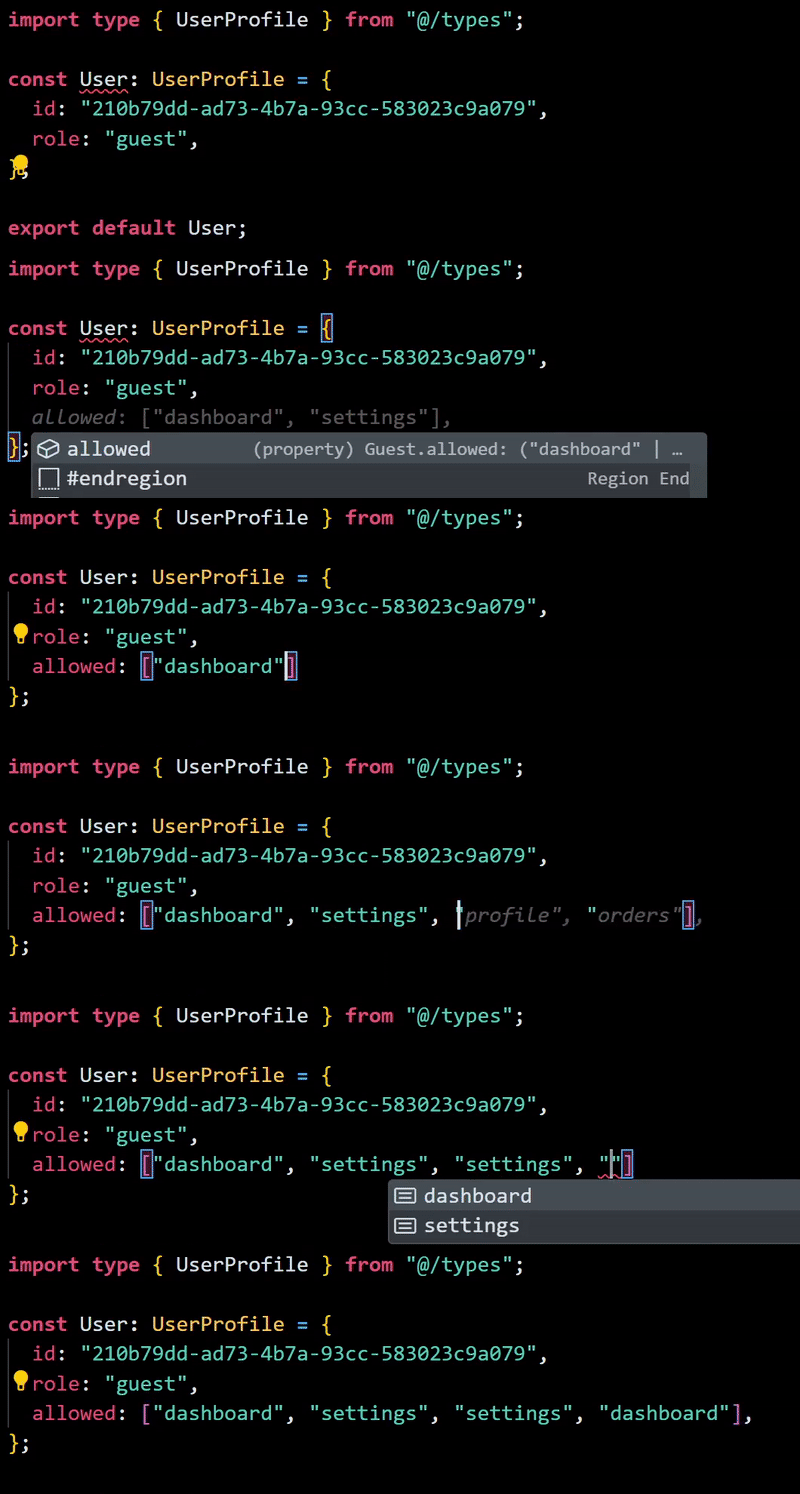
Reproducing indefinite deduplication — code snippet
Second bottleneck: The hidden unresolved union types
Similarly, if we attempt to assign a new value to the allowed property of an Editor interface instance (e.g., media or articles sections) immediately after setting the role to employee (like role: "employee"), TypeScript correctly signals an error:
Type '{
  id: string;
  role: "employee";
  allowed: ("timesheets" | "directory" | "media")[];
}'
is not assignable to type 'UserProfile'.
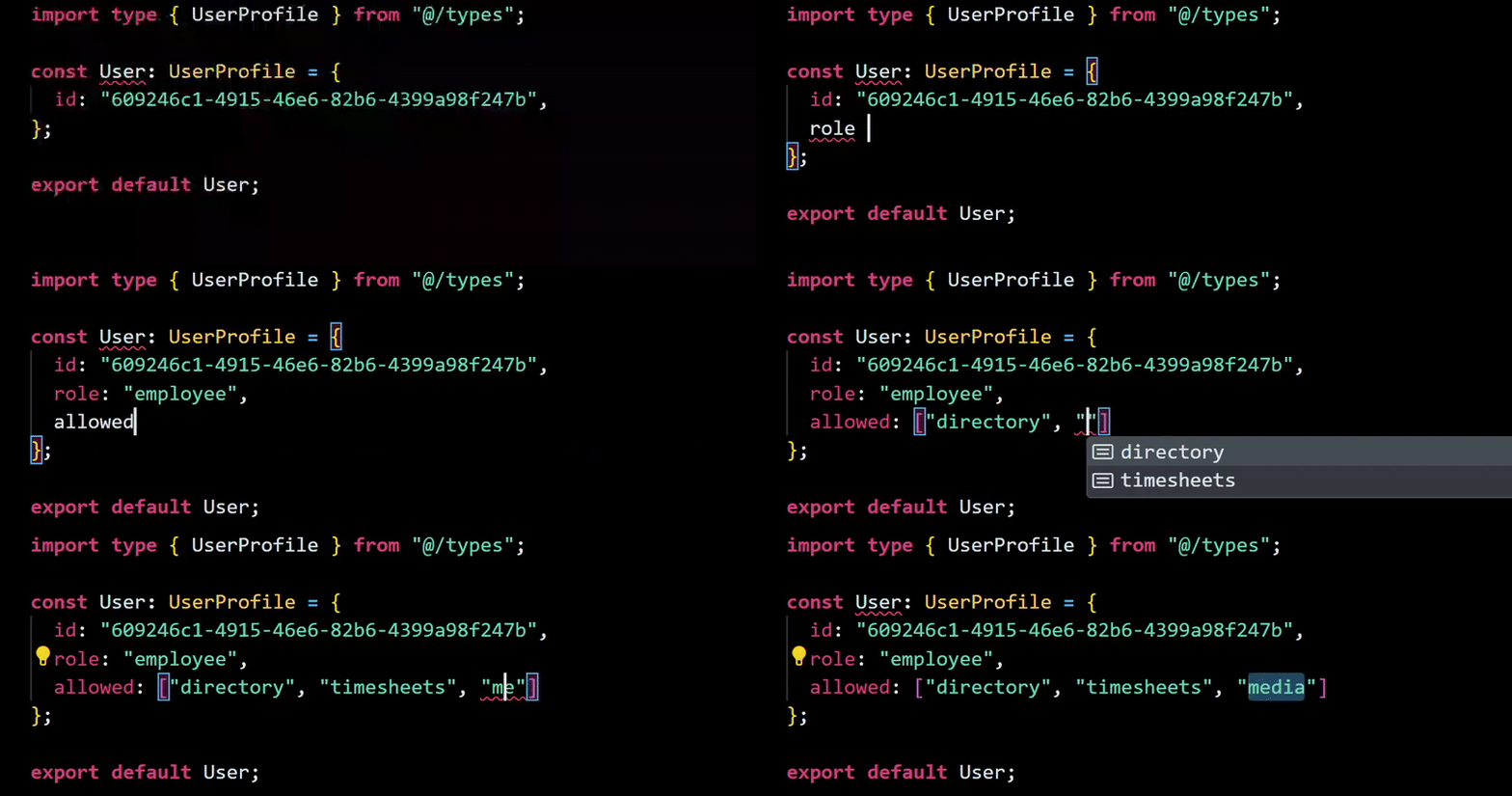
Reproducing unresolved union types — code snippet
But why does this happen?
The root cause of deduplicated tuples
To prevent deduplication, we must transform the <Extract<Section, [literals]>> utility type into something that trims used values. When duplicates are present, the developer should be warned by the compiler. Our goal is to force TypeScript to error at compile time when duplicates are detected.
To achieve this, we need to model the allowed property not as a general array type, but as a Tuple of Unique Values.
This issue will be addressed in a later section, as the logic involves generic type enforcements. Therefore, it's better to cover the topic comprehensively there.
Solution for the hidden unresolved union types
There's a subtle bug in our TypeScript file, specifically within the Employee interface:
interface Employee {
  role: "employee";
  allowed: Extract<Section, Editor["allowed"] | "timesheets" | "directory">[];
}
Consider this part:
allowed: Extract<Section, Editor["allowed"] | "timesheets" | ("directory">[]) ;
Recall the TypeScript error: Type '"articles"' is not assignable to type '"timesheets" | "directory"'. Even though the allowed prop is narrowed to the Section type by inheriting Editor itself, we supposedly had everything Editor has plus "timesheets" | "directory". Instead, we allowed only those two literals.
The underlying root issue was here:
❌ Editor["allowed"]
// Because this resolves to the ARRAY TYPE: ("dashboard" | "settings" | ... | "publications")[]
To fix it, we need to add [number] at the end:
✅ Editor["allowed"][number]
// This resolves to the UNION TYPE of the literal strings: "dashboard" | "settings" | "articles" | "media" | "publications"...
This correction provides a proper type experience:
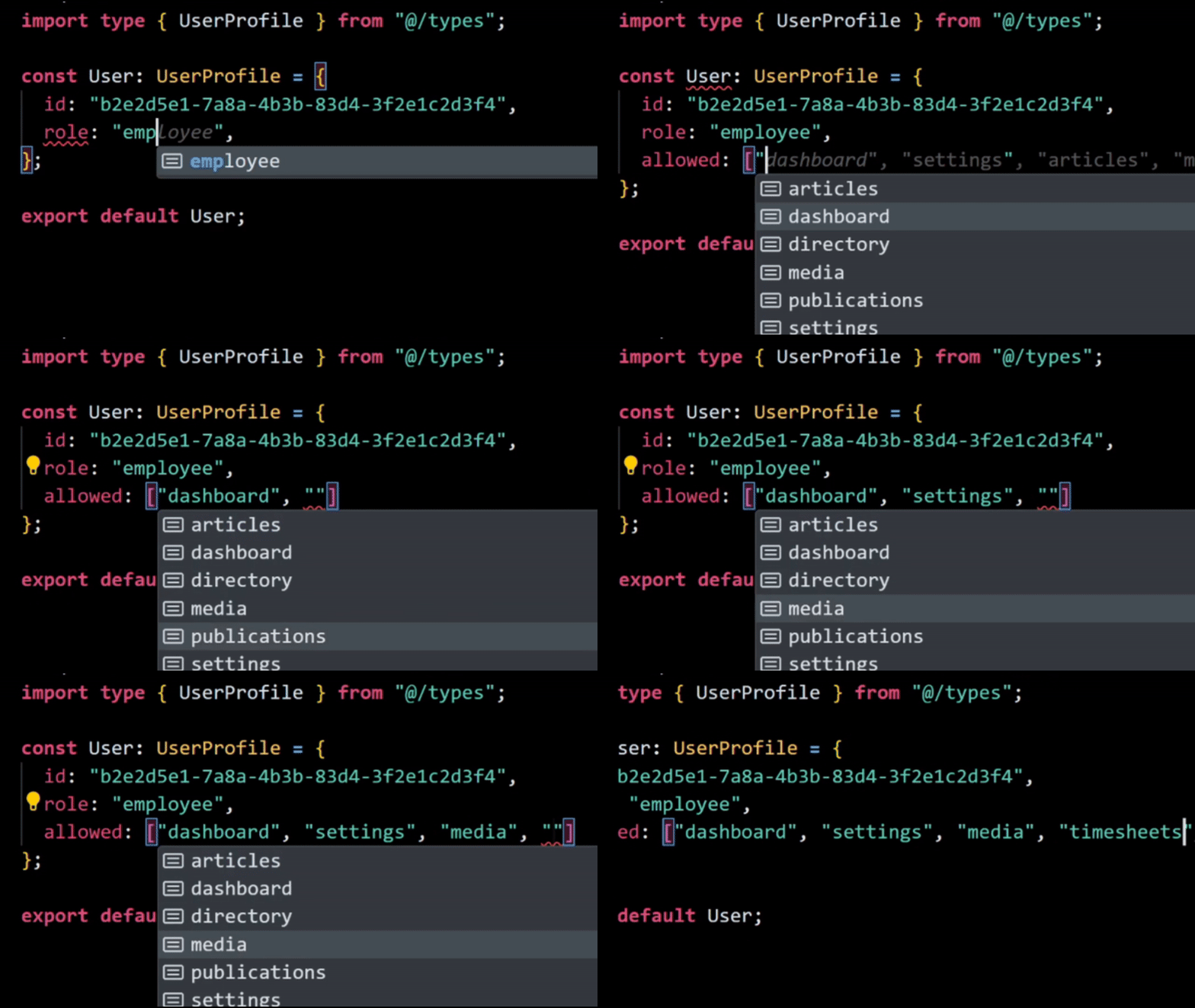
Reproducing resolved union types — code snippet
We achieved our goal by making a small change to our Employee interface. The final source type looks like this:
interface Employee {
  role: "employee";
  allowed: Extract<
    Section,
    Editor["allowed"][number] | "timesheets" | "directory"
  >[];
}
With this type-safe foundation, developers can now build the business logic.
However, we still have further steps to reach our desired goal, specifically addressing the first issue related to deduplication.
Making a generic type
Before tackling the more sophisticated issue of deduplicated tuples, which we postponed, it's crucial to review the fundamentals of enforcing generic types. This topic requires a general understanding of specific baselines, including:
- conditional types
- mapped types
- recursion
- inferring
- and so on.
This section delves into more advanced TypeScript concepts, aligning with the article's 'advanced' designation. We will proceed thoroughly and gradually.
Creating basic generics
Type manipulation can be challenging. Therefore, developers often opt for traditional methods, such as creating an interface with built-in utility types like Pick and Record, unless they are working on a library API or more static, business-driven logic. This is precisely why generics are employed at the core of internal APIs to enhance the developer experience (DX).
While some might suggest "Just use ts-pattern, or third-party libs," I generally prefer to avoid a 452 kB package in my package.json dependencies or devDependencies solely for a utility, except in scenarios where building from scratch strongly necessitates third-party solutions.
Returning to the topic, generics emerged as a way to capture the type of an argument in a manner that could also denote the return value. Simply put, a generic indicates a special kind of variable that operates on types rather than values.
Recall the Section type mentioned earlier. Let's first try shortening the previous implementation using generic types while adhering to the DRY principle:
function Unique<T>(arr: T[]) {
  return arr;
}
T is commonly used as a placeholder for Type. For our context, we will use S as we go through the Section type we declared recently.
Usage:
const uniqueValue = Unique([1, 2, 3, 4, 5]);
// Ts yields: const uniqueValue: number[]
However, this logic can be uncertain, as demonstrated here:
const uniqueValue = Unique([1, 2, "three", 4, 5]);
// Ts yields: const uniqueValue: (string | number)[]
Therefore, we must narrow the type depending on the context requirements; in our case, it will be the Section type. To convert the logic, we can utilize the extends keyword.
Definition: extends is widely used to extend interfaces, enabling the creation of more specific interfaces by inheriting properties and methods from a base interface.
function Unique<S extends Section>(section: S) {
  return section;
}

const selectSection = Unique("dashboard");
// Ts yields: const selectSection: Section

const selectSection = Unique("socials");
// Ts warns: Argument of type '"socials"' is not assignable to parameter of type 'Section'.
The result:
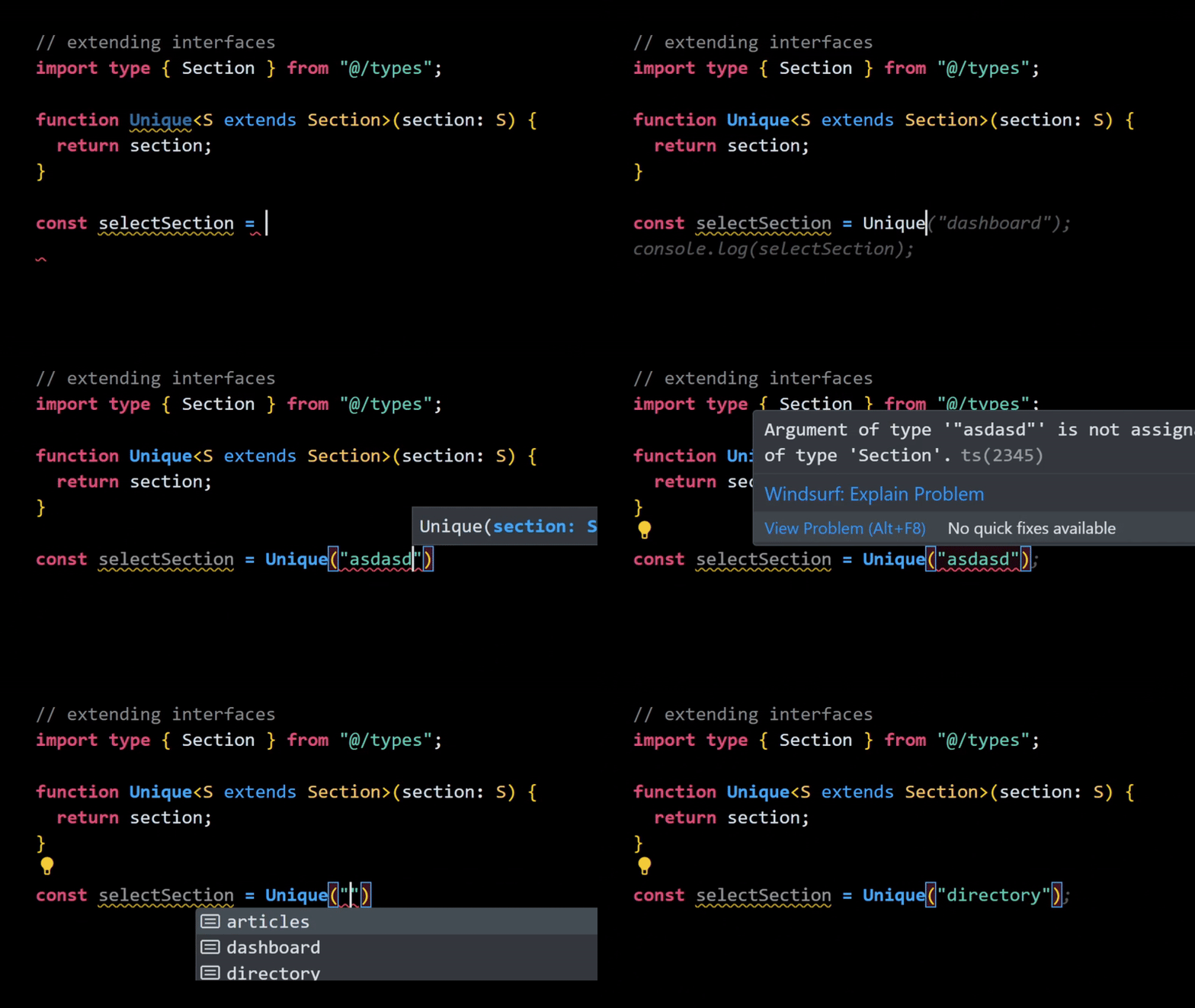
Demonstration of extends keyword
We can also use generics in our type definitions to avoid repetition when implementing the Extract utility in our main interfaces. Compare the following:
// from this

interface Guest {
  role: "guest";
  allowed: Extract<Section, "dashboard" | "settings">[];
}

interface Client {
  role: "user";
  allowed: Extract<Section, "dashboard" | "settings" | "profile" | "orders">[];
}

// to this

type ExtractSection<T extends Section> = Extract<Section, T>[];

interface Guest {
  role: "guest";
  allowed: ExtractSection<"dashboard" | "settings">;
}

interface Client {
  role: "user";
  allowed: ExtractSection<"dashboard" | "settings" | "profile" | "orders">;
}
While this ExtractSection implementation might seem like over-engineering initially, consider that as the application scales, it will significantly facilitate the development process, especially concerning reusability.
TypeScript conditional types
Conditional types implement logic at the type level based on structural matching. Think of them as similar to ES6+ ternary operations (if / else statements):
condition ? expressionIfTrue : expressionIfFalse;
We can apply this to our Section logic as follows:
type IsSection<T> = T extends Section ? true : false;

type articles = IsSection<"articles">;
// Ts yields: type articles = true

type articles = IsSection<"justc0de_sessions002">;
// Ts yields: type articles = false
Hot take: Distributive behavior of conditional types
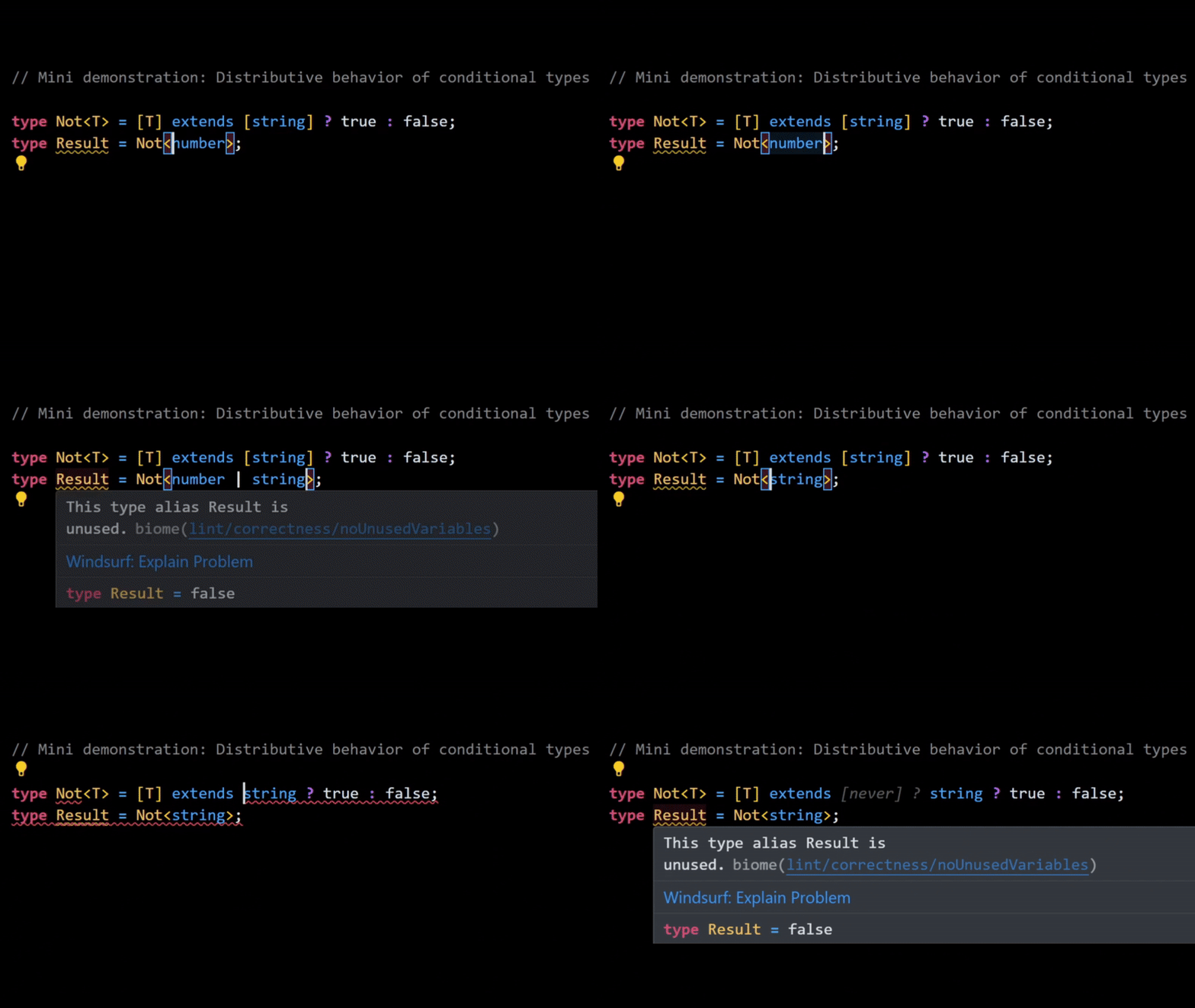
Demonstration of the distributive behavior
Using 'infer' keyword to extract something from a matched type
The infer keyword is essential for capturing parts of a matched type within a conditional type. Its utility will soon become clear.
How does it work?
type UnwrapPromise<T> = T extends Promise<infer U> ? U : T;
This means: if T is Promise<Something>, then return that Something (inferred as U), otherwise return T.
The infer keyword provides a powerful mechanism to expose underlying internal type logic. It is invaluable for many advanced TypeScript scenarios, particularly in library development and open-source projects.
What does it yield?
type Result1 = UnwrapPromise<Promise<number>>; // number
type Result2 = UnwrapPromise<string>;           // string
Key takeaway regarding the infer keyword
Now, for a real-world implementation. Let's revisit the first bottleneck regarding deduplication and see how we enforce uniqueness among tuples in TypeScript.
The comprehensive solution for the deduplicated tuples
Reproducing unresolved union types — reference
We have significant work ahead. The first requirement is a type-level utility that checks for duplication. Let's call it VerifyUnique:
type VerifyUnique<S extends readonly unknown[]>
Here, S is an acronym for Section — representing section literals:
export type Section =
  "dashboard" |
  "settings" |
  "profile" |
  "orders" |
  "timesheets" |
  "directory" |
  "articles" |
  "media" |
  "publications" |
  "users" |
  "finance";
The readonly keyword ensures that the literals are constant and static. unknown[] is used so our application can apply this utility to other literal types, not just Section[].
type VerifyUnique<S extends readonly unknown[]> =
  S extends readonly [
    infer H,
    ...infer T
  ]
    ? H extends T[number]
      ? [`Error: Duplicate '${H & string}' detected`, ...VerifyUnique<T>]
      : [H, ...VerifyUnique<T>]
    : S;
This sophisticated use of generic types, combining all the concepts discussed, serves as a demonstration. It's designed for scalability and maintainability, adhering to the DRY principle if implemented elsewhere in the application.
Let's break down what's happening in the snippet above:
-
Destructuring the types using
inferkeyword.readonly [ infer H, ...infer T ]We are preparing the type for the next recursion step by destructuring it. This is analogous to a JavaScript
headTailfunction:function headTail(arr) { const [head, ...tail] = arr; return { head, tail }; } console.log(headTail([1, 2, 3])); // { head: 1, tail: [2,3] } -
Conditional checking by extending the destructured type.
H extends T[number] ? ... ```
This checks the current tuple element (`H`) against the `rest tuple` (`T`) at compile-time for comparison.
3. Recursive conditional type checking.
```typescript
? H extends T[number]
? [Error: Duplicate '${H & string}' detected, ...VerifyUnique
If the condition is `true`, it indicates that a duplicate genuinely exists within the user-provided array. (Note: The custom error message might not always be visibly printed in all IDEs, even if the condition errors.)
And finally, our type-level utility with a test context:
// utils.ts

import type { Section } from "@/types";

type VerifyUnique<S extends readonly unknown[]> =
  S extends readonly [
    infer H,
    ...infer T
  ]
    ? H extends T[number]
      ? [`Error: Duplicate '${H & string}' detected`, ...VerifyUnique<T>]
      : [H, ...VerifyUnique<T>]
    : S;

const isDuplicated = <S extends readonly Section[]>(arr: S & VerifyUnique<S>) =>
  arr;

const c = isDuplicated(["articles", "users"]);
A critical point emerges when we use S & VerifyUnique<S>:
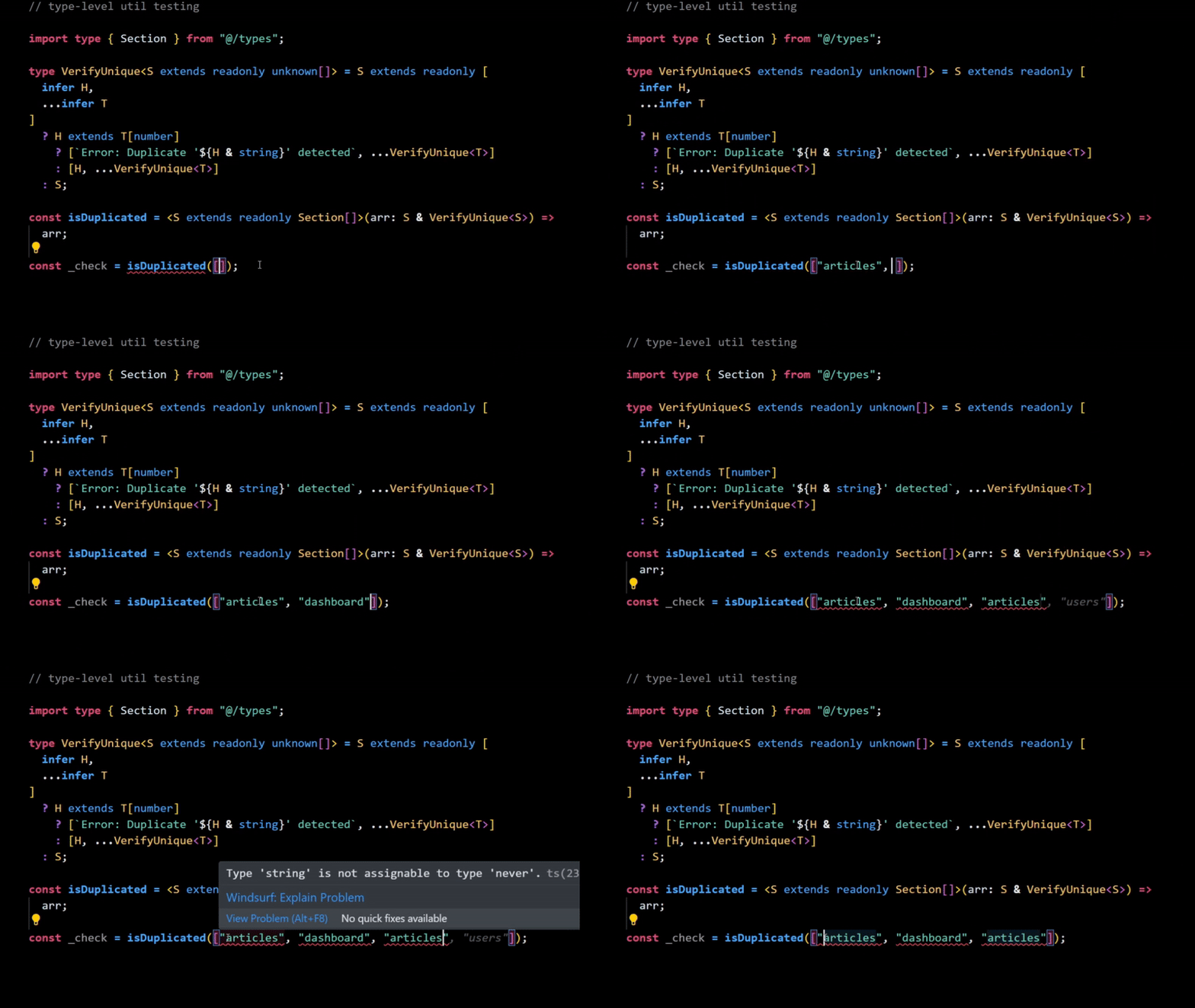
Demonstration reference to 'S'
An alternative approach for printing custom TypeScript errors, though it can be fragile:
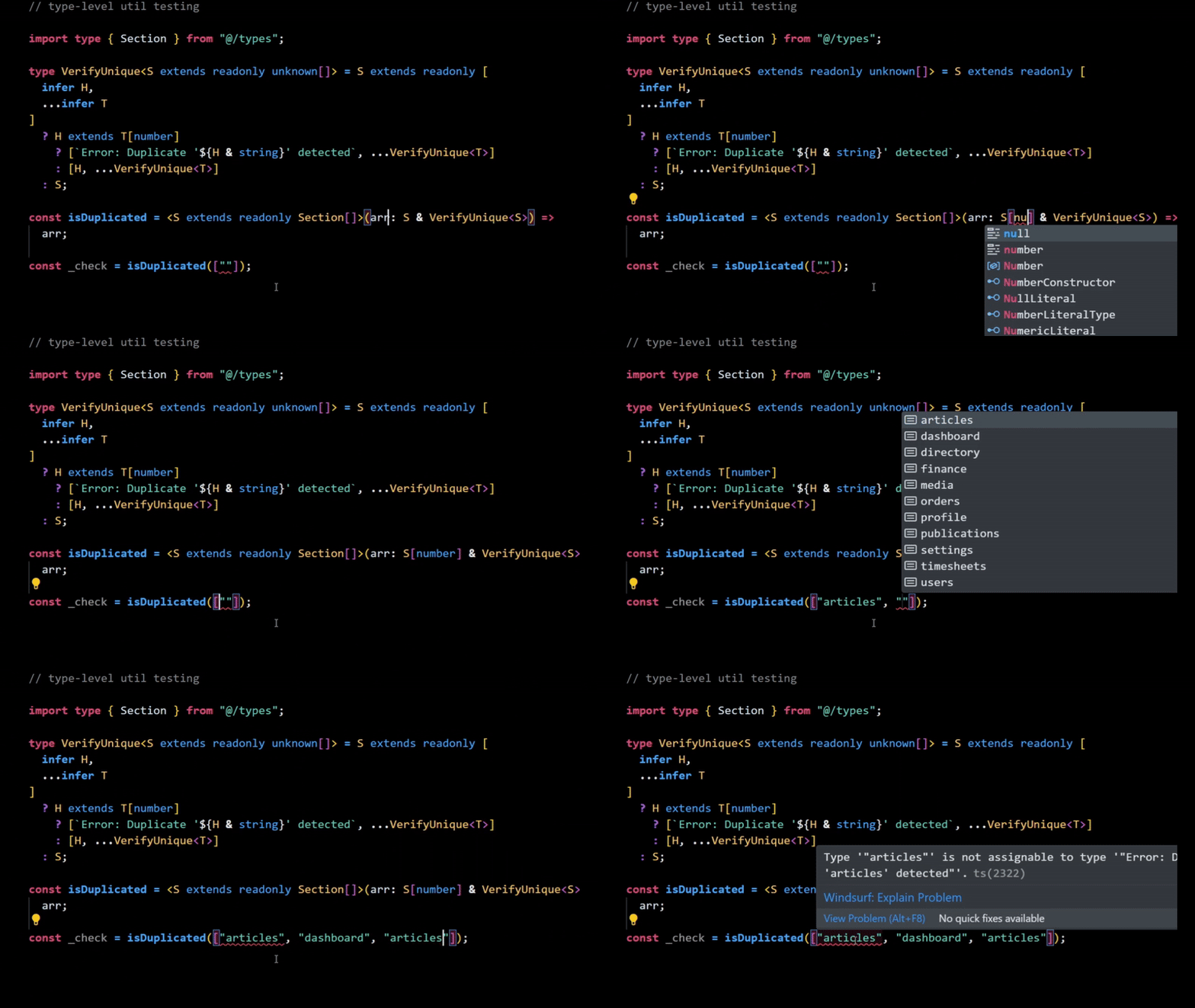
Demonstration reference to 'S(number)'
If we omit readonly, the logic completely loses its type-safety:
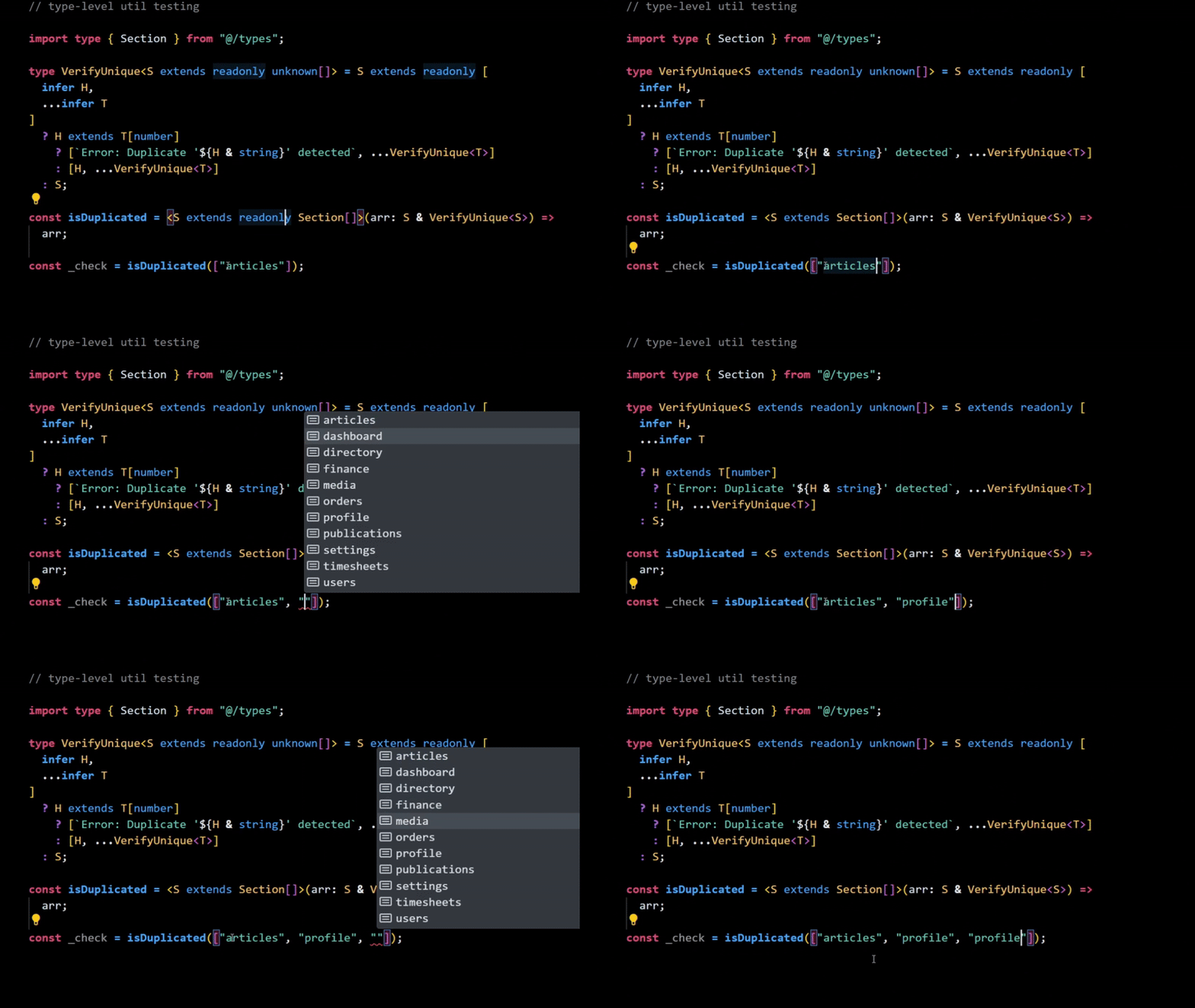
Demonstration reference to 'readonly' keyword
Using S[] yields:
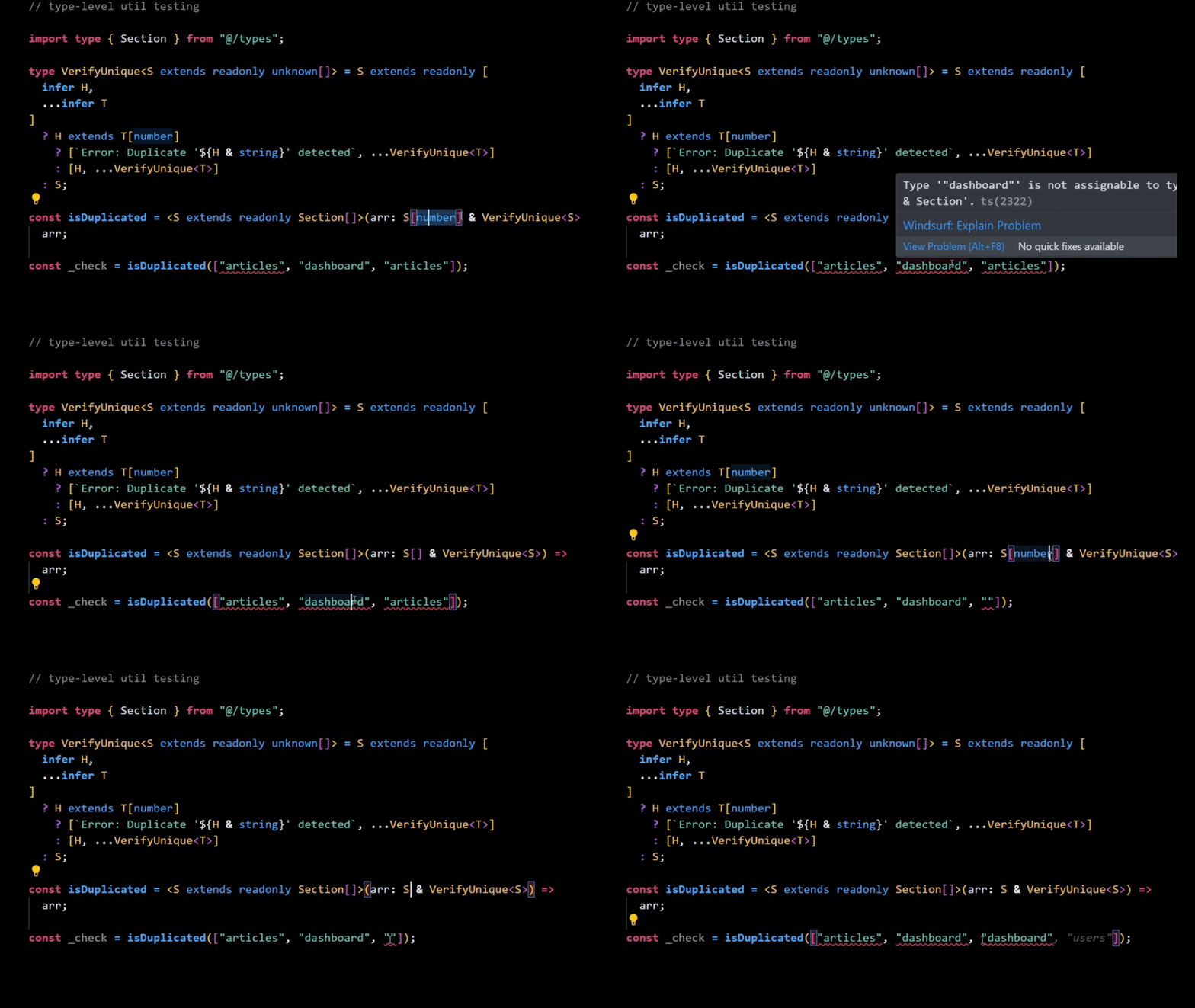
Demonstration with empty array symbol after S type
These illustrations effectively demonstrate the distinctions in usage with the VerifyUnique utility type.
Now, let's proceed to the final step.
Creating a runtime function that wraps everything
Having solved 75% of the problem, we now need a function that encapsulates this logic and enables user creation. We'll proceed gradually.
Let's define a createUser function:
export const createUser = (user) => user;
Next, we'll embed the UserProfile type we prepared earlier:
import type { UserProfile } from "@/types";

export const createUser = (user: UserProfile) => user;
Now, let's transform it into something that can be consumed by the VerifyUnique TypeScript utility type we created:
import type {
  Section,
  UserProfile,
  UserRole
} from "@/types";

export const createUser = <
  R extends UserRole,
  S extends readonly Section[]
>(user: {
  id: UserProfile["id"];
  role: R;
  allowed: S &
    VerifyUnique<S> &
    Extract<UserProfile, { role: R }>["allowed"];
}) => user;
The potential for breakage primarily exists on the allowed line; the rest of the details have been covered earlier in the article.
allowed: S &
  VerifyUnique<S> &
  (Extract<UserProfile) ,
  { role: R }>["allowed"];
Breaking it down step by step:
- At the call site,
Sis the actual tuple type we pass, e.g.,S = readonly ["dashboard", "orders"]. VerifyUnique<S>ensures uniqueness across the wired intersections.- Ultimately, the
allowedvalue MUST BE ASSIGNABLE and MUST SATISFY every constraint simultaneously.
Thus, the allowed sections must be:
- The literal tuple type
S. - Unique (as enforced by
VerifyUnique<S>). - Matching the role-specific
allowedshape.
Bottom Line
The code snippet below functions seamlessly with TypeScript, satisfying createUser in every possible way:
// api/get-user.ts

import {
  createUser
} from "@/lib/utils";
/* Auth imports */

const user = createUser({
  id: "9adfeaf3-c3cb-4b3d-af5d-5123c65319a3",
  role: "employee",
  allowed: ["publications", "timesheets"],
});
This demonstrates an end-to-end type-safe solution. To achieve fully transparent end-to-end enforcement, we would typically add branded types for IDs, a topic for another discussion.
Here is the result of all that effort:
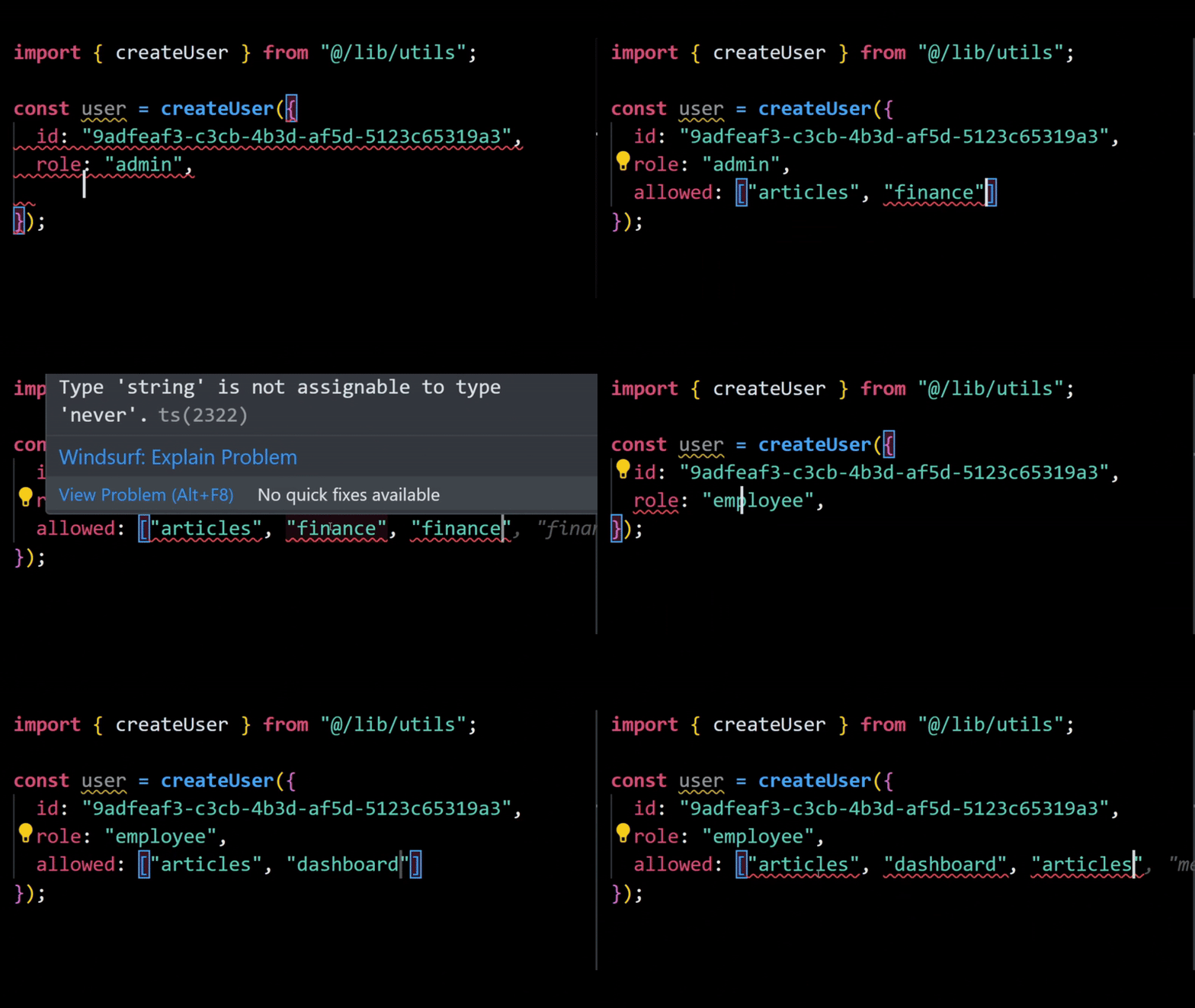
Type-safe user definer object demonstration